Data enrichment improves an existing record by adding, correcting, standardising or validating information from other sources, then checks that the information belongs to the right company or person. Teams meet the problem in a familiar form. The CRM, meaning the customer relationship management system that stores accounts and contacts, holds a name and little else, yet sales still has to decide whether the account fits, who should own it and what message makes sense.
What Data Enrichment Means in Practice
A business card with only a name and phone number is a useful analogy. Enrichment turns that thin card into a fuller profile with company, role, size and recent activity, so a team can decide who to contact and what to say. It always starts with a known record, such as a company or contact already in the CRM.
That history matters. Workato's history of CRM systems traces the move from Rolodexes in the 1950s to digital contact systems, sales-force automation and CRM, with the term dated to 1995. Modern tools connect those records to industry, company size, technology used, job roles, location, hiring activity and observable activity that may hint at interest.
The key limit is simple. An added field is useful only when it is linked to the right real-world company or person, which is why enrichment is more than finding an email address. A profile only helps a team align account insights with your offerings when the account match is correct in the first place.
Illustrative record before and after enrichment (hypothetical)
| Field | Before | After | Source, date and confidence | Decision it supports |
|---|---|---|---|---|
| Company name | Example Ltd | Example Ltd | Unchanged, matched to the company web domain | Confirms the record is the same account |
| Job title | Head of ops | Head of Operations | Standardised against the same person's role | Helps routing and message tone |
| Company size | Blank | 51 to 100 employees | Outside data supplier, dated, medium confidence | Tests fit against a size band |
| Technology used | Blank | A CRM platform | Detection on the company site, dated, medium confidence | Shapes a relevant product angle |
| Recent hiring | Blank | Two open operations roles | Public job post, dated, weak signal on its own | A timing hint only |
| Work email | Blank | Left blank | No reliable source, so not added | Prevents a guessed send |
Notice the last row. A blank can be the right answer when no reliable source exists, because a guessed email can bounce and can mislead the team. The aim is a decision-ready profile where confirmed details stay separate from assumptions.
Enrichment adds claims, not facts. Each claim needs a source, a date, a confidence level and a decision it supports.
Four Types of Enrichment and What Each Adds
The four types of enrichment at a glance
| Type | What it adds | Example fields | Main use |
|---|---|---|---|
| Firmographic | Company profile | Industry, headcount band, revenue band, location, ownership | Segmenting and fit against the ideal customer profile |
| Technographic | Technology in use | CRM, analytics, cloud or payments tools where detectable | Integration or replacement offers |
| Intent signals | Observable activity that may suggest interest | Relevant job posts, funding rounds, product launches, topic engagement | Timing and prioritisation, treated as hints |
| Contact hygiene | Accuracy of the person-level record | Job title, seniority, verified work email, role change, bounce status | Deliverability and correct targeting |
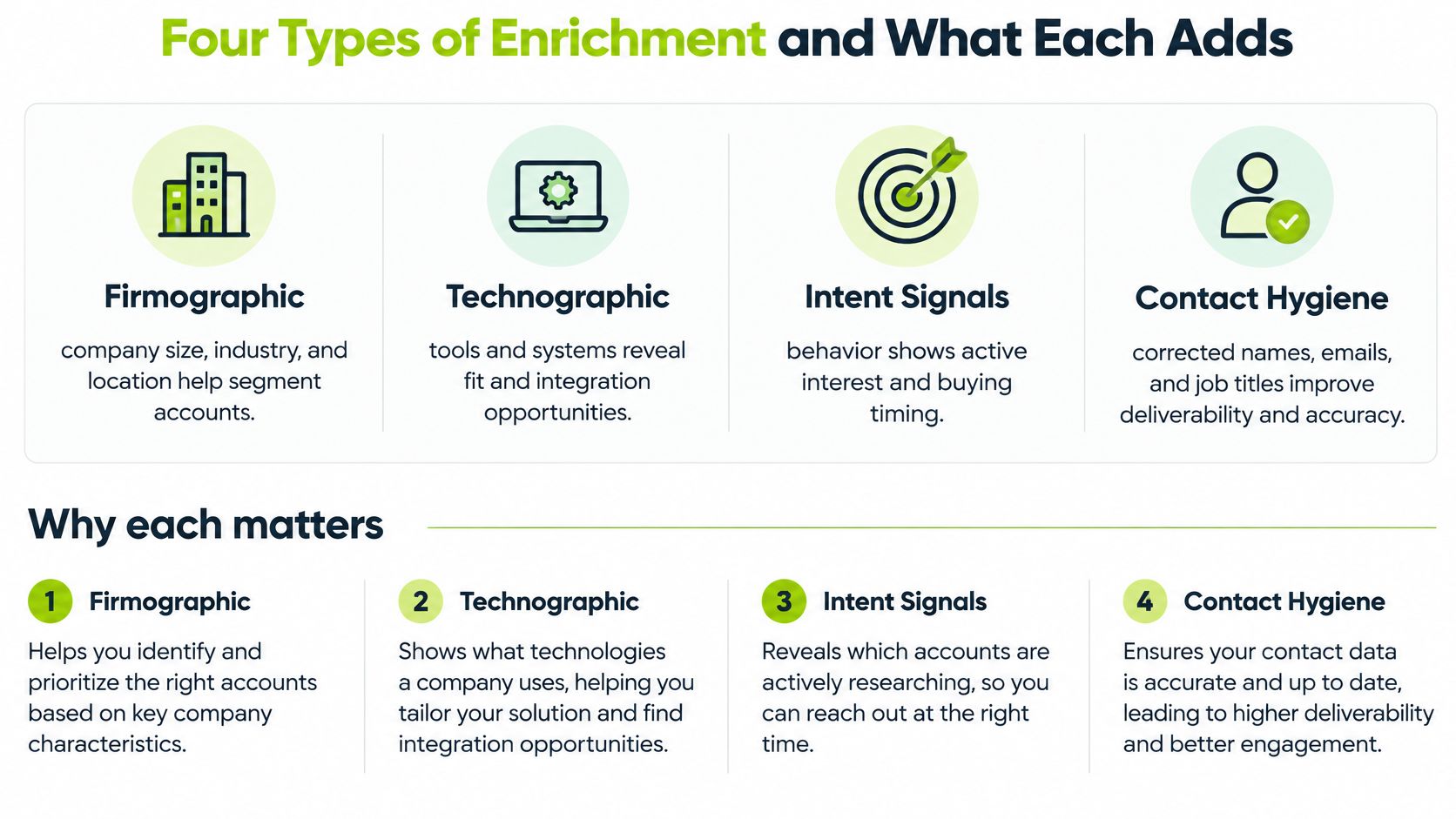
Firmographic data describes the company itself. Industry, headcount band, location, ownership and age let a team test fit against the ideal customer profile, meaning the written definition of a suitable account. Without it, segmentation is guesswork.
Technographic data describes technology in use, such as a CRM, analytics tool, cloud platform or payments provider. It supports a narrow decision. Does this account use a tool the offer integrates with, or one it replaces?
Hints are not proof
Intent signals describe observable activity, such as hiring for a relevant role, a funding round, a product launch or engagement with a topic. They're hints, not proof of a buying decision. One vacancy says a team is hiring. It doesn't say budget exists for a related purchase.
Contact hygiene covers the person-level record, including correct job title, seniority, verified work email, role changes and bounce status. It's often the first priority because wrong roles waste outreach and bounced emails damage deliverability, meaning the ability to land in inboxes at all.
Adding fields doesn't prove the underlying record is right. Industry reporting on Validity's State of CRM Data Health research notes that 76% of surveyed CRM users reported that less than half of their organisation's data was accurate and complete. That's the case for verification alongside enrichment. Every field should support a specific routing, qualification or messaging decision, or it shouldn't be added.
Where Enrichment Data Comes From and How It Is Collected
Enrichment source types, strengths and limits
| Source | Examples | Best for | Main limitation |
|---|---|---|---|
| Internal records | CRM, support tickets, call notes | Facts you already hold | Often incomplete and out of date |
| Public company sources | Company website, registries, filings, press releases | Verifiable company facts | Describes the company, not buyer intent |
| Job postings | Public vacancies on company or job sites | Hiring and capacity signals | A vacancy alone does not prove purchase intent |
| Technology detection | Website scripts and public signals | Tools in use | Misses server-side tools and goes stale |
| Third-party data providers | Commercial company and contact databases | Scale and speed | Coverage and freshness vary by market, so test before committing |
| Manual research | Reading websites, notes and call records | Small, high-value lists | Slow and hard to scale |
Internal records are first-party data, meaning information a business holds from its own dealings. They're usually reliable for what they cover, but coverage is patchy. Public sources give verifiable company facts, while job postings show capacity rather than budget.
Technology detection reads website scripts to find tools in use, so it misses server-side tools that never appear on a page. Third-party providers offer scale, but coverage and freshness vary by country and segment, so a sample test matters before commitment. The same scepticism applies when reviewing what store records reveal about rivals, since any database is only as good as its collection method.
Manual research suits a short list of high-value accounts and doesn't scale beyond it. Teams weighing signal-based sources can read more in a guide to B2B intent data and how signals should be interpreted.
Governance and conflicts
In the UK, a person's name, work email or job title is still personal data in a professional context. The Information Commissioner's Office guidance on business-to-business marketing says use must be lawful, fair and transparent, and people have an absolute right to object to direct marketing. Each value should therefore carry its source, collection date, confidence level and permitted use.
Conflicts need a rule decided in advance. In a hypothetical case, a commercial database lists 45 employees while a company website and dated filing show 60. The rule could be to use the provider value only when it's dated within 90 days and matches the company domain. Otherwise the CRM value stays, confidence is marked low and the record goes to review.
How an Enrichment Workflow Runs Step by Step
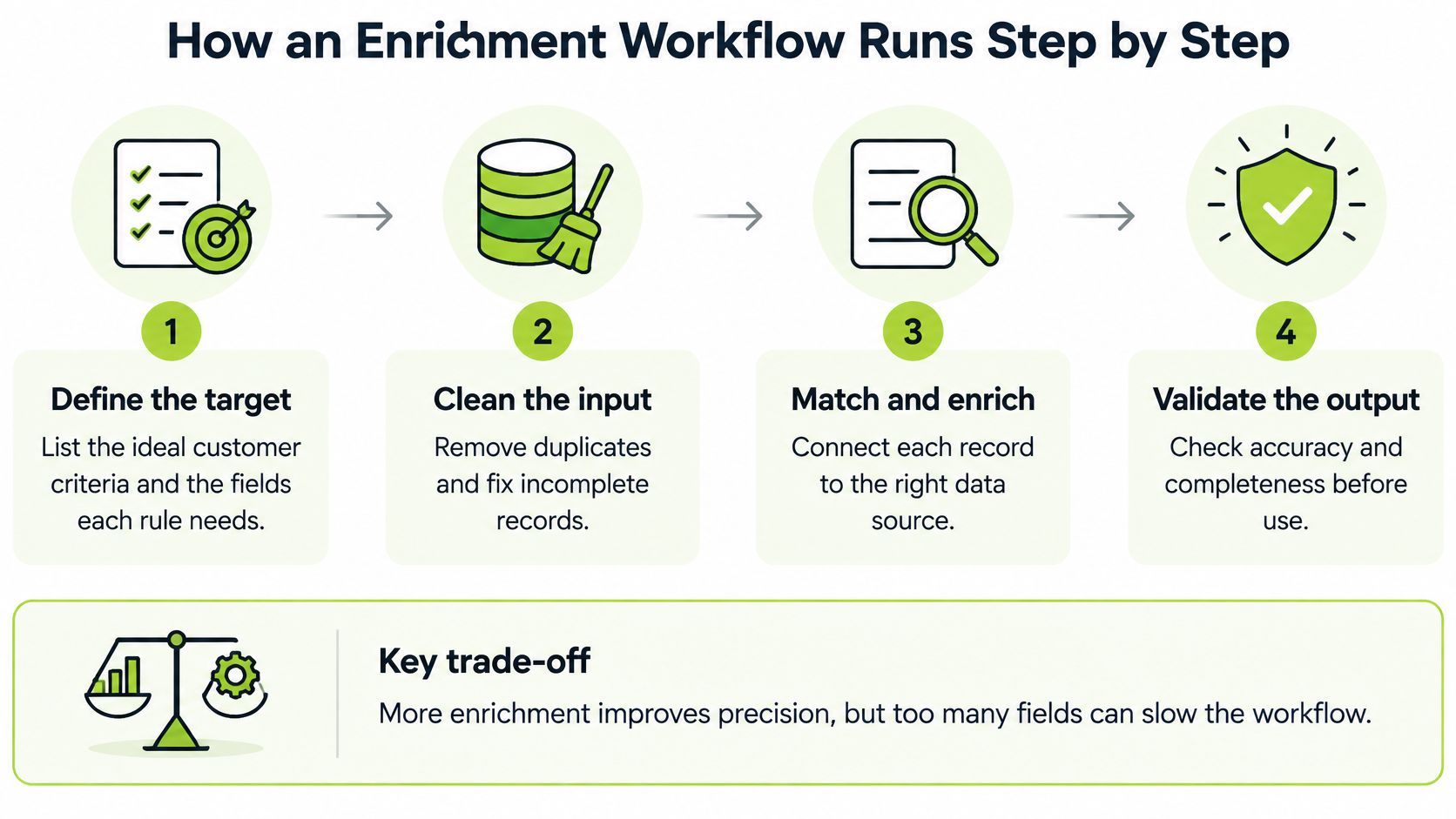
- Define the target: List the ideal customer criteria and the fields each rule needs, so enrichment serves a decision.
- Clean the input: Remove duplicates and standardise company names, domains and job titles before anything is appended.
- Resolve identity: Match each record to the correct company or person, using a deterministic key such as a domain or verified email first, then similarity checks on name and address.
- Append attributes: Add only the fields chosen in step 1, each with source, date and confidence.
- Check conflicts: Apply the source rule where values disagree, or send the record to review.
- Apply qualification rules: Score accounts against explicit criteria rather than a single signal.
- Route to the CRM: Write records above the confidence threshold and flag the rest.
- Schedule refresh: Set a review date based on how quickly each field changes.
Step 3 is where most damage happens. Identity resolution means deciding whether two records refer to the same real-world entity. Research on entity resolution methods frames this with precision and recall, where precision is the share of predicted matches that are correct and recall is the share of true matches the system finds.
The strictness trade-off
Strict matching avoids attaching the wrong technology or hiring signal to an account, but it misses true matches. Loose matching finds more records, but false matches produce misleading segmentation and outreach. Neither setting is correct in itself. It depends on the cost of each error.
A labelled hypothetical makes the flow concrete. From 1,000 raw rows, deduplication leaves 640 unique companies. Of those, 520 match at high confidence and 120 go to review instead of being forced through.
Tools don't change this logic. Clay is one tool that can run these steps, alongside CRM features and data providers, and a breakdown of Clay lead generation workflows shows that practical side. The rules, thresholds and review path matter more than the tool name.
How Enrichment Changes Outbound Results and Qualification
Three effects follow when enrichment is done with checks in place. Each one is about removing bad inputs, not adding volume.
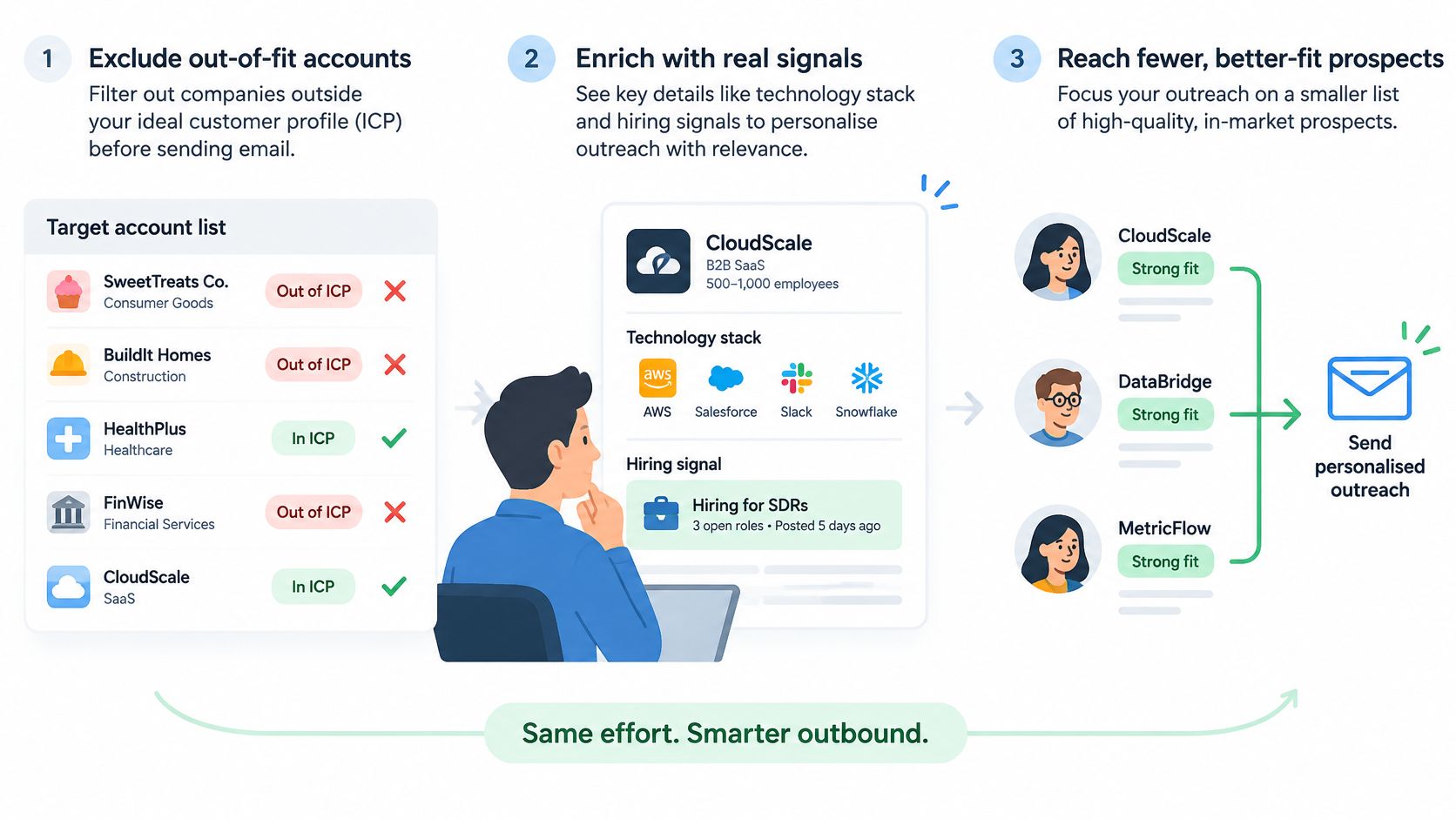
- Better targeting: Accounts outside the ideal customer profile get excluded before any email is sent.
- More relevant personalisation: A message can refer to a technology or hiring signal, but only where that signal is verified and recent.
- Cleaner handoffs: The right owner, role and account record reach the CRM, so sales doesn't inherit duplicates.
The opposite is common. According to Melissa's State of Enterprise Data Quality 2025 survey, 84% of enterprises reported struggling with inaccurate or duplicate data in 2025. Enrichment that never checks existing values spreads those errors into outreach, scoring and reporting.
A worked qualification example
Take a labelled hypothetical. 300 accounts enter the workflow and 120 meet the firmographic fit rules. Of those, 40 show two independent signals, such as a relevant job post and a detected tool. Those 40 receive a priority score and go to sales, while the other 80 are held for nurture rather than discarded.
Two signals matter because one signal is easy to misread. A vacancy might reflect replacement hiring, while a detected tool might be a legacy leftover. Together, they're a stronger reason to prioritise, though still not proof of intent. A structured approach to how to qualify a lead helps teams write those rules down.
Measurement should follow the same discipline. Qualified conversations and booked meetings show whether enrichment is working. Record volume does not. Pipeline and closed revenue should be reported separately, because they're different measures and mixing them hides where the process breaks.
Quality Control and Cost Considerations
Four quality dimensions and how to test them
| Dimension | Question to ask | Simple test |
|---|---|---|
| Accuracy | Is the value true? | Check 50 sampled records against a trusted reference and log the error rate |
| Completeness | Is the field filled where a rule needs it? | Measure the fill rate for each field, not each record |
| Freshness | How old is the value? | Date-stamp every field and review active segments every 90 days |
| Fitness for purpose | Does this field change a decision? | Remove fields that no routing, scoring or messaging rule uses |
The test method is deliberately plain. Sample 50 records per source, check them against a trusted reference and log the error rate field by field. A provider can be strong on headcount and weak on job titles, and only field-level testing reveals that.
Refresh timing
Data decays whether anyone touches it or not. A CRM enrichment benchmark guide recommends refreshing important records within 90 days because CRM data can decay by roughly 30% per year. That's an operational recommendation, not a universal threshold. Job titles and employment fields change faster than stable company details, so intervals should follow volatility, meaning how quickly a field goes stale.
What drives cost
- Provider credits: The price charged per lookup.
- Lookups per record: Each extra source multiplies the bill.
- Refresh frequency: Re-checking records costs the same as checking them once.
- Human review time: Low-confidence records need a person's judgement.
- Rework: Bad data creates wasted outreach and CRM cleanup.
A labelled hypothetical shows the shape. 5,000 records with three lookups each at £0.10 per lookup comes to £1,500 before review time. That price is illustrative, not a quote. The practical lesson is to run paid lookups only on records that already meet core criteria.
Cost rule: Filter first, enrich second. Paying to enrich accounts that will be excluded anyway is waste.
Compliance belongs in the same checklist. Before enriching a business contact with a named person's work email, a team should document a Legitimate Interests Assessment. It names the specific interest, shows the processing is necessary, considers a less intrusive method and balances the organisation's interests against the individual's. Storing it with the workflow makes the decision auditable later.
Decide Whether to Enrich In-House or Outsource
A team with a few hundred target accounts and one dependable provider can keep enrichment close to the spreadsheet: check the source, note the date, mark confidence and record which decision each new field supports. Once several providers feed a customer relationship management (CRM) system, each appended field behaves like a claim that can conflict, decay or arrive without a clear origin.
The choice usually turns on five questions: how many records need work, how many sources must be reconciled, who can build and own the pipeline, who owns CRM routing and field rules, and how quickly buyer roles or company details change. Low volume and one source favour manual checks. Higher volume, scoring rules and routing favour a documented system with fallback paths and a named owner.
Clay can be part of either path, but the tool does not settle the design. The key test is whether the team can keep source, date, confidence and intended use attached to every field after the first import. Guidance on how to improve lead quality with data enrichment is useful background when comparing that workload with outside help.
The three routes map to different bottlenecks. Fully Managed Outbound suits a proven offer where enrichment should sit inside list building, verification, deliverability, copy testing, reply handling and meeting booking. Custom GTM System Builds suit an internal system spanning audience discovery, account research, buying signals, qualification, lead scoring, CRM routing and automation, tested with real records and supplied with documentation, training and a runbook. Private GTM Workshops suit teams learning Clay workflows, AI-assisted prospecting, enrichment costs and quality control themselves.
Teams that want enrichment handled inside a managed outbound programme, or built as a documented in-house system with clear quality rules, can start with a short introductory call to map the accounts, sources and bottleneck involved. Visit H2 to book that conversation and get a scope matched to the actual problem.
