When an outbound campaign gets few replies, how can a team tell whether the problem is the message, the audience or an email that never reached the inbox? Rewriting the subject line won't resolve all three.
Prospecting by email works as a connected system, from choosing suitable accounts to interpreting qualified replies. Founders, sales leaders and RevOps teams need visibility across that system before deciding what to change.
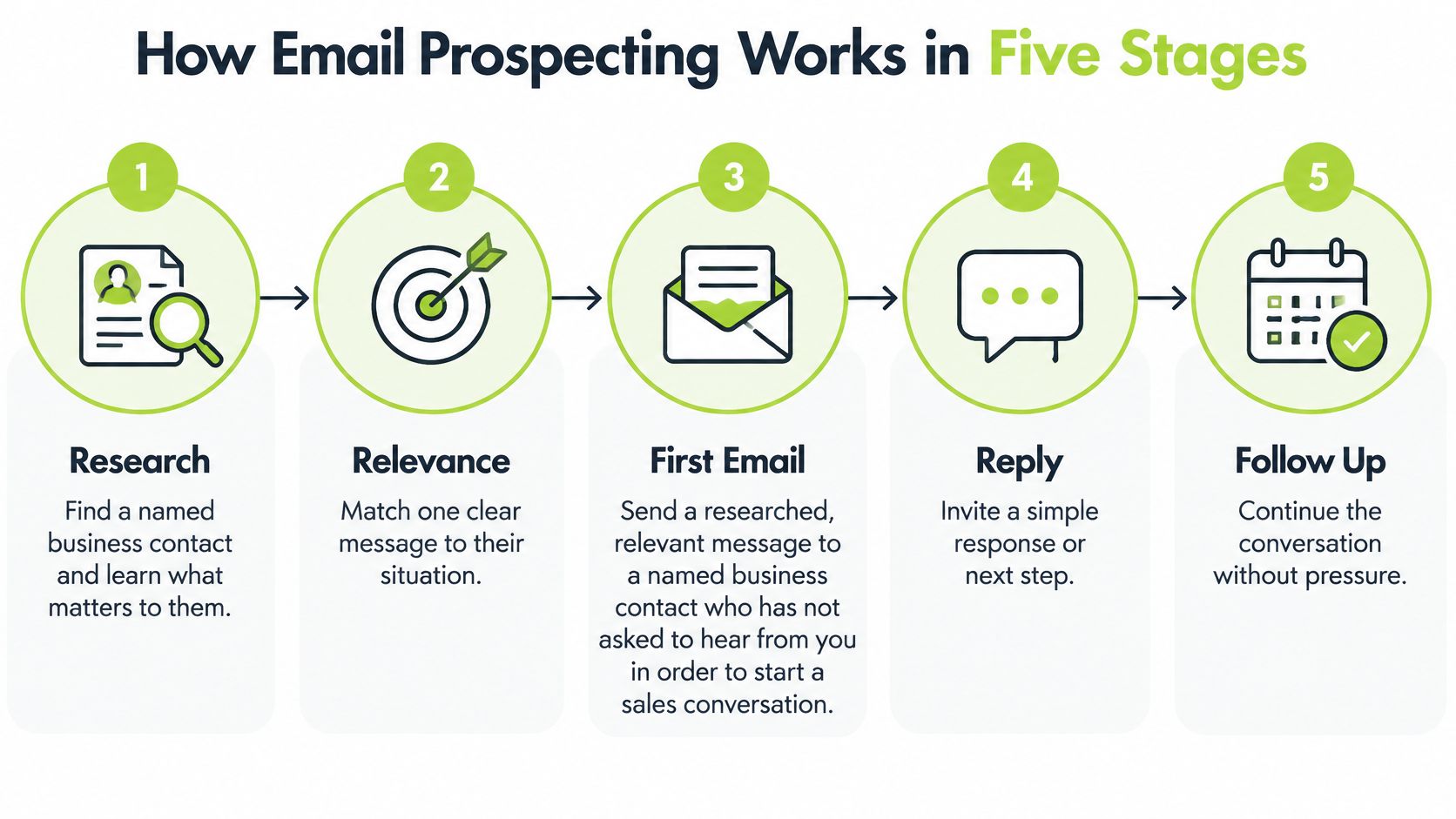
How Email Prospecting Works in Five Stages
Email prospecting is sending a researched, relevant message to a named business contact who hasn't asked to hear from the sender, to start a sales conversation. Teams should judge it by qualified conversations, not emails sent.
The operating process follows five stages: research, list building, messaging, deliverability and review. Each stage produces something the next stage needs, so a mistake near the beginning can affect the whole campaign.
The five stages of email prospecting
| Stage | Question it answers | Output | Common mistake |
|---|---|---|---|
| 1. Research | Who should the team target and why? | First ideal customer profile | Starting with job titles instead of problems |
| 2. List building | Which accounts and contacts fit? | Qualified list with legal status recorded | Mixing unverified and verified records |
| 3. Messaging | What is worth saying to this buyer? | Message and offer | Generic claims about the product |
| 4. Deliverability | Will the email reach the inbox? | Authenticated domain and sending plan | Increasing volume before checking authentication |
| 5. Review | What did replies and bounces show? | Changes for the next batch | Judging the campaign by opens alone |
The distinction between prospecting and bulk promotion is selection and relevance, not the number of messages. MarTech's account of commercial email illustrates why a defined audience, relevant offer and attributable commercial response matter, without making early bulk-email practices a suitable modern template.
Automation belongs inside this process, rather than replacing it. Molted Email's guide to AI agents for sales prospecting provides useful context for assessing automated research and outreach workflows. Operators still need to decide what qualifies an account and inspect the evidence behind generated messages.
Practical rule: A weak stage can't be repaired by better copy. Check the stages in order before rewriting an email.
For example, a carefully written message about database support still misses the mark if the recipient doesn't operate the relevant database. More personalisation won't fix that account-selection error.
Research the Audience and Buying Signals
A useful starting discipline is the rule of two: investigate an account when at least two public signals point towards the same problem, then confirm that the account fits. This is a research heuristic, not proof of purchase intent.
An ideal customer profile, or ICP, describes company size, sector and the problem the offer addresses. The buyer role identifies who owns that problem. A broad list of technology companies and senior job titles isn't an ICP.
Common buying signals and their limits
| Signal | What it may suggest | What it does not prove |
|---|---|---|
| Job posting for a role tied to the problem | The team may be building capacity around that problem | Budget or purchase intent |
| Technology already in use | Compatibility with the product | Dissatisfaction with the current tool |
| Recent funding round | Budget may be available | Timing or priority for the offer |
| Sales hiring surge | Growth pressure on pipeline | Willingness to buy external services |
| Public comment on the problem | The problem is on their agenda | Readiness to act now |
| Major website change | A product or market shift | Any specific need for the offer |
Build the initial profile from sales calls, support conversations, won and lost deals, and past campaigns. Record the language buyers use, including why they postponed a decision or chose another approach. H2's guide to sales buying signals gives further context for separating an observable event from an assumption about intent.
Hypothetical example: a 40-person software firm advertises for a database administrator and announces a platform migration. Together, those events justify checking its environment and responsibilities. Neither establishes available budget, an urgent support gap or permission to contact a particular individual.
Make the research useful to the buyer
The Mental Momentum cold-outreach analysis argues for messages that support self-directed investigation rather than treating a meeting as the only useful outcome. A practical application is a standalone diagnostic question that helps the recipient assess a possible risk.
Before a contact enters the list, check:
- Size and sector: Does the account resemble businesses the offer can help?
- Problem: Is there evidence of a relevant operational situation?
- Geography: Can the business serve this market appropriately?
- Role: Does the contact own, influence or experience the problem?
- Legal status: Has the recipient category been established?
A signal earns further investigation. It doesn't earn an automatic sales pitch.
Check the Legal Rules for Each Recipient
In the UK, the Privacy and Electronic Communications Regulations, or PECR, distinguish recipients by legal status. Describing a campaign as B2B doesn't settle whether consent is required.
The Information Commissioner's Office guidance on business-to-business marketing explains that unsolicited marketing email may be sent to corporate subscribers, including limited companies and LLPs, without prior consent, provided the sender doesn't conceal its identity and supplies a valid opt-out method. Sole traders and some partnerships are treated as individuals, for whom specific consent is generally required unless the narrow soft opt-in applies.
Legal status and practical steps by recipient
| Recipient | Rule that applies | Practical step |
|---|---|---|
| Limited company or LLP contact | Unsolicited marketing email can be sent without prior consent in the UK | Identify the sending organisation and give a working opt-out |
| Sole trader | Treated as an individual; specific consent is generally needed | Confirm status before sending, or rely on the soft opt-in only where it clearly fits |
| Named individual at a company | Personal-data rules can still apply | Record the lawful basis and act on objections |
| US business recipient | CAN-SPAM applies with no B2B exception | Use accurate headers, a postal address and an opt-out honoured within the statutory deadline |
The soft opt-in isn't a general permission to email any business with a related interest. List managers should establish whether its conditions apply, rather than infer permission from a public email address.
A named employee's details can also involve personal-data obligations even when the employer is a corporate subscriber. For additional context, HarvestMyData explains how organisations can understand lawful bases for email marketing; official guidance and qualified legal advice should inform the final decision.
US recipients and operational records
The Federal Trade Commission's CAN-SPAM compliance guide states that commercial email has no B2B exception: headers must be accurate, subjects mustn't mislead, and messages need a valid physical postal address and clear opt-out. The guide requires opt-out mechanisms to remain usable for at least 30 days and requests to be honoured within 10 business days.
Operationally, the CRM needs:
- Legal-status fields: Record the recipient category and the evidence supporting it.
- Shared suppression: Block opted-out contacts across sending and data tools.
- Objection records: Preserve when the request arrived and what action followed.
This is general guidance, not legal advice. Other jurisdictions require their own assessment.
Build the List and Choose the Tools
A prospect list should preserve the reasoning behind selection, not merely contain names and addresses. The list manager needs a traceable route from account fit to contact choice.
- Select matching accounts. Pull companies meeting the agreed size, sector and geography criteria from the CRM or a company database. Record the source of each row.
- Find problem owners. Identify responsibilities as well as titles. Database reliability might sit with an engineering lead in one company and a platform team in another.
- Verify addresses before sending. Remove invalid addresses and hold uncertain records for review. A catch-all result shouldn't become a confirmed address.
- Complete legal-status fields. Keep records without sufficient evidence out of active campaigns.
- Apply shared suppression. Ensure that an opt-out recorded in the sending platform also prevents future CRM-driven enrolment.
- Log campaign activity. Attach sends, replies and bounces to the contact, account and campaign ID so reporting can distinguish separate tests.
Compare workflows, not feature counts
A workable stack might combine a CRM such as HubSpot or Salesforce, a data provider, an address-verification service and an outbound sending platform. Clay is one option for enrichment and routing, but adding it doesn't remove the need for qualification rules or human review.
Evaluate shortlisted tools against the same criteria:
| Criterion | What the operator should establish |
|---|---|
| Data provenance and refresh | Where records originate and how changes are detected |
| Verification and duplicates | How uncertain addresses, repeated contacts and shared domains are handled |
| CRM sync and suppression | Whether opt-outs and record updates propagate reliably |
| Authentication support | Whether legitimate sending can be authenticated |
| Export and audit trail | Whether decisions and activity remain accessible outside the tool |
| Cost | Current currency, billing period, usage limits and enrichment charges |
Test the awkward cases before purchasing: a contact changes employer, an account appears under different names, or an opted-out address returns through enrichment.
A tool comparison should include a deliberately messy sample list. A polished demonstration won't show whether the workflow handles exceptions safely.
Assign a named owner to resolve failures. Otherwise, automation can repeatedly move incomplete records between tools without anyone accepting responsibility.
Protect Deliverability Before You Scale
If receiving systems filter messages before delivery, low replies can't establish whether the copy worked. Deliverability is a prerequisite for a fair campaign test, not a repair task after sending volume increases.
Complete the sending setup
- Configure SPF. Sender Policy Framework identifies servers authorised to send for the domain. The approved sending services need to be accounted for in the domain's SPF setup.
- Enable DKIM. DomainKeys Identified Mail adds a cryptographic signature that receiving systems can validate. Enable signing for each legitimate sending service.
- Introduce DMARC carefully. Domain-based Message Authentication, Reporting and Conformance provides handling instructions and authentication reporting. Start with monitoring, investigate legitimate senders that fail, then move towards enforcement once they pass.
- Monitor Gmail requirements. Google's email sender guidelines set additional requirements for senders delivering 5,000 or more messages daily to personal Gmail accounts, including authentication, alignment and one-click unsubscribe for marketing and subscribed messages; Google recommends spam rates below 0.1% and avoiding 0.3% or higher.
These are setup responsibilities for the person managing DNS and sending infrastructure. Installing a sending tool doesn't establish that every message will authenticate correctly.
Launch with controls
Before launch, separate prospecting traffic from core corporate mail where appropriate, verify recipient addresses and define a gradual sending plan. Separation isn't permission to conceal the sender or cycle through disposable domains.
The SmartReach State of Cold Email report reports a 2026 estimate that about 17% of cold emails fail to reach the inbox, with fully authenticated domains using an enforcement DMARC policy approximately 2.7 times more likely to achieve inbox placement. Those are reported benchmark observations, not a guarantee for any particular domain or evidence that authentication alone causes the difference.
Use an email deliverability audit to organise checks before increasing activity. The operating checklist should include:
- Authentication: Confirm each sending service passes the intended checks.
- Recipient quality: Inspect bounce reasons rather than treating all failures alike.
- Complaints: Pause expansion when recipients report unwanted mail.
- Unsubscribe: Test both visible links and the required one-click mechanism.
- Ownership: Give someone authority to stop a campaign when warning signals appear.
A technically valid setup can't compensate for recipients who don't want the messages.
Write Messages That Earn a Reply
Consider a hypothetical database-support provider contacting an engineering lead. A weak message might look like this:
Hypothetical weak email
Subject: Accelerating growth
Hi Alex, The service helps ambitious software companies unlock efficiency and transform performance. Would a fifteen-minute call be possible this week?
The problem isn't merely the wording. The recipient has no concrete reason to believe the message concerns an issue worth investigating.
Replace the pitch with a useful question
A rewrite should connect an observable situation to a plausible question, without pretending the sender knows the recipient's internal problems.
Hypothetical revised email
Subject: Database cover after the migration
Hi Alex, The platform update mentions a completed migration, and the careers page lists a database administrator vacancy.
During the handover, has responsibility for database alerts outside working hours been assigned?
The support service covers database monitoring and incident response. Is temporary cover a live issue, or is it already handled?
A reply requesting no further contact will stop future outreach.
[Real sender name], [Role], [Company]
[Valid postal address]
The company updates and service description are hypothetical. A live version must use checked evidence and an accurate description of the sender's offer.
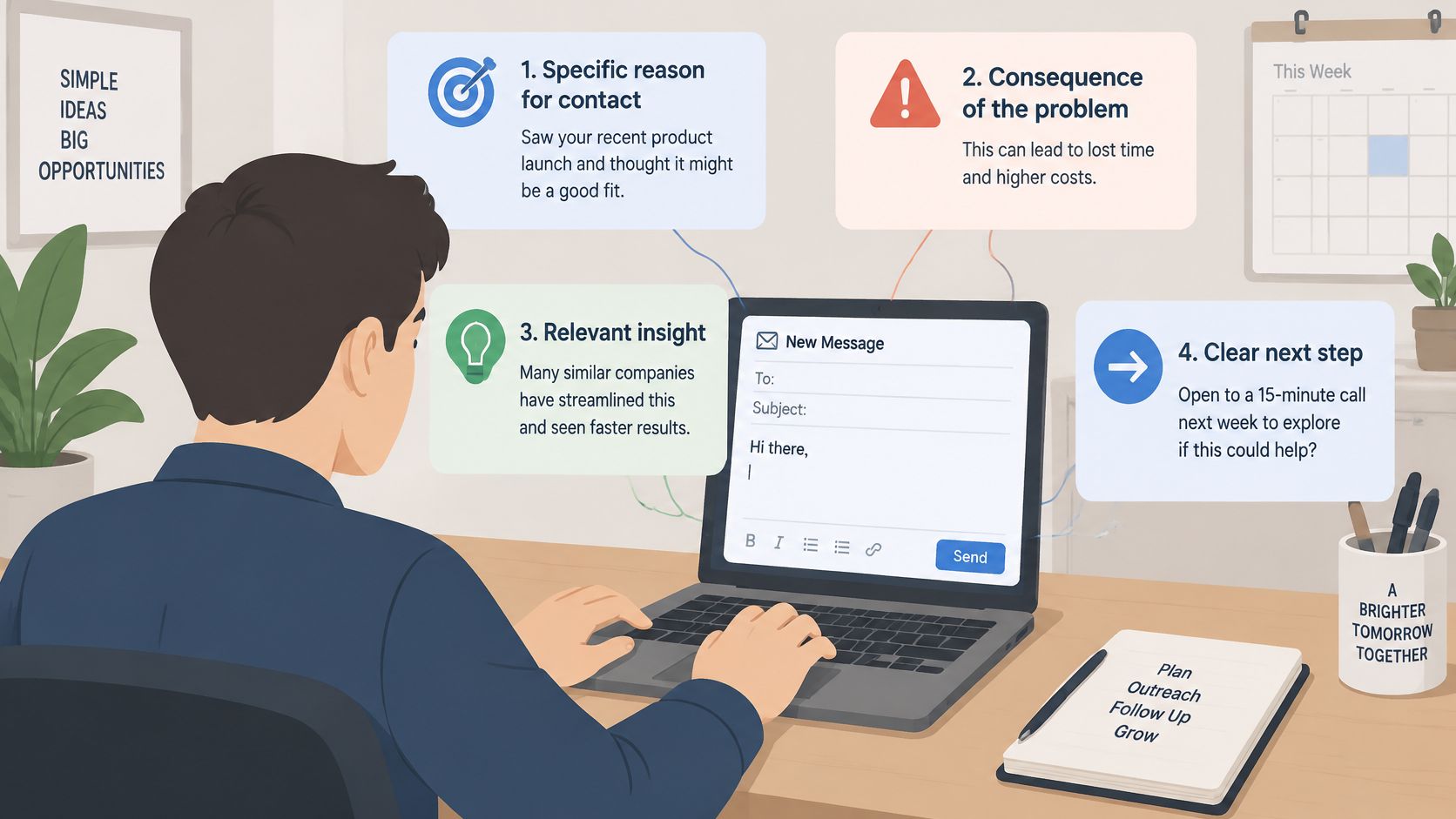
Why the rewrite is easier to answer
The opening supplies a specific reason for contact. It refers to business events rather than adding an unrelated compliment.
The question identifies a possible operational consequence, uncovered responsibility during a handover, without asserting that the recipient has this problem. The supporting facts establish relevance, not proof of a buying need.
Finally, the next step allows an easy correction or refusal. A response saying the issue is already handled is useful qualification information, not a reason to push harder.
SendX's guidance on how to write more effective outreach emails offers further drafting context. H2's explanation of email copywriting also helps distinguish persuasive wording from unsupported claims.
Before sending, check:
- One reason: Why this contact, at this company?
- One problem: Is the potential consequence understandable?
- One verifiable proof point: Can the sender support the relevant factual claim?
- One optional next step: Can the recipient answer without booking a call?
- One clear exit: Is opting out straightforward?
Follow-ups should add useful context or resolve a question, not repeat the meeting request. Never invent results, testimonials or personal experience to make the message sound credible.
Measure Replies Without Fooling Yourself
Start with separate counts for delivered emails, unique recipients, human replies and positive replies. Delivered means accepted by the receiving mail system, not proven inbox placement; human replies exclude automated responses, while positive replies indicate relevant interest.
Define whether the unique-recipient count means everyone targeted or only people receiving accepted mail. Keep that definition fixed across comparisons.
The denominator changes the answer
Bebop's cold-email statistics describe a 2025 dataset of 7,530,489 B2B emails with a 0.45% reply rate, measured as unique replies divided by every email sent, excluding auto-replies and bounces. The same analysis notes that figures around 3–4.5% often use recipients or sequences rather than individual sends.
A sequence can therefore generate a reasonable response per person while consuming many sends. Neither measure is wrong, but they answer different questions.
Hypothetical campaign: 100 recipients are targeted with three messages each, producing 300 sends. Of those sends, 285 are delivered and 15 bounce; five people reply, including two positive replies.
| Measure | Formula | Hypothetical value |
|---|---|---|
| Delivered rate | Delivered emails ÷ emails sent | 285 ÷ 300 = 95% |
| Bounce rate | Bounced emails ÷ emails sent | 15 ÷ 300 = 5% |
| Recipient reply rate | Unique human replies ÷ unique recipients | 5 ÷ 100 = 5% |
| Send reply rate | Unique human replies ÷ emails sent | 5 ÷ 300 = 1.67% |
| Positive reply rate | Positive replies ÷ unique recipients | 2 ÷ 100 = 2% |
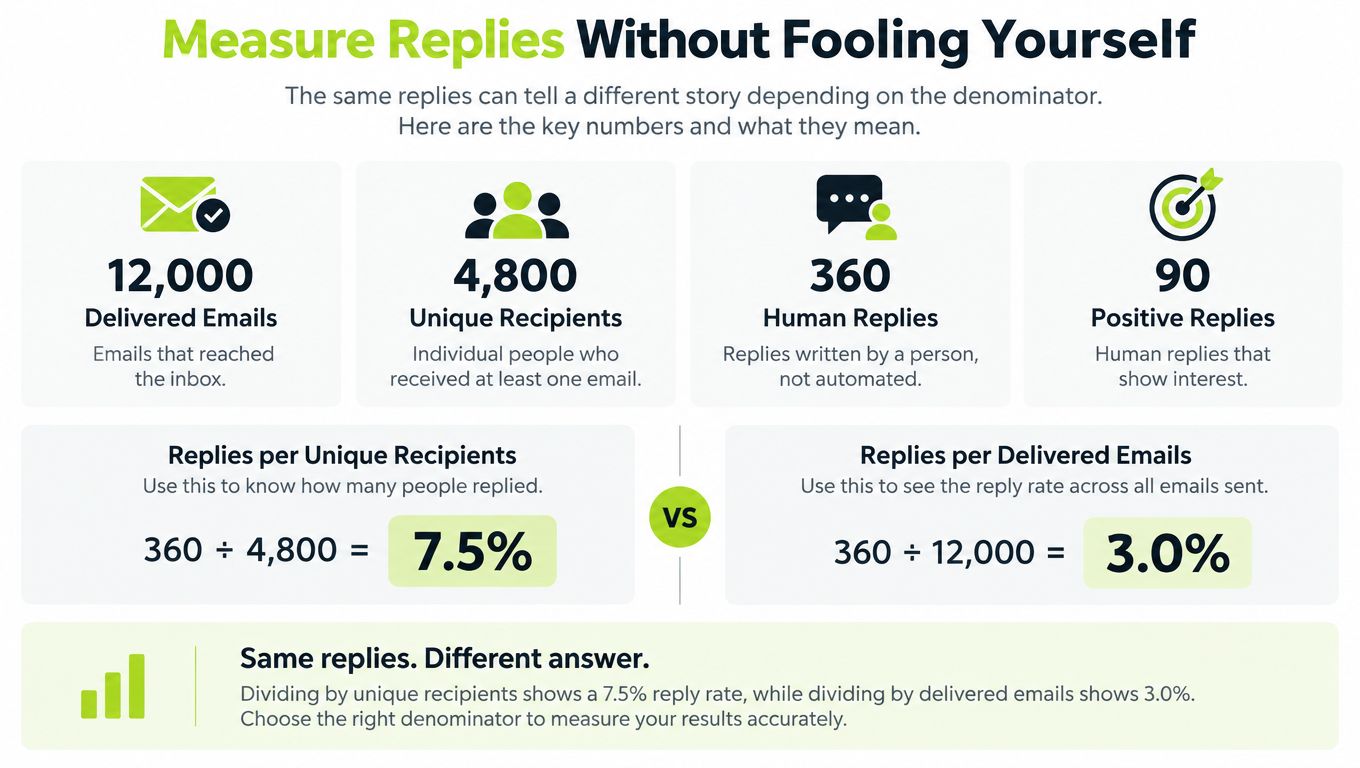
The hypothetical table uses all sends for send reply rate. A rate calculated from delivered messages needs a different label and shouldn't be compared directly with it.
Diagnose before changing the campaign
Review delivery and complaint information first, then inspect bounce causes. Compare human and positive replies by audience segment, and read the objections behind the totals.
Measurement discipline: Change one variable at a time and keep a record of the hypothesis. Otherwise, an improved result won't reveal which change helped.
Open tracking can provide diagnostic clues, but it doesn't establish buying intent. For commercial decisions, prioritise positive replies within a clearly defined segment, then assess whether those conversations become qualified meetings and opportunities.
A negative reply shouldn't enter the positive column because a person responded. Equally, a meeting isn't qualified merely because it appears in the calendar.
Decide Whether to Run Prospecting In-House or Outsource
The decision starts with capability and capacity, not software preference. A team should assess whether the following responsibilities have real owners.
- Commercial clarity: A proven offer and an audience with a credible reason to consider it.
- Campaign ownership: Someone accountable for research, launch decisions and weekly review.
- Technical maintenance: Capacity to manage authentication, sending issues and data quality.
- Governance: Reliable legal-status records, suppression handling and CRM logging.
- Sales capacity: People available to respond promptly and progress suitable conversations.
Match the operating model to the gap
In-house prospecting fits teams that want direct control and can maintain the operating work. It also keeps audience learning close to sales and marketing, but requires protected time rather than an occasional task between other priorities.
Outsourcing fits a business with a proven offer and room for more sales conversations, but without the time or appetite to build the outbound function. It doesn't remove the client's responsibility to explain the offer, provide commercial context and report whether conversations were useful.
A provider's scope should make ownership explicit across research, verification, infrastructure, copy, reply handling, meeting booking and CRM reporting. The handoff matters as much as the launch: interested replies need context, ownership and a clear next action.
Choose the appropriate support
H2's fully managed outbound service fits the outsourcing profile; teams developing internal capability can consider private GTM workshops, while defined workflow bottlenecks may suit custom GTM system builds. Confirm scope and current costs against H2's pricing page before budgeting.
A prospect starts by booking an intro and explaining where growth is stuck. H2 then shows the audience, infrastructure and campaign it would build to address that challenge. Clients can also contact the team at hello@h2.studio.
If the checklist exposes a capacity gap rather than an unproven offer, the next conversation should establish whether managed support fits the business and its sales team.
H2 offers fully managed outbound and custom GTM systems that connect audience research, email infrastructure and campaign learning. Teams struggling to identify where prospecting by email is breaking down can visit H2 and book an intro to start with a free GTM strategy. Bring the current audience, campaign and operational bottleneck so the discussion can focus on what needs to change.
