Stacking every available filter and messaging everyone who changed jobs is popular advice. It also wastes licences. How to Use LinkedIn Sales Navigator well starts with a stricter rule. Teams build accounts first, map several stakeholders, and don't start outreach until three independent checks are logged against the account. A LinkedIn signal opens research. It doesn't prove intent.
Use Sales Navigator for Account Research
Treat account research as a weekly decision process, not a race to collect contacts. Sales Navigator can help sellers find relevant people, understand account relationships and prepare better conversations, as described in the LinkedIn Sales Navigator field guide. Start with the account case. A person's profile or activity is evidence to examine, not proof that the company is ready to buy.
Each week, write an ideal customer profile, save accounts that fit it, map several stakeholders and record why each account qualifies. Then review alerts as research prompts. No single LinkedIn signal should start outreach: log three independent checks against the account first. This rule works like a quality gate. One signal raises a question; separate checks help determine whether the account deserves attention.
The sequence to repeat each week
- Write the ICP: Describe the geography, industry, company size and problem you address in one sentence.
- Save accounts: Keep companies that fit the description closely enough to explain their inclusion in a pipeline review.
- Map stakeholders: Look for buyers, evaluators and users, rather than relying on one contact.
- Record the reason: Note why the account fits before monitoring alerts or drafting a message.
- Log three checks: Record independent evidence against the account before treating a signal as a reason to reach out.
Advanced Search offers many filters, including geography, industry, company size, seniority, role and account characteristics. Filters are useful for narrowing a search, but a long stack can create false confidence. It may exclude a good-fit account or retain a poor-fit one because its fields match. Start with the ICP, then assess the account itself.
Two features can add useful context. TeamLink shows whether a colleague has a first-degree connection to a prospect, which may make a warm introduction possible. It does not establish buying intent. CRM integration can import assigned accounts and contacts and synchronise account and contact lists daily, helping keep research connected to the team's records.
A saved lead is a hypothesis about relevance. The qualification note makes that hypothesis testable.
Cost makes disciplined account selection more important. LinkedIn's 2026 pricing information lists LinkedIn Sales Navigator Advanced at US$159.99 per licence per month, or US$1,799.88 annually. Search volume alone does not show whether a licence is useful. Review account fit, stakeholder coverage and the sales conversations that follow.
Complex B2B decisions can involve several people. A contact may leave, ignore a message or lack authority, so research centred on one person is fragile. A clear ICP gives the team a consistent reason to include an account, while three recorded checks help distinguish a useful signal from an assumption.
Build Target Accounts Before People
Account first, people second, qualification note third. That order prevents the common outcome of hundreds of loosely related profiles with no account logic. The LinkedIn Sales Navigator how-to guide recommends starting with only one to three high-signal filters, inspecting results manually, and adding constraints only when relevance is insufficient.
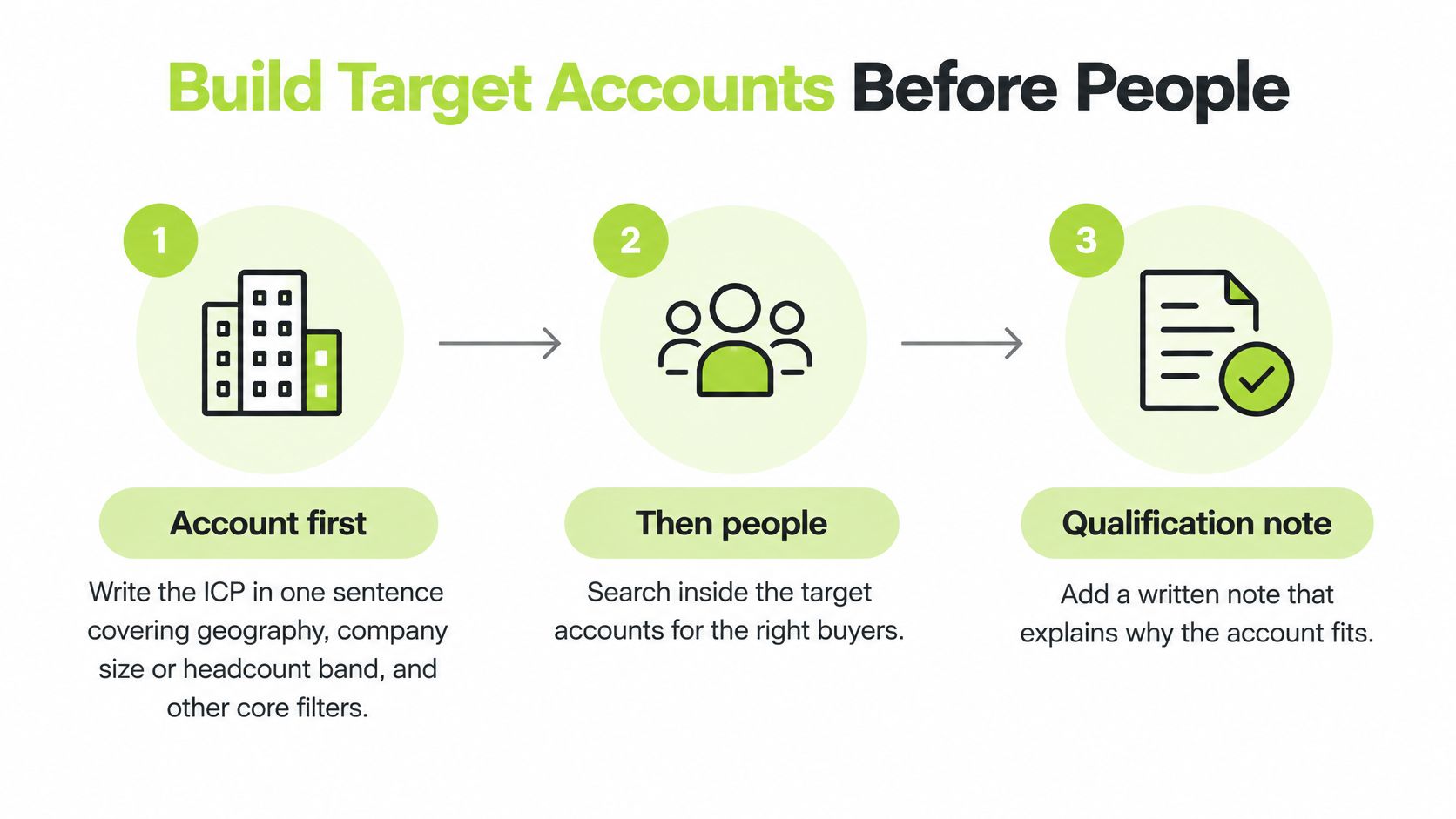
The eight-step build
- Write the ICP in one sentence: Cover geography, company size or headcount band, industry and the problem being sold.
- Open an account search narrowly: Start with geography, company headcount and industry, or a similarly small set.
- Read early results by hand: Add a constraint only when results are clearly drifting from the ICP.
- Save fitting companies: Place them in a named account list and note the inclusion reason.
- Search people inside each account: Use current company with function and seniority.
- Save several stakeholders: Cover a likely economic buyer, a technical evaluator and an operational user.
- Check each profile properly: Review role, company, tenure and stated responsibilities, not title alone.
- Record qualification before contact: Write the reason in the CRM or research sheet.
LinkedIn recommends the limited-filter start because over-filtering can exclude valid prospects and create a false sense of precision. Sales Navigator supports more than 50 search filters, but the control point is inclusion and exclusion logic. Account filters answer whether the company belongs in the market. Lead filters then answer who inside that company is worth researching.
| Stage | Start with | Save | Do not |
|---|---|---|---|
| Account search | One to three filters such as geography, headcount and industry | A named account list with a fit reason | Turn on every available filter at once |
| Stakeholder search | Current company, function and seniority | Several leads per account across buyer, evaluator and user | Rely on one job title |
| Qualification note | Role, tenure and evidence of the problem | A written reason in the CRM or research sheet | Treat the title alone as proof |
A worked example
Say a hypothetical UK B2B software studio sells product engineering support to companies in a defined headcount band. The ICP sentence names UK technology companies where engineering capacity is blocking delivery. The account search starts with geography, headcount and industry. One fitting account is saved with a note explaining the fit, such as sector, size and visible demand for engineering capacity.
Inside that account, three stakeholders might be saved. A head of engineering may own delivery capacity. A chief technology officer may hold budget. A product lead may feel the delivery problem daily. Saving only the head of engineering would leave the account single-threaded and fragile.
That broader view aligns with structured market mapping, where accounts and roles are mapped before campaigns begin. Teams that need help keeping account ownership, notes and handoffs tidy can also review structured sales operations support as an operational reference. The point isn't extra process for its own sake. It's an auditable list another person can inspect.
Practical rule: If no one can explain why an account is on the list, the account isn't qualified yet.
Title-only saving causes predictable waste. A person may have the right title but a narrow remit, short tenure or responsibility for a different region. Reading the profile against the buying problem catches those mismatches early. The result should be a smaller, defensible account list with several relevant stakeholders per company.
Save Lists and Tighten Boolean Searches
A first build becomes useful only when it turns into repeatable segments. Teams should save a separate search for each meaningful slice, such as company size plus geography, buyer function, seniority, or a technology-related account criterion. Each search name should state its qualification logic. A name like UK SaaS, sales leaders, mid-market is clearer than Q1 leads.
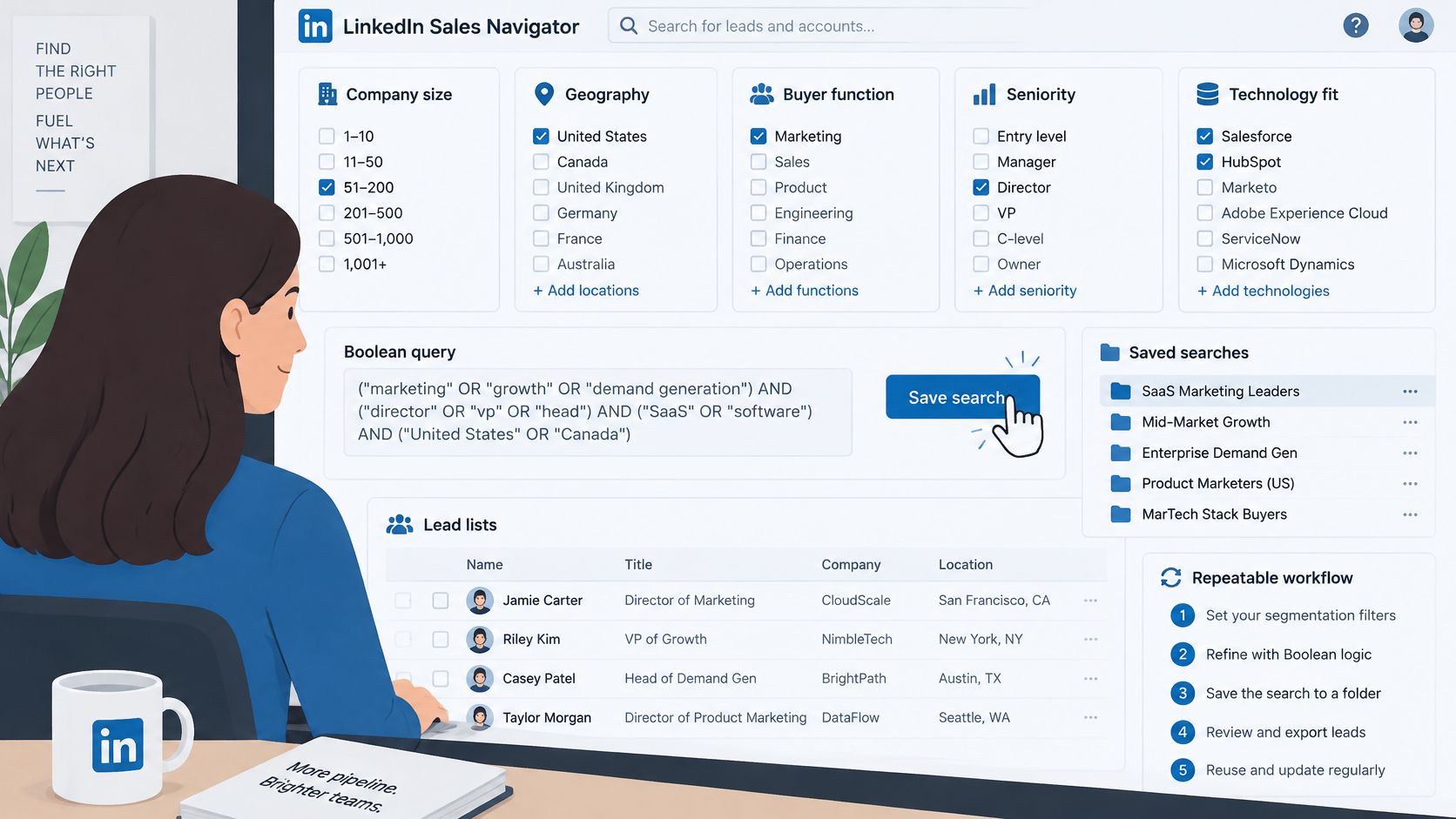
One Boolean string, explained plainly
Boolean search uses operators to include, broaden or exclude terms. A practical title string is ("Head of Sales" OR "VP Sales" OR "Sales Director") AND (SaaS OR software) NOT (recruiting OR staffing). It looks technical, but each part has a simple job.
- Quotation marks: Keep an exact phrase together, such as "Head of Sales".
- OR: Allow any one of the listed alternatives, which helps where companies use different titles for similar roles.
- AND: Require both sides of the search, so role and sector context must both appear.
- NOT: Remove a repeated bad fit, such as recruiting or staffing profiles in a software sales search.
Exclusions should follow evidence, not guesswork. A manual pass through early results shows which bad fits keep appearing. Only then does a NOT term earn its place. Adding exclusions too early can remove valid prospects whose profiles mention an excluded word for an unrelated reason.
Turn saved searches into a review loop
Notifications should be enabled for new matching leads and accounts. The LinkedIn Sales Navigator help page on saved searches states that saved searches provide weekly notifications and that saved lead alerts can appear in the All alerts area. That makes the weekly email and homepage alerts a prioritised research queue rather than background noise.
Each alert needs a short check. Teams confirm the trigger, re-check that the account still fits, and confirm the person still holds the role. A job change, company update, role change or relevant post can justify renewed research. It doesn't independently prove purchase intent, so no message should follow automatically.
Validated items move to the CRM with source, date, signal type, account and next action. Duplicates get suppressed. Employment status gets re-checked before contact. This routing step matters because Sales Navigator profiles can be incomplete, outdated or ambiguous. A profile is a research source, not verified contact data.
Broad saved searches create the opposite problem. Alert fatigue sets in, weekly notifications get ignored, and important changes are missed. Narrow segments with clear names keep the queue small enough to review properly.
A naming checklist keeps lists usable:
- Segment named: Geography, size, function or sector is visible in the title.
- Logic named: The reason this group qualifies is stated, not implied.
- Owner clear: One person reviews new matches each week.
- Next action defined: Each validated alert leaves Sales Navigator with a dated CRM task.
Judge Alerts Before You Outreach
One LinkedIn signal shouldn't start outreach. The decision rule is stricter: log at least three independent checks before a record moves to messaging. Those checks are a relevant business change, a role that owns the problem, and evidence the account meets the commercial rules. The LinkedIn Sales Navigator product page frames alerts around activity such as job changes and shared content, which are research inputs rather than proof of readiness to buy.
| Signal | Possible meaning | Does not prove | Extra check |
|---|---|---|---|
| Job change | A new priority may be forming | Budget, timing or a live project | Current responsibilities and company fit |
| Shared content or post | The topic is on their radar | Active evaluation of your category | Whether the content matches the problem you sell |
| Headcount growth | Hiring or added capacity | A purchase decision | Whether the vacancies relate to your offer |
| Account IQ summary | A hypothesis from LinkedIn first-party data | A verified current priority | Company website, role scope and public evidence |
Read each signal with limits
A job change can suggest new priorities, fresh scope or a mandate to review existing tools. It doesn't prove budget, timing or a live project. A person may also need time to learn the role before buying anything. Current responsibilities and company fit decide whether research should continue.
Shared content can show topic awareness. It can equally be passive scrolling, a polite company share or interest without authority. The useful question is whether the content connects to the specific problem being sold. Generic engagement with leadership content, for example, says little about a software purchase.
Headcount growth often means hiring and added capacity. It doesn't mean the company plans to buy in a particular category. Vacancies need checking. Growth in an unrelated department shouldn't raise an account's priority.
An Account IQ summary is augmented with LinkedIn first-party data such as executive-team information and headcount changes. Treat it as a hypothesis. The company website, the person's current scope and other public evidence still need checking before the summary supports outreach.
Negative signals stop the queue
Some findings should pause or close research. Irrelevant seniority means the person probably can't act. A company outside the ICP means even a warm conversation may not convert. Activity unrelated to the offer shouldn't be stretched into a reason to write.
Say a founder sees a new VP of Operations, a hiring spike and a post about tooling at one account. That cluster looks promising. The three-check rule still applies. The founder verifies that the role owns the relevant process, that vacancies connect to the problem being sold, and that the company meets size and sector rules. Only then does outreach become defensible.
Readers who want a wider framework for separating weak activity from stronger evidence can use H2's guide to sales buying signals. Inside Sales Navigator, the same discipline applies. Alerts become available after leads or accounts are saved, so unsaved results won't enter the monitoring loop at all.
A signal earns research time first. Three logged checks earn outreach time.
The checks belong beside the account record, where another team member can see them. That record then moves to messaging or to Clay with reasons attached. Without those reasons, the next person inherits a name and a hunch.
Sync Lists with CRM and Clay
The handoff starts after a record passes the three checks. CRM integration should import assigned accounts and contacts and synchronise account and contact lists daily. That keeps Sales Navigator from becoming a second, unofficial database. The CRM stays the place where ownership, next steps and conversation history live.
Fields that make a record usable
- Source and date: Show where the lead came from and when the signal appeared.
- Signal type: State whether the trigger was a role change, post, hiring change or another update.
- Account and stakeholder role: Identify the company and the person's place in the buying group.
- Qualification reason: Preserve why the account fits and why the person matters.
- Next action: Name the owner and the next step, with a date.
Duplicates need suppression before anyone writes. Employment should be re-checked because roles change and profiles lag behind reality. Critical contact fields should be validated independently. Teams comparing workflow options for how to capture LinkedIn contacts in CRM should still keep the qualification reason attached, because contact capture alone doesn't explain why outreach is justified.
Clay fits beside the CRM as one possible enrichment and workflow tool. It isn't the system of record and it doesn't replace the qualification note. A practical path pushes only saved, reviewed accounts into Clay, enriches missing firmographic fields, and returns a score or research note. A person can still override that output. H2's guide to Clay data enrichment covers how enrichment supports that kind of workflow.
Enrichment can fill gaps. It can't decide that an account deserves attention.
Write from stored evidence
Good messages use the stored facts: the account change, the person's responsibility and the link to the problem. Message Assist or similar AI drafting can produce a first draft to edit. The source evidence stays in the CRM, and the draft gets checked against it. Generic AI personalisation that repeats a job title isn't evidence.
A labelled example email shows the difference:
Example email: Noticed the operations team is hiring two coordinators while the new VP of Operations settles in. Is scheduling still handled manually across those sites, or has the team already moved that into a system?
That example cites a public hiring and role fact, then asks one specific question. A weaker version says only that the sender saw the profile and wants to connect. The weaker version could go to anyone, which is exactly the problem.
Ownership closes the loop. One person owns each account list. No one sends until the next action field is filled. That single rule stops duplicate outreach, stale follow-up and records that drift between tools with no accountable owner.
Stay Inside Limits Then Choose Ownership
Sales Navigator access can be temporarily restricted when activity appears unusual. The LinkedIn Sales Navigator help page on unusual activity lists InMail, connection invitations, lead and account searches, and profile views among the affected functions. Set a daily workflow, assign an owner to each saved account list, and review evidence before contact.
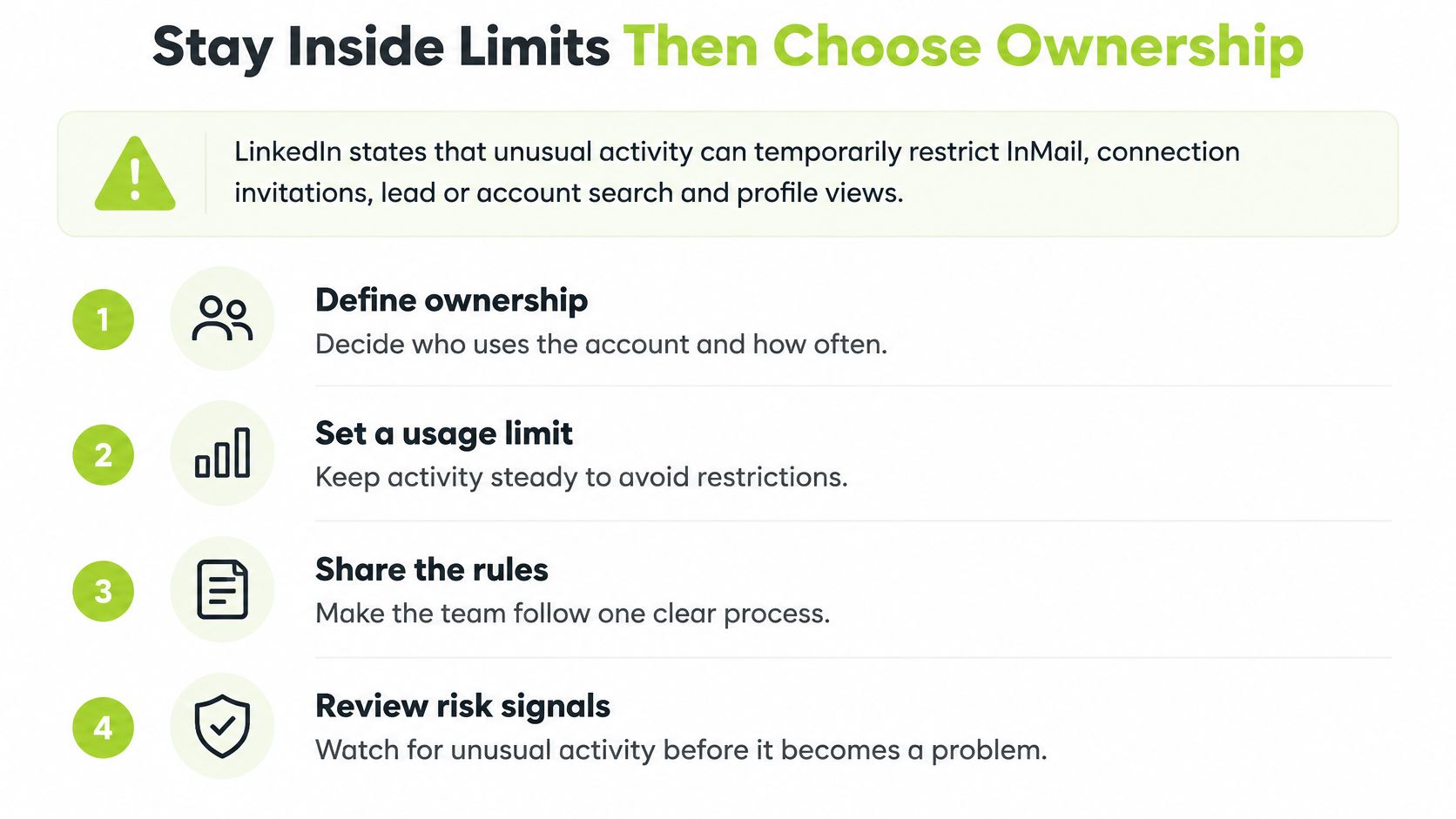
Three operating modes
Manual research suits a small number of high-value accounts where each stakeholder needs careful review. AI-assisted research uses Account IQ, Lead IQ or Message Assist to form a starting hypothesis. Some capabilities are limited to Advanced or Advanced Plus plans, or described as beta features. Check AI summaries against the company website, role scope and public evidence. A summary is a lead, not proof.
CRM-backed team workflow suits higher volume, with ownership, routing and next actions held in one system. Track days active, saved accounts and leads, stakeholders researched, and qualified conversations. Logins alone do not show whether the work is producing useful sales conversations.
LinkedIn's Social Selling Index can provide context for consistent use. Its article on social selling success describes four activities scored from 0 to 25 each, for a total from 0 to 100, and reports that sales professionals adopting social selling were 51% more likely to exceed their sales goals. LinkedIn presents this as a relationship, not proof that a higher score causes revenue.
Team size affects how much process is practical. A 2024 Databox survey found that 67.52% of respondents had between one and five people at their company using LinkedIn Sales Navigator. For a small team, first agree who reviews accounts, who owns each next action, and how often the workflow runs. Add seats, segments or alerts only when there is a clear owner for the resulting work.
Keep research in house when the team can review lists regularly and take the conversations that follow. Outside support may suit a B2B team with a proven offer and sales capacity, but limited time for research, list building and follow-up. Fully managed outbound includes email and LinkedIn campaigns, reply handling and meeting booking, with conversations and next steps recorded in the client's CRM. A custom GTM system build fits when routing or qualification needs a system; a private GTM workshop suits teams that want to learn the workflow. Scope and plan details depend on the business and its goals, and can be agreed in an intro conversation.
Teams with a proven offer, room for more sales conversations and limited time to run outbound can book an intro with H2 to discuss a free GTM strategy and the right ownership model. Treat each LinkedIn signal as a prompt for research, not a reason to send. Before outreach, log three independent checks against the account: fit with the target market, evidence of a relevant need, and a credible reason to act. A signal starts the review; the three checks support the decision.
