Most advice about Clay data enrichment starts with the wrong premise: that adding more providers automatically produces better data. It doesn't. Clay can route records through a broad network of external tools, but it doesn't turn conflicting sources into a trustworthy system by itself. Without field-level rules, overwrite protection and review paths, a larger provider stack can easily make your CRM more expensive and harder to audit.
That distinction matters because Clay sits inside a wider GTM category that is expanding quickly. Independent market estimates place global data enrichment solutions at $1.97 billion in 2025, with a projection of $5.48 billion by 2034 and a 12.0% compound annual growth rate over that period, while another estimate projects the sector could reach $4.58 billion by 2030. These figures come from industry data enrichment market estimates, but market growth doesn't remove the operator's responsibility. A workflow still needs clear ownership, measurable quality and disciplined spending.
The Reality of Clay Data Enrichment
Clay's value comes from coordinating providers, not from owning a definitive database. Its documentation describes a system that routes records through external enrichment tools and uses waterfalls to query them in sequence until a result appears. Clay operates as a Clay GTM platform that orchestrates external providers rather than hosting the data itself. That makes it an orchestration layer, not a native source of truth. If one provider returns an outdated title and another returns no title, Clay cannot resolve the business question without rules that specify which value wins, why, and who reviews the exception.
Adding connectors increases possible coverage, but it also increases the number of outcomes your team must govern:
- Different definitions: Providers can interpret employee count, industry, and job seniority differently.
- Uneven freshness: A complete-looking record may contain fields verified at different times.
- Conflicting identities: Company names, domains, and subsidiaries can create false matches.
- Unclear accountability: Someone still must decide whether a disputed value reaches Salesforce or HubSpot.
That operational burden is easy to miss because Clay has attracted substantial investor interest. Its funding history includes a $2.5 million seed round in June 2017, a $13.5 million Series A disclosed in 2024, a $46 million Series B in June 2024, a $40 million Series B expansion in January 2025, a $100 million Series C in August 2025, and a $115 million Series D announced in September 2026 at a $7.1 billion valuation, as recorded in Clay's funding history. Clay says it reached 4x revenue growth in 2025 and serves more than 5,000 customers. Those figures show demand for combining data, automation, and AI. They do not establish that every enrichment output is accurate.
Treat Clay as a decision system
A useful Clay table separates three layers:
- The source value, preserved exactly as returned.
- The normalised value, formatted for routing or messaging.
- The decision status, such as accepted, disputed, missing, or awaiting review.
This structure creates an audit trail and keeps uncertainty visible. A phone number may be present but unverified. A technology signal may fit the account but be outdated. A company may match the domain while belonging to the wrong legal entity.
The same discipline should guide your go-to-market strategy for B2B. Enrichment should support a commercial decision, not become a collection exercise. If a field does not change qualification, routing, personalisation, or compliance handling, leave it out of the first workflow.
Practical rule: Do not scale a waterfall until you can explain what happens when providers disagree, a value is missing, or a match is only probable.
Start with a small test batch. Clay's guidance recommends testing before running a full source, which limits operational risk while identifiers, provider behaviour, credit consumption, and overwrite rules are still being checked. The first objective is not maximum coverage. It is a workflow whose outputs a sales operator can inspect, explain, and defend.
Designing Your First Enrichment Workflow
A reliable Clay table starts before the first enrichment action. The input determines whether every later step is efficient or wasteful. If the table contains duplicate contacts, inconsistent domains and fields nobody uses, the workflow will spend credits amplifying the mess.
Prepare the input before connecting providers
Begin with a clear source record. For a company-led workflow, that might include the company name, website domain, CRM account ID and a known country or market. For a contact-led workflow, include the contact's name, company domain, CRM contact ID and any existing email or role information that your team trusts.
Then work through this sequence:
-
Deduplicate against a stable identifier. Use the CRM account or contact ID where available. If that isn't available, combine normalised domain and contact identity carefully. Don't rely on company name alone, because subsidiaries, punctuation and trading names can create duplicates.
-
Standardise before matching. Normalise domains, remove tracking parameters from website URLs, apply consistent country formats and separate company names from contact names. Keep the original input in a protected column so you can investigate a bad transformation.
-
Define the outbound decision. Decide what the workflow must help someone do. It might identify a suitable department, verify a work email, classify an account or route an opportunity to an owner. The decision determines the required fields.
-
Create a field contract. For every output, document the data type, acceptable values, source priority, fallback behaviour, review requirement and overwrite rule. A field contract is more useful than a long list of available enrichments.
-
Set write permissions before the run. Decide which fields may populate blanks, which may update existing values and which may never overwrite a human-entered value. Store provider, verification date and confidence status beside important outputs.
Enrich only what the motion uses
Teams often ask for every available firmographic and contact field because the table makes it possible. That approach increases cost and creates more opportunities for contradictions. Start with the narrowest useful set.
For an account qualification workflow, useful fields might include the website, company category, location, relevant technology and a qualification status. For a contact workflow, the essentials may be role, department, work email, seniority and a review flag. A personal interest, funding event or hiring signal belongs in the workflow only if a human can explain how it changes targeting or message selection.
Build the table in stages. First validate identity. Then enrich core qualification fields. Only after those fields pass your checks should you add deeper research, AI classification or campaign personalisation. This sequencing keeps expensive work away from records that fail the basic ICP test.
Protect the CRM from silent damage
Don't send every Clay output directly into the CRM. Use an intermediate state that marks records as ready, rejected or requiring review. That lets RevOps inspect edge cases before an automated sync changes routing, ownership or campaign eligibility.
A simple operating rule works well: blank CRM fields can be filled automatically, existing trusted values need a defined update condition, and disputed values stay outside the production record until a person resolves them. It isn't glamorous, but it prevents a fast enrichment run from becoming a slow data-recovery project.
Choosing Connectors and Building Waterfalls
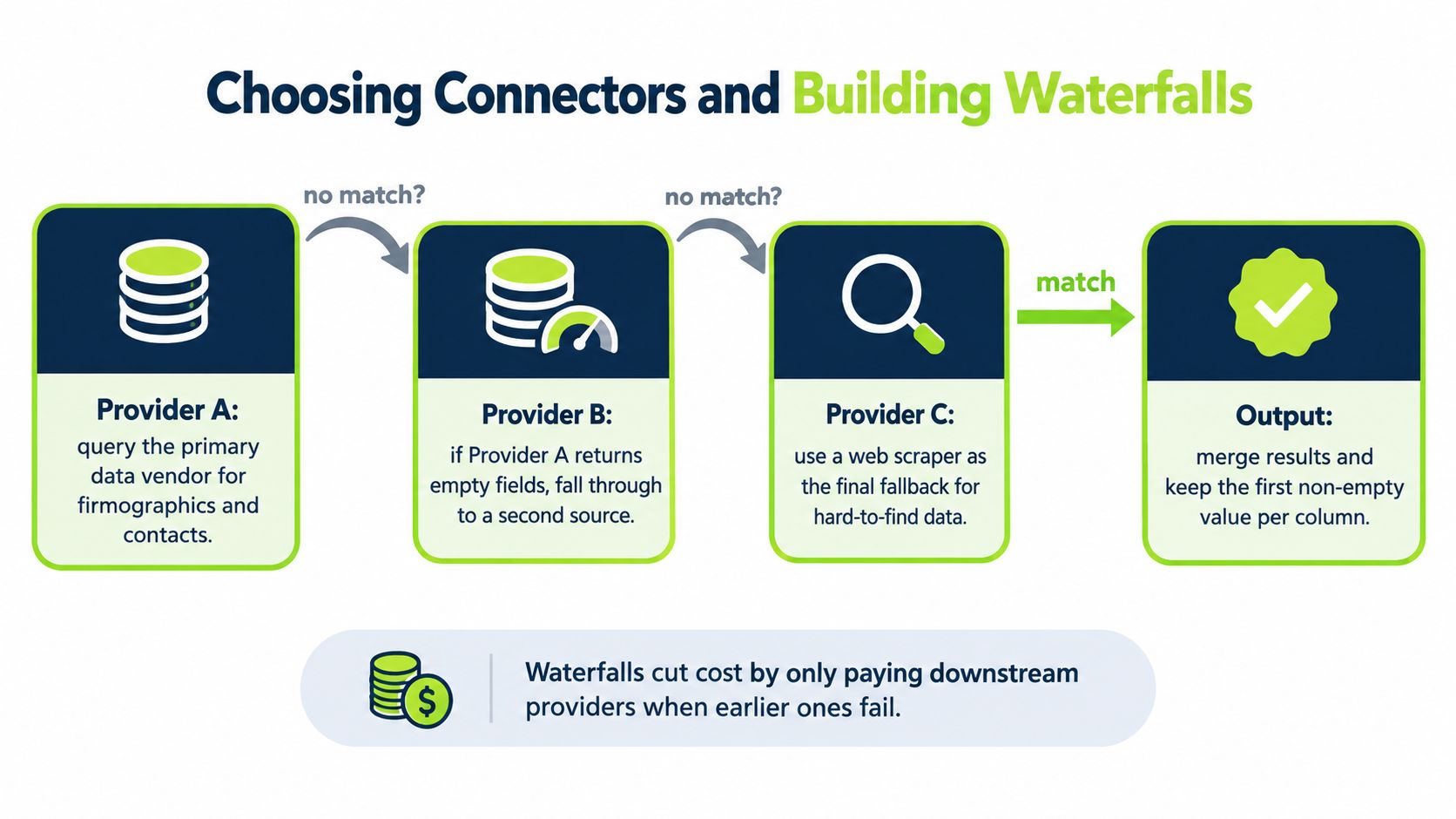
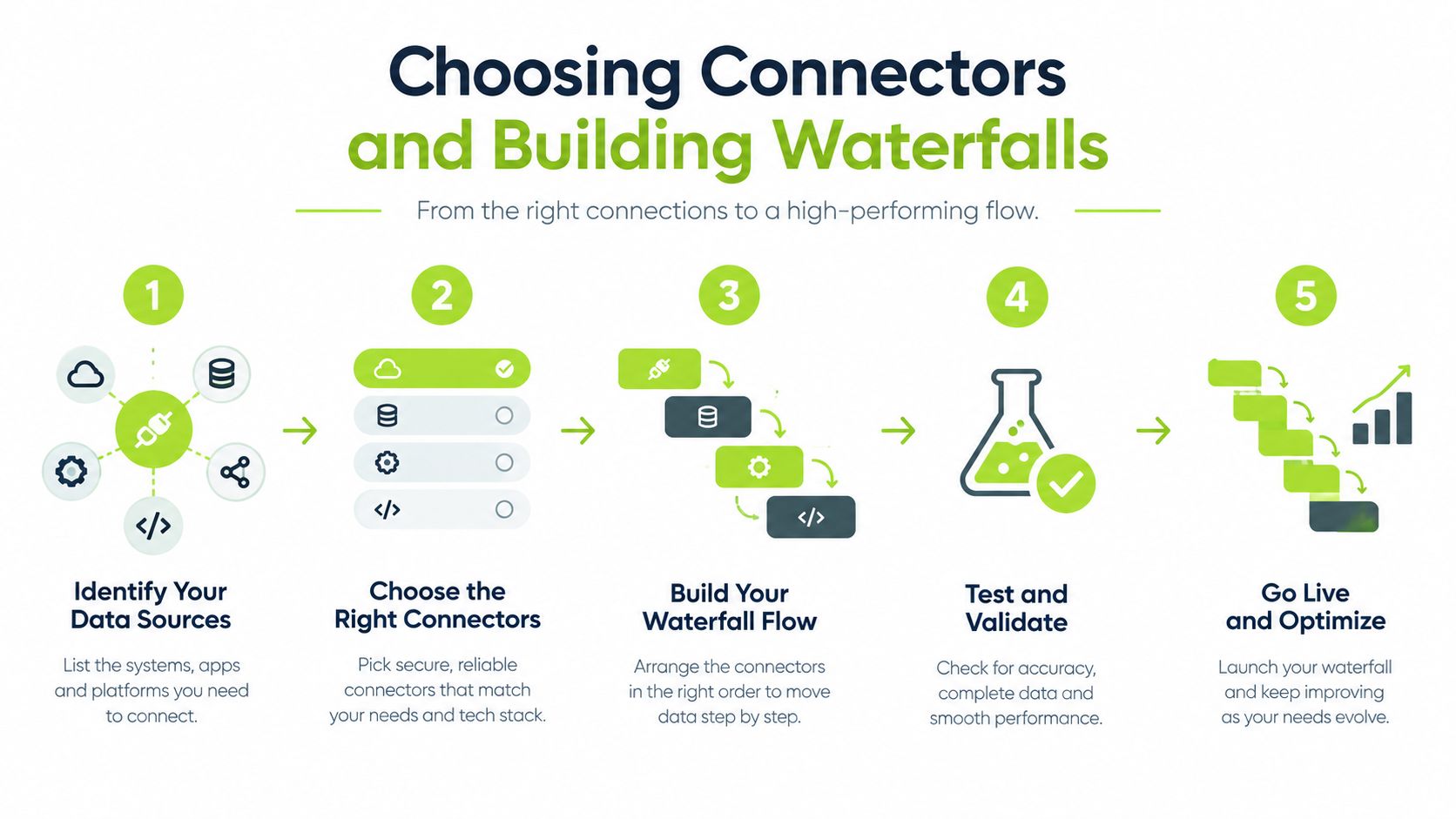
A Clay waterfall is an operating rule, not a provider shopping list. Its job is to apply sources in a deliberate order, stop when a value meets the acceptance standard, and expose records that need review. Without those controls, flexible orchestration turns into credit waste, inconsistent fields and undocumented provider decisions.
Sequence by field, not by provider brand
Choose connectors for the field they handle, the market they cover and the evidence they return. A provider that finds work emails reliably may perform poorly on technology detection. A company database may identify an account correctly while lacking a direct dial. A web source may uncover a difficult company attribute but provide weak contact coverage.
Separate waterfalls by field or closely related field groups. Combining every request into one universal sequence makes it harder to diagnose failures and encourages unnecessary lookups.
A practical sequence has three layers:
- Primary source: Start with the provider that has the strongest expected match quality for the field and target market.
- Targeted fallback: Query another provider only when the field is blank or fails a defined validation rule.
- Research fallback: Reserve scraping or AI-assisted research for exceptional records with a clear reason to justify the extra review and usage.
Order alone does not control the workflow. The stop condition does. A returned value must meet a usability rule before the waterfall ends. For an email, require a valid relationship to the company's work domain. For a company domain, compare it with the input website. For a role, classify the title before accepting it as a sales-qualified contact.
Define what counts as a match
A connector can return a value that technically exists but is operationally wrong. If Clay checks only whether a cell is non-empty, the waterfall stops before a better source has a chance to run. Add validation between providers so present and usable are treated as different states.
Useful checks include:
- Compare the returned company domain with the input domain and flag mismatches.
- Reject generic inboxes when the campaign requires an individual contact.
- Flag titles that mention the target department but identify an assistant, contractor or former employee.
- Store mobile numbers and direct dials as separate types instead of treating them as interchangeable.
- Preserve the provider and returned timestamp for every accepted value.
Retain disagreement rather than hiding it. If two providers return different company sizes, store both values, apply the documented priority rule and mark the record when the conflict could change segmentation, routing or ownership. This creates an audit trail for later corrections and shows whether a provider is producing a recurring class of errors.
Test quality before scaling
Clay's guide to choosing a data enrichment provider recommends testing returned data against a random manual sample of 50 records. Clay's guide to choosing a data enrichment provider The sample should resemble the production queue, including difficult accounts, incomplete inputs and records likely to trigger fallbacks. A sample made only of clean, ideal records will conceal the conditions that create review work.
Track at least four measures:
- Match rate: How often the workflow returns a value that passes validation.
- Completeness: How many required fields are populated for each record.
- Accuracy: How often outputs agree with a trusted manual check or source record.
- Cost per verified record: What the workflow consumes for a value that passes the acceptance rule.
Review those measures by connector and by field, not only for the table overall. A high aggregate match rate can conceal a weak email source or a fallback that runs on too many records. Test the full sequence, record which stage supplied each accepted value and inspect failed records before expanding the workflow.
A cheap first step is expensive when it fills cells your sales and marketing systems cannot trust. Measure accepted outputs, fallback frequency and unresolved conflicts, not populated cells alone.
Managing Cost and Quality Trade-offs
Clay charges around actions, not just records. An action may enrich data, run a table, call an AI model, send data to a third-party system or export a result. Workflow cost therefore reflects requested fields, fallback frequency, repeated tests and downstream operations. A table that looks small can consume significant credits if every record reaches several providers and triggers multiple updates.
The hidden cost is often governance work. Someone must review failed matches, resolve conflicting values, monitor provider changes and explain why a CRM field changed. Treat Clay as an orchestration layer, not as a single, authoritative data source.
Broad enrichment on weak-fit records creates the worst economics. If an account fails the basic ICP test, a detailed contact profile does not improve the opportunity. It adds actions, review work and possible bad data to a record that should have stopped earlier.
Use depth as a qualification decision
Set enrichment depth according to the decision a record must support:
- Screening: Confirm identity and a few firmographic conditions.
- Qualification: Add fields required for routing, scoring or campaign inclusion.
- Research: Examine buying context, technology, hiring or company-specific details.
- Activation: Generate messages, send outputs to systems or trigger campaign steps.
Give every layer an exit condition. A record that fails screening should not receive qualification or research actions. A record that passes qualification but lacks a relevant signal may fit a nurture route rather than a personalised outbound sequence.
Ask, “What is the next field worth paying for on this record?” Track each field's marginal value by whether it changes an operational decision. If a technology field rarely affects qualification, remove it from the default path or reserve it for a narrower segment.
Waterfalls also need stop rules. Stop after an accepted value meets the validation rule, and record which provider supplied it. Otherwise, later providers can spend credits investigating a field that is already good enough.
Compare spend with operational value
| ICP Tier | Enrichment Depth | Typical Credit Cost | Best Use Case |
|---|---|---|---|
| Priority | Deep profile with validated contact and account context | 5 to 10 credits for a full enrichment, based on benchmark guidance | High-fit accounts where research changes messaging or ownership |
| Qualified | Core firmographic and contact fields through a controlled waterfall | About 5 to 10 credits per lead for a basic waterfall, based on benchmark guidance | Campaign-ready records with a clear outbound route |
| Unconfirmed | Identity and minimum screening fields only | Depends on fields and providers used | Early qualification before committing to deeper research |
| Excluded | No enrichment beyond the information needed to record the exclusion | Avoided actions | Records outside the ICP or blocked by data-quality rules |
These credit ranges are planning references, not fixed pricing. Use your own run history to calculate cost per accepted record, cost per campaign-ready contact and cost per qualified conversation. Record rejected outputs and review time as well, because a cheap result that requires manual repair may cost more operationally.
Teams comparing suppliers should separate coverage from value. A provider can fill more columns while contributing little to targeting. The comparison of data enrichment services for B2B growth offers a useful framework for comparing service models, while the same discipline applies inside Clay. Compare providers on fields that affect your motion, match quality, refresh behaviour and failure handling, not catalogue size alone.
Set credit limits by workflow and require review when a run exceeds its expected fall-through rate. Preview test data before a full source run, keep AI research behind qualification gates and exclude duplicates before they enter a waterfall. These controls will not make every action productive, but they prevent weak inputs from consuming a premium workflow.
Integrating Enriched Data with CRMs and Campaign Stacks
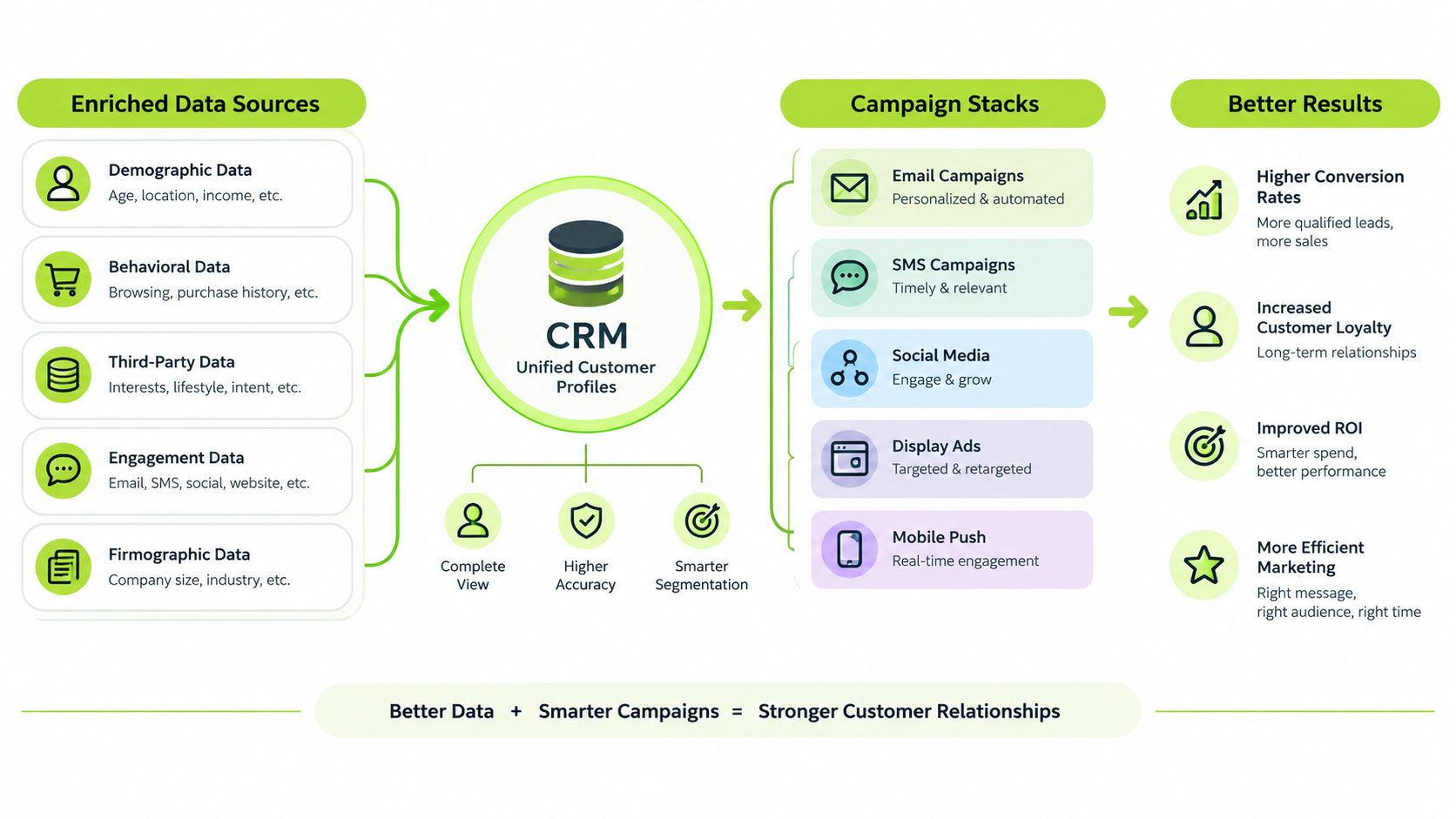
Enriched data only creates value when downstream systems can interpret it safely. A CRM needs more than a new value in a custom property. It needs to know what the value means, where it came from, when it was checked and whether a person is allowed to edit it.
Clay's bulk-enrichment materials describe syncing large datasets back to systems such as Salesforce, HubSpot and Snowflake, but the integration pattern should remain conservative. Send stable identifiers with every update, map normalised values to controlled fields and keep raw research outside the fields that salespeople rely on for daily decisions.
Build an auditable field model
For each enriched property, store enough metadata to answer four questions:
- What was found? Keep the accepted, normalised value.
- Where did it come from? Record the provider or research method.
- When was it checked? Store a verification or refresh date.
- Can the workflow overwrite it? Add an ownership or protection status.
Use separate fields for source values and operational values when the distinction matters. For example, preserve a returned job title, then map it to a controlled seniority category used for routing. If the raw title changes, the routing logic can be reviewed without losing the original evidence.
A CRM update should also be idempotent. Running the same workflow again shouldn't create duplicate contacts, change ownership unpredictably or append repeated notes. Match on a stable CRM identifier wherever possible, and send only fields that passed the workflow's validation rules.
Turn signals into controlled actions
Signals such as funding, technology changes or hiring activity can inform lead scoring and campaign eligibility, but they shouldn't automatically prove buying intent. A vacancy can indicate a capability being built, not a willingness to purchase. Technology usage can identify a relevant account, not a current project. Treat signals as evidence that changes a review path or score, not as a licence to make unsupported claims in outreach.
Campaign tools need the same guardrails. A record should enter a sequence only when the contact is eligible, the account passes the ICP rules, the required contact field is verified and no suppression condition applies. If Clay generates research or copy, keep approval status separate from the generated text so sales can review the reasoning and edit the message.
A specialist resource such as a LinkedIn scraping API may help collect additional public information for research workflows. It still needs to fit your data permissions, source documentation and validation rules. More collection doesn't remove the need to decide whether the resulting signal is relevant and defensible.
For teams connecting several systems, CRM workflow automation guidance can help frame the handoffs around ownership, exceptions and trigger logic. The practical test is simple: can a sales representative understand why a record was routed to them without opening the Clay table?
Operating Rules and Continuous Maintenance
A one-off enrichment pass is a snapshot, not a maintained data system. Contact roles change, companies update their websites and records lose relevance over time. An independent operations guide estimates that B2B data becomes stale at 25% to 30% per year, which is why continuous data enrichment guidance recommends scheduled refreshes alongside real-time handling for new records.
Use different refresh paths
New inbound leads should receive enrichment close to the point of capture, before routing or qualification. Historical records need a rolling refresh rather than an indiscriminate full-database run. Many teams use monthly or quarterly refreshes for older records and real-time enrichment for new inbound leads, according to the same operations guidance. Choose the cadence by field volatility and commercial importance, not by habit.
A practical maintenance model looks like this:
- At intake: Standardise the record, check identity and enrich only fields needed for immediate routing.
- During campaign preparation: Recheck priority contacts and confirm fields that will appear in messaging.
- On a rolling schedule: Refresh historical records in manageable groups, prioritising active segments and recently engaged accounts.
- After a trigger: Re-enrich when a contact changes role, a company changes domain or a relevant account signal appears.
- After a failure: Review bounced, rejected or disputed records and feed the reason back into the workflow.
Give exceptions an owner
Automation should stop when the system can't explain its decision. Assign someone to review provider conflicts, uncertain matches, protected CRM fields and records that repeatedly fall through every connector. That person doesn't need to inspect every successful record, but they do need a queue with clear reasons and outcomes.
Review quality with a recurring sample, not just a dashboard of populated fields. Compare accepted outputs against source records or a manual check, track match rate, completeness, accuracy and cost per verified record, then adjust provider order when the results deteriorate. Keep a change log for connector settings, validation logic and overwrite rules so a sudden routing change can be traced to a specific workflow edit.
The operating standard is straightforward: automate repeatable decisions, document exceptions and keep human review where the evidence is ambiguous. Clay can run the mechanics at scale, but your team still owns the definitions, thresholds and consequences.
H2 offers custom GTM system builds, managed outbound programmes and private workshops covering Clay workflows, enrichment, verification and cost control. If your current setup burns credits, creates disputed CRM records or leaves your team unsure what to automate, visit H2 to discuss the workflow and operating rules you need.
