Your CRM is full of records that looked usable when they were created. Now, titles have changed, companies have reorganised, email addresses are missing, and account owners can't trust the routing rules built on top of them. A list that once supported outbound now creates duplicate research, poor handoffs, and avoidable uncertainty.
That's why data enrichment services have become a core go-to-market capability rather than a one-off data-cleaning task. The global data enrichment solutions market was estimated at USD 2.37 billion in 2023 and is forecast to reach USD 4.58 billion by 2030, representing a 10.1% CAGR from 2024 to 2030, according to Grand View Research's market analysis. A separate projection values the sector at USD 2.88 billion in 2025, rising to USD 5.13 billion by 2030 at a 12.2% CAGR, as reported in Research and Markets' 2026 market report.
The important question isn't which provider has the largest database. It's whether the service can recognise your records, fill the fields your workflows need, refresh them at a sensible cadence, and do so without creating unacceptable cost or compliance risk.
| Enrichment model | Best fit | Main advantage | Main limitation |
|---|---|---|---|
| API enrichment | Live forms, routing, Clay workflows | Immediate processing | Coverage depends on the selected source |
| Batch enrichment | CRM clean-up, migrations, large list builds | Efficient bulk processing | Results represent a snapshot |
| Waterfall enrichment | Difficult records, high-coverage prospecting | Multiple sources improve the chance of a usable match | Higher workflow complexity and governance requirements |
Introduction Why Enrichment Decisions Matter Now
A RevOps manager usually notices data decay indirectly. Marketing asks why a segment contains people who no longer hold the relevant role. Sales reports that several contacts have moved companies. Operations finds duplicate accounts with slightly different names and domains. None of these problems sits neatly inside one CRM field, yet each one weakens the next action.
A data enrichment service can add missing contact, company, and account attributes, but the service model determines how the result enters your operating system. A real-time API can enrich a form submission before routing takes place. A batch service can process a defined CRM population or prospect list. A waterfall workflow can query multiple providers in sequence when a single source can't return a sufficiently complete record.
The distinction matters because enrichment isn't the same as freshness. A completed record can still become unusable after a contact changes employer, an account changes its technology stack, or a previously valid address stops working. One 2026 benchmark estimates that B2B contact data decays by 25–30% a year, which would mean a database of 10,000 records could lose roughly 2,500–3,000 usable contacts annually without maintenance, according to DataMagnet's B2B data benchmark.
Practical rule: Treat enrichment as a controlled refresh process, not as a permanent repair to a static database.
This comparison uses four decision lenses: coverage, quality, cost, and maintenance. Coverage asks whether a provider can recognise the record. Quality asks whether the returned values are valid and useful. Cost includes not only credits or subscription fees, but also failed lookups, duplicate processing, manual review, and re-enrichment. Maintenance asks how the workflow responds when the data changes.
The strongest choice may also vary within the same company. An inbound routing workflow can favour low-latency API enrichment, while a quarterly account research project may suit batch processing. A complex Clay workflow may use a waterfall only for fields where the extra coverage justifies additional provider calls.
What Data Enrichment Services Actually Do
Data enrichment takes an existing identifier or partial record and appends additional information from one or more external sources. The input might be a person's email address, a company domain, a name, or a CRM account. The output can include contact attributes such as role and work email, firmographic attributes such as industry and company size, or technographic attributes describing the systems associated with an account.
The commercial value comes from turning incomplete records into records that can support a decision. A sales team might use company attributes to qualify an account. Marketing might use role and industry fields to create a segment. RevOps might use location, employee range, or account category to route a lead. Enrichment doesn't decide whether a prospect will buy, and a vacancy, technology choice, or social activity shouldn't be treated as proof of purchase intent. It supplies structured evidence for a defined workflow.
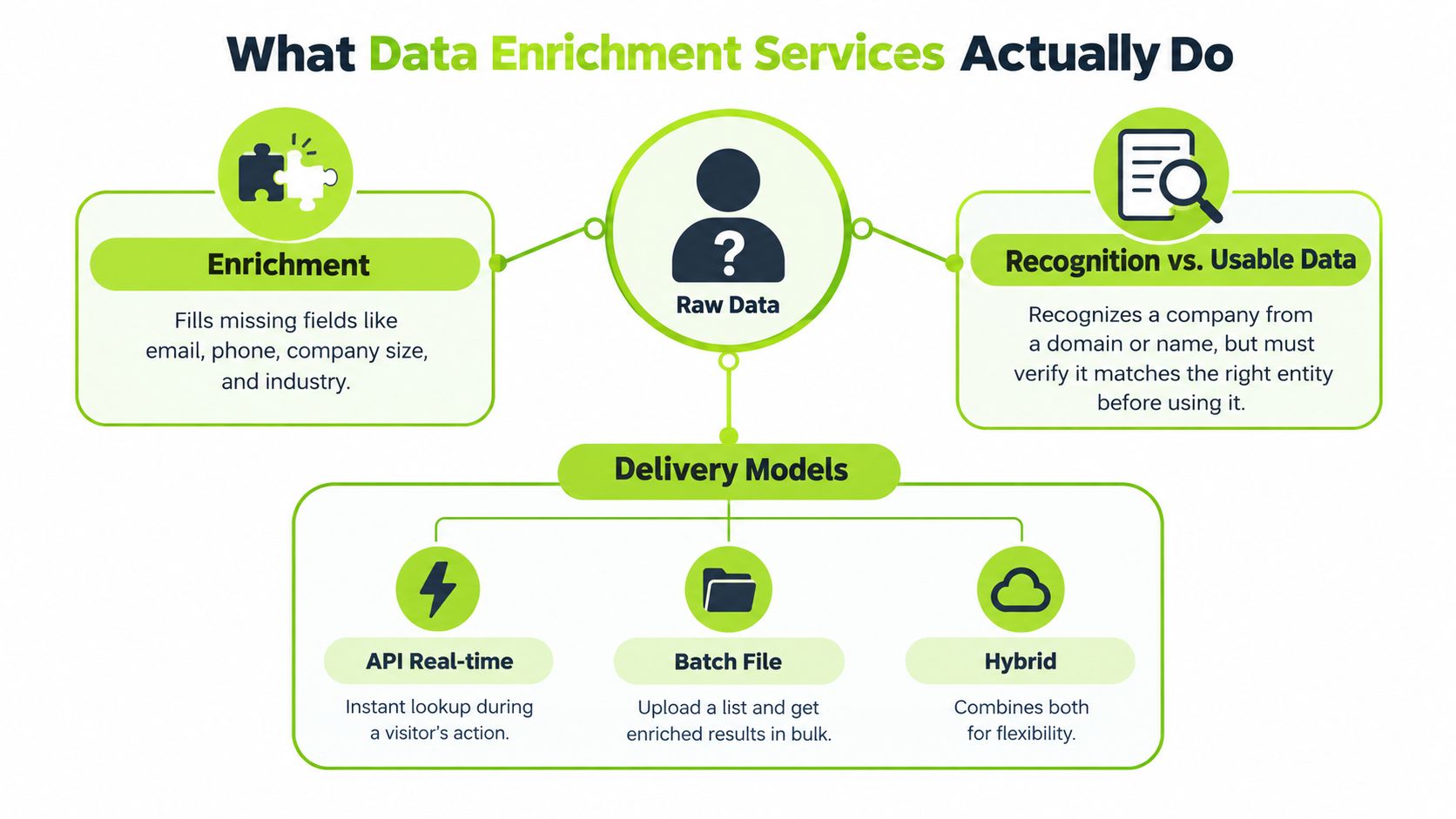
Recognition is not the same as usable data
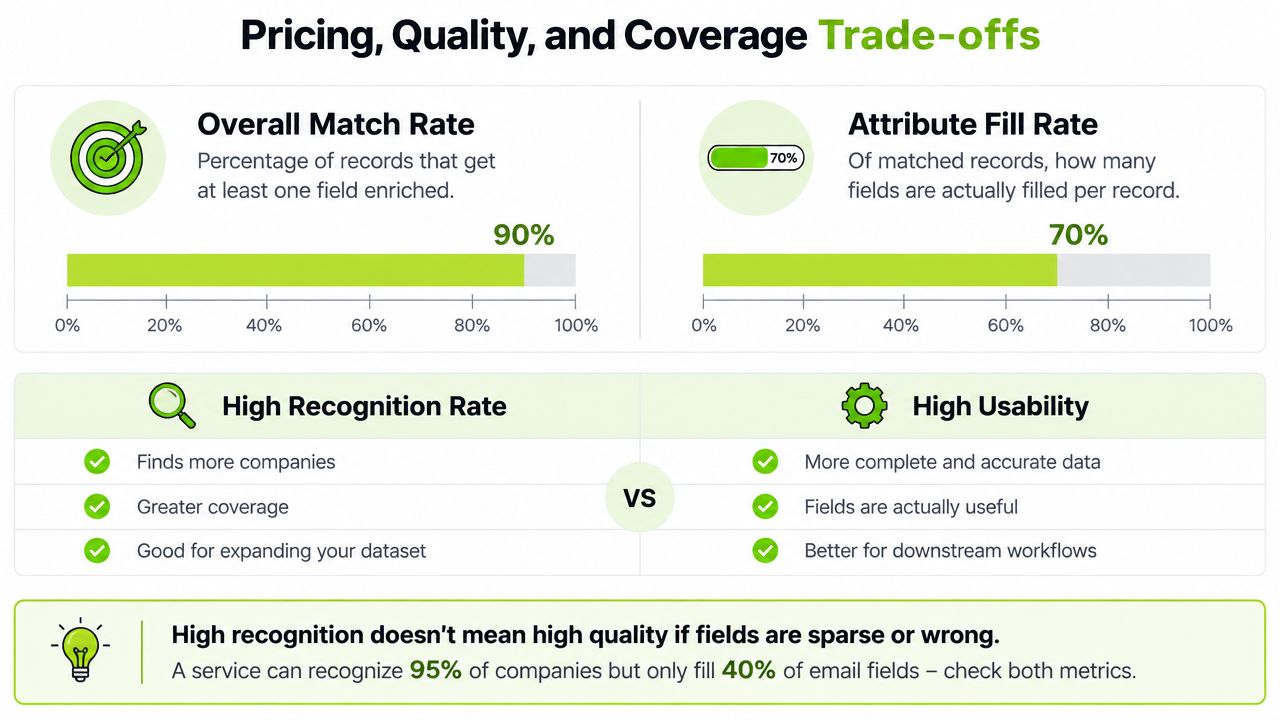
Two measures prevent a common reporting error:
- Overall match rate is the share of submitted records a provider can recognise at all.
- Attribute fill rate measures how many matched records receive a value for a particular field.
A provider might recognise a large share of company domains but return few usable phone numbers, role values, or verified email addresses. Decile's explanation of enrichment coverage makes this distinction explicit. A high recognition rate can therefore hide sparse delivery on the fields your sales or routing process depends on.
That distinction also changes how you test a provider. Don't ask only, “How many records matched?” Ask how many matched records received the exact fields required for the next action, and whether those values passed your verification rules. Teams evaluating email workflows can also use this guide to verifying email addresses when defining their acceptance criteria.
Three delivery models
API enrichment runs during an event, such as a form submission, account creation, or Clay table action. It suits workflows where the next step depends on immediate output.
Batch enrichment processes a file or selected CRM population. It works well for list construction, migrations, account research, and scheduled hygiene because the team can inspect the input and output as defined datasets.
Waterfall enrichment uses multiple providers in sequence. The workflow tries a preferred source first, then falls back to another source when the first returns no match or fails to fill a required field. Waterfall logic can improve coverage, but it introduces more provider relationships, field conflicts, cost decisions, and provenance questions.
Comparing API Batch and Waterfall Enrichment Models
The three models solve different timing and coverage problems. API enrichment prioritises latency, batch prioritises controlled volume, and waterfall prioritises record recovery when one source isn't enough.
| Criteria | API Enrichment | Batch Enrichment | Waterfall Vendor-Sourced |
|---|---|---|---|
| Coverage | Depends on one endpoint or configured provider | Depends on the selected dataset and matching process | Can improve coverage by trying multiple sources |
| Speed | Near-immediate response within a workflow | Results arrive after file processing | Slower and more variable because fallback calls may run |
| Freshness | Can query at the moment an event occurs | Reflects the processing date unless refreshed | Can improve field recovery, but still needs refresh rules |
| Control | Strong control over triggers and field updates | Strong control over input and output files | Strong control over fallback logic, with more configuration |
| Cost control | Easier to limit calls to qualifying events | Easier to scope a defined population | Requires rules for when additional calls are worthwhile |
| Operational complexity | Lower at small scale, higher when error handling grows | Moderate, especially during imports and deduplication | Highest because sources, conflicts, and compliance must be managed |
| Best Clay workflow use | Real-time lookups and conditional actions | Research tables and planned list builds | Multi-provider enrichment for hard-to-match records |
API enrichment
An API fits a lead-routing process where a new submission needs to be classified before assignment. A Clay workflow can also call an endpoint after a row meets defined criteria, then pass the returned fields into qualification or personalisation steps.
The strength is timing. The workflow can make a decision while the record is active, rather than waiting for a file export. The weakness is that a fast response doesn't guarantee useful coverage. If the endpoint recognises a company but doesn't fill the role or contact field your sequence requires, the workflow still needs a fallback or a human review path.
API works best when the value of freshness is higher than the value of exhaustive coverage.
Batch enrichment
Batch processing gives operators a stable input and a reviewable output. That makes it suitable for a CRM migration, an account universe, an old prospect list, or a research project where the team wants to compare enriched attributes before updating the source system.
The risk is treating the returned file as permanently accurate. Batch enrichment improves the dataset at a point in time, but it doesn't automatically respond to subsequent changes. Teams should preserve the original value, the enriched value, the provider, and the processing date so later refreshes don't erase the evidence needed to investigate a conflict.
Waterfall enrichment
A vendor-sourced waterfall is usually justified when the cost of an unresolved record is high or when a single provider leaves too many operational gaps. In the benchmark material, one 2026 test submitted 5,000 B2B contacts and reported 87.1% coverage with 95.7% validity for a waterfall provider. The median across 14 tools was 58.9% coverage, while the lowest tested tool reached 41.3%, according to Explorium's B2B data API benchmark.
That spread makes waterfall attractive for high-value prospecting, but it doesn't make every lookup worth cascading. Use it selectively for records that pass your qualification rules, and stop the chain once the required fields are complete.
Pricing Quality and Coverage Trade Offs Explained
Price comparisons become misleading when they count every returned record as a success. A provider can charge for a lookup that recognises an account but leaves the email, phone, or role field empty. The operational question is therefore not “What does a match cost?” but “What does a usable record cost?”
Start with two coverage measures
Overall match rate tells you how often the provider recognises a record. Attribute fill rate tells you whether the recognised records contain the fields needed for the workflow. These measures should be tracked separately by field, segment, geography, and input type.
For example, a company-domain lookup may produce a reliable account match while failing to identify a current contact. A person-level lookup may return a role but not a deliverable email. If your workflow requires both, the usable rate is constrained by the weaker field.
Before comparing plans, create a field-level scorecard:
- Required fields: Define the minimum output needed for routing, research, or outreach.
- Accepted values: Specify what counts as valid, including role recency, company alignment, and email status.
- Fallback rule: Decide whether a failed field triggers another provider, a manual check, or a discard.
- Cost boundary: Set the point at which another lookup costs more than the record is worth.
- Refresh rule: Record when the field should be tested again.
Single source versus waterfall
The benchmark comparisons cited by Explorium reported multi-source waterfall systems delivering roughly 85–97% match rates, compared with 50–65% for single-source APIs. The same source describes time-sensitive decay of about 2.1% per month when records aren't refreshed. These figures are benchmark-style results, not a universal promise for every market or provider, so they should guide testing rather than replace it.
Waterfall costs more to operate because the workflow may make multiple calls for one record. It also creates a quality-control problem: two sources may disagree, and a later provider may return a value without making its provenance obvious. You need source priority, conflict handling, and a way to audit the final value.
A single API can be the more rational choice when your inputs are consistent, your required fields are narrow, and unresolved records don't justify extra spend. Waterfall becomes more defensible when a missed match creates substantial sales or routing waste, or when your target market contains records that one source routinely fails to recognise.
The right comparison is cost per usable field set, measured on your own records. A low-cost lookup that fills little of the required output may be more expensive than a higher-priced service that produces a complete, verifiable record in one pass. For cold email campaigns, include enrichment costs in your outreach budget when using our cold email ROI calculator. Check data quality with a controlled sample.
Use Cases That Show When Each Service Fits Best
A SaaS company launching an outbound campaign often starts with a broad account list and a small set of identifiers. The team needs to identify relevant contacts, verify usable details, and add firmographic or technographic context before writing messaging. A batch workflow is useful for shaping the initial universe, while API lookups can handle individual records added later.
The same company may use a waterfall only for accounts that meet its qualification rules but remain incomplete after the first provider. That keeps the expensive path focused on records with a plausible commercial reason to exist in the workflow.
Outbound prospecting and list building
For a new list, batch enrichment usually gives the operator better control. The team can deduplicate accounts, define the target segment, enrich the selected rows, and inspect missing or conflicting fields before contacts enter an outreach workflow.
API enrichment helps when the list changes continuously. A new account discovered through research can be processed immediately, provided the workflow checks whether the record belongs to the intended market before spending credits.
Waterfall enrichment is most useful for qualified accounts where contact coverage is the bottleneck. It may recover a role or contact detail that a single source misses, but the workflow should stop once the required field set is complete.
Inbound routing and scoring
Inbound forms create a timing problem. Sales operations may need company, role, geography, or segment information before assigning ownership. An API is usually the natural fit because it can enrich the record during the routing event.
The routing logic should distinguish between known, inferred, and missing values. A company-size field returned by a provider can support a routing rule, but it shouldn't overwrite a trusted CRM value without a defined precedence policy. If the API fails, route the record to a review queue rather than allowing the workflow to create an unowned lead.
Account research and ICP definition
Account research benefits from batch processing because analysts can compare many records against the same criteria. Public company information, technology usage, employer vacancies, and relevant social activity may help identify accounts worth investigating, but none of those signals establishes intent on its own.
A Clay table can combine enrichment with website review, qualification rules, and human approval. The output shouldn't be treated as a final truth about the account. It should be a structured research layer that helps a GTM team decide which records deserve further investigation.
CRM hygiene at scale
CRM hygiene starts with deduplication and field governance, not with indiscriminate enrichment. If duplicate people or accounts remain, the team may spend credits enriching several obsolete versions of the same entity and then create conflicting updates.
For a large clean-up, batch processing offers a clear boundary. For records that change frequently, API or scheduled refresh workflows can handle updates after the initial repair. Waterfall should remain a targeted escalation path, not the default for every CRM row.
Integration Implementation and Keeping Data Fresh
A reliable enrichment workflow begins with the destination fields, not the provider catalogue. Decide which CRM fields the workflow may write, which fields it may only suggest, and which existing values must never be overwritten automatically.
Build the workflow around controlled inputs
Use a stable identifier whenever possible, then define the matching fallback for incomplete records. Before enrichment, deduplicate contacts and accounts, normalise domains, and exclude records that aren't eligible for processing. Store the original value alongside the enriched value where auditability matters.
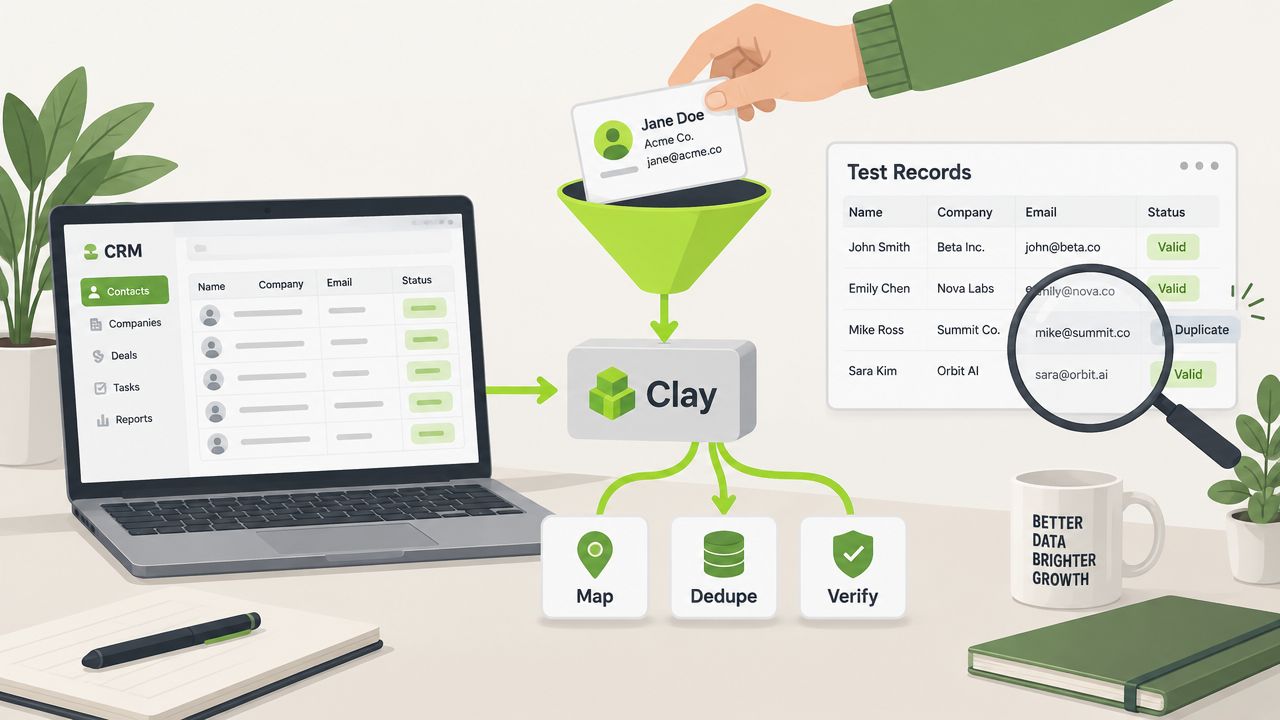
A practical Clay workflow can follow this sequence:
- Select eligible rows: Filter by account status, segment, ownership, or campaign purpose.
- Run the primary lookup: Query the first provider only after the row passes the qualification rule.
- Check required fields: Test the returned values against your acceptance criteria.
- Trigger fallback logic: Send only incomplete records to the next provider.
- Verify before writing: Check email status, entity alignment, and conflicts with trusted CRM data.
- Update and log: Write approved values and preserve source, timestamp, and decision status.
The integration should also include failure paths. A provider timeout, ambiguous match, or missing field shouldn't produce a blank overwrite. It should create a review state or retain the previous trusted value.
Teams designing broader CRM workflows can use this guide to CRM workflow automation for the surrounding handoffs, triggers, and ownership rules.
Refresh and governance
Refresh cadence should follow how quickly a field changes and how costly an incorrect value becomes. Contact roles and work details need more attention than stable descriptive fields. The benchmark material cited by Explorium reports roughly 2.1% monthly decay when records aren't refreshed, reinforcing the need to treat freshness as an operational variable rather than a one-time result.
Waterfall workflows require additional governance. Check each provider's source provenance, permitted use, retention terms, and approach to privacy. GDPR obligations and vendor terms relating to AI training should be reviewed before multiple sources are connected to a production CRM or outbound system.
Choosing the Right Data Enrichment Service for Your Team
Choose the service model from the workflow backwards.
A small team with consistent inputs and a narrow field requirement may need one API, especially when live routing or event-based processing matters. A team cleaning a defined CRM population or building an account universe will usually benefit from batch processing because it can control the input, review the output, and schedule the work.
Invest in waterfall logic when single-source testing leaves too many qualified records incomplete and the commercial value of recovery outweighs the extra provider cost and governance burden. Don't deploy it everywhere by default. Use qualification gates, field-level stopping rules, and a clear record of which source supplied each value.
A mature RevOps function can build these workflows internally. A team without the time, data engineering capacity, or confidence to maintain them may be better served by a managed system build or an outsourced GTM programme. The key test is operational ownership. If nobody owns deduplication, verification, refreshes, and exception handling, the workflow will eventually become another source of stale data.
H2 combines commercial research, data engineering, Clay and AI workflows, contact verification, and campaign operations through its GTM services. Its work can include managed outbound, custom GTM system builds, or private workshops, depending on whether the immediate constraint is pipeline capacity, workflow design, or team capability.
Start with a representative sample of real CRM records. Measure match rate, attribute fill rate, validity, cost per usable record, processing time, and the effort required to review exceptions. Then choose the smallest service model that meets the workflow's needs and schedule the refresh before the first clean dataset begins to age.
H2 can help you design and operate data enrichment workflows that connect research, Clay automation, CRM routing, contact verification, and outbound execution. Visit H2 to explore the available GTM services and book a 15-minute introductory call about your audience, data quality, and current growth constraint.
