Nearly half of sales professionals struggle most with the work that happens before a single email is written. In 2025, 49% identified account research as the most difficult part of email prospecting, even though 45% of sales teams already used AI to assist with that research, according to Outreach's 2025 survey of 500 sales professionals.
Most outbound problems start right there. Teams treat list building as a quick database download, push thousands of unverified contacts into a sequence, and then wonder why replies dry up and sender reputation sinks.
Learning how to build a prospect list properly means changing what the list is. Instead of a static spreadsheet judged by row count, treat it as a dated, sourced, compliance-checked asset that decays over time. Every record should carry the evidence behind its fit, its verification status, its legal classification, and the date it next needs a refresh.
Six Stages That Turn Research Into a Prospect List
A prospect list is a set of accounts and buyer roles that match your ideal customer profile, each backed by observable evidence and fields your team can check. It isn't a raw export from a contact database, and it isn't finished once the CSV lands in your CRM.
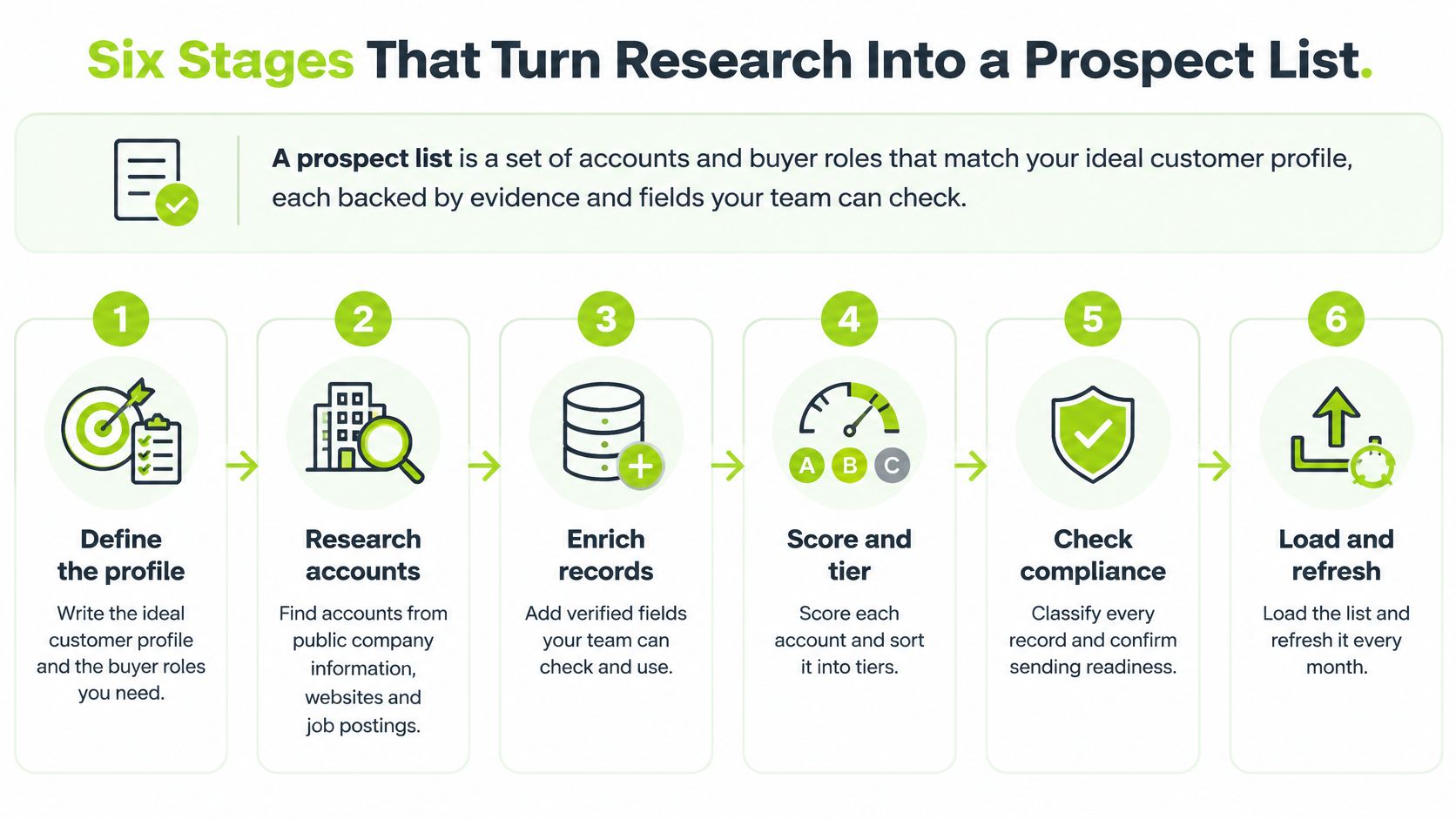
A dependable workflow runs through six stages in strict order. Each stage produces a concrete output and has a clear finish line before the next stage begins.
| Stage | What you produce | Done when |
|---|---|---|
| Define the ICP and buyer roles | Written criteria, disqualifiers and a buyer-role map | The team agrees the criteria and exclusions |
| Identify and score accounts | Shortlist of accounts with evidence and a tier | Each account has a fit criterion and a context signal |
| Enrich required fields only | Records holding the fields needed to qualify | Field-level accuracy is sampled and recorded |
| Verify contacts and compliance | Contacts marked verified, needs review or do not contact | Email validity, consent status and suppression are checked |
| Check sending readiness | Authenticated sending domains and a working suppression flow | Authentication passes before any large load |
| Load, refresh and measure | CRM-ready records with source, date and confidence | A refresh schedule and metrics are agreed |
Why the Sequence Cannot Be Reversed
Skipping ahead creates hidden operational debt. When a team exports contacts before writing exclusions or checking field accuracy, errors spread straight into copywriting, CRM routing, territory assignment, and pipeline reporting. Sales reps end up emailing disqualified companies, while RevOps spends weeks untangling duplicates.
Operational rule: Treat list construction as a recurring pipeline with gates between stages, not a one-off spreadsheet export before a campaign launch.
Start small to get moving today. Pick one target market, write its qualification criteria and exclusions on a single page, and only open a data tool like Clay, Cognism, or Apollo once your team signs off on that page.
Defining Your Ideal Customer Profile and Buyer Roles
Database searches fail when the team hasn't agreed what a good account looks like. Poor underlying data already drags down revenue operations: 24% of CRM administrators believed less than half of their organisation's data was accurate and complete, while 40% said their companies struggled with CRM data-quality problems, according to Validity's 2024 State of CRM Data Management findings reported by EverReady's CRM data quality statistics. Among teams reporting problems, the biggest gaps were incomplete data (68%), missing data (65%), incorrect data (61%), duplicate records (53%), and expired data (49%).
Collecting more rows won't fix those gaps. A smaller list governed by explainable qualification rules gives sales teams a far stronger base for segmentation and relevant outreach. Think of each record as a dated asset with evidence attached: because the inputs decay, the qualification logic needs to be visible so a bad record can be traced back to the rule that let it in.
Observable Criteria and Disqualifiers
Write your ideal customer profile (ICP) around facts an analyst or workflow can verify from outside the company. If your team is still untangling company attributes from individual job titles, review how an ideal customer profile differs from a buyer persona before drafting filters.
Ground your written rules in five observable company criteria alongside explicit exclusions:
- Geography and legal jurisdiction: Define the exact countries or regions you can sell into, support, and invoice cleanly.
- Employee range and revenue model: Set specific headcount bands (such as 50 to 200 staff) and specify whether you serve subscription software, agencies, logistics operators, or manufacturers.
- Technology environment: Note the tools a buyer must already run, such as HubSpot, Salesforce, NetSuite, or AWS, when integration drives value.
- Hiring activity and service fit: Identify open vacancies or operational patterns that point to a live capacity gap your product or service can solve.
- Hard disqualifiers: List competitors, existing customers under contract, regulated niches you can't serve, and business models that historically churn.
Each of these criteria should be checkable against a source you can point to: a careers page, a registry filing, a technology-detection scan. If nobody can say where a criterion gets verified, it doesn't belong in the written rules yet.
Commercial evidence sharpens those criteria faster than guesswork. During onboarding and investigation, H2 reviews a client's sales calls, support conversations, past campaigns, customer stories, and failed attempts to uncover real audiences, buyer language, and practical buying triggers. Your own team can run the exact same audit across recorded calls and closed-lost CRM notes before locking the ICP. Pay attention to the words buyers use for their problem, since those phrases will later shape messaging as well as targeting.
Required Fields and a Worked Example
Once the criteria are written, define the required fields every record must hold before it's accepted. At a minimum, include company fit, geography, employee range, technology environment, relevant buyer role, verified work email, and a plain-text evidence field explaining why the account qualifies. Add the date the evidence was captured. A job posting that proved fit in January may be filled by March, and without a capture date nobody knows when the record stopped being true. Map the distinct roles inside each account as well: operational user, technical evaluator, economic buyer, executive sponsor, procurement contact, and potential blocker.
Hypothetical example: A UK payroll software vendor writes a one-page ICP targeting UK logistics firms with 50 to 200 employees that currently list a live payroll administrator vacancy on their careers page. Its disqualifiers rule out construction firms with no dedicated internal payroll team and any business already using an enterprise ERP payroll suite under a multi-year contract. Every record added to the sheet must link directly to the job posting URL and Companies House employee band as its qualification evidence, each stamped with the date it was checked.
That last requirement does the heavy lifting. When a rep questions a record three months later, they open the evidence link rather than re-researching the account from scratch, and stale entries get flagged for refresh instead of polluting the campaign.
Finish this stage by putting your ICP, buyer-role map, and disqualifiers on one shared page and getting sign-off from sales and RevOps before any prospecting tool is opened.
Finding, Enriching and Scoring Accounts in Tiers
Exporting contacts in bulk looks fast until you inspect the fields. Reported B2B data accuracy varies sharply across the market: high-quality data is cited at 97% or more, whereas average provider accuracy sits near 50%, according to Pintel's B2B data quality statistics. Trusting a vendor's headline accuracy figure without testing it on your own segment guarantees wasted enrichment spend.
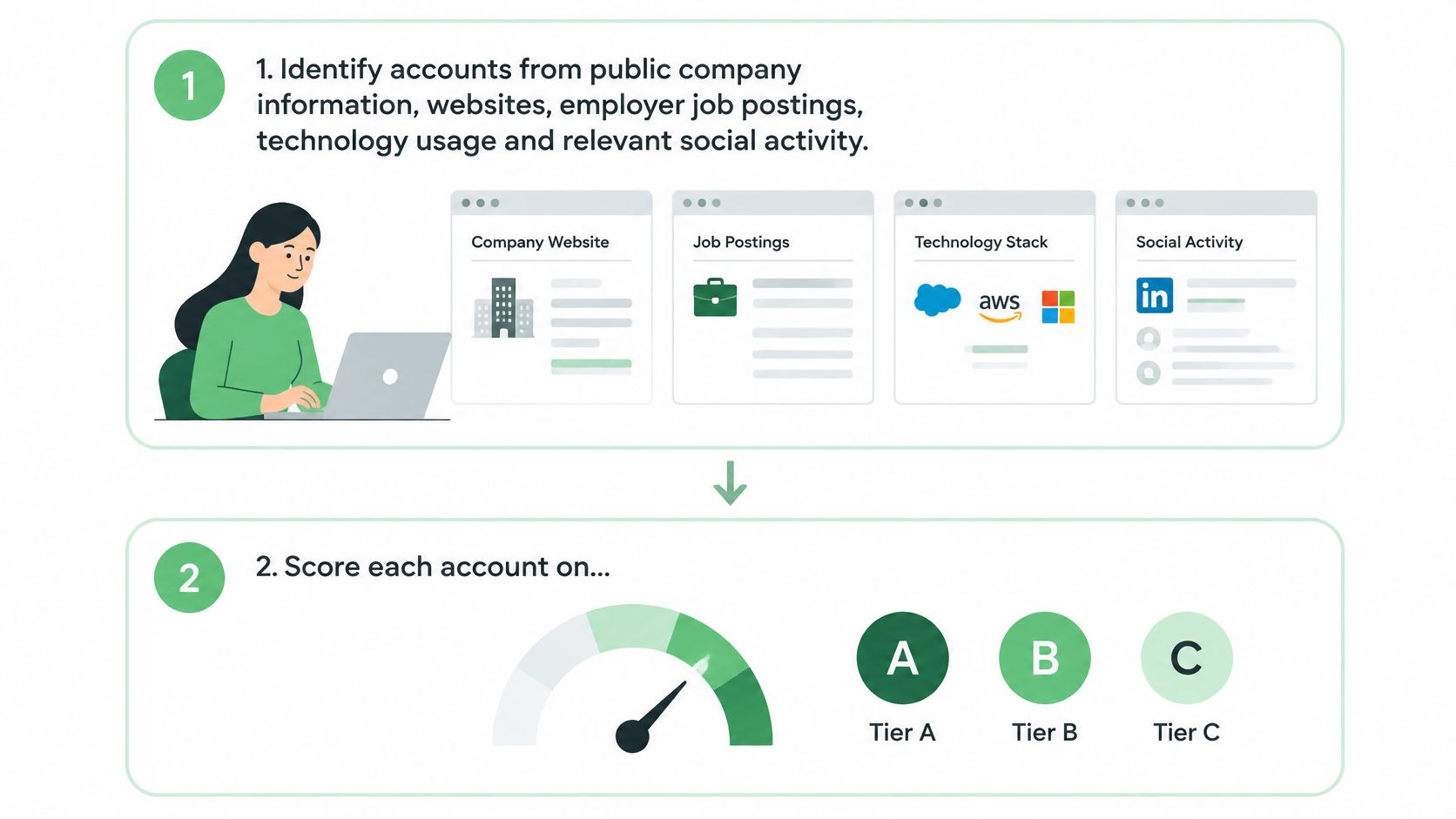
The Five-Step Research Pipeline
Run account building as a controlled pipeline with a quality check at each step rather than one giant import:
- Identify candidate accounts from public signals. Pull companies from public registries like Companies House, company websites, employer job boards, technology-detection tools, and relevant social activity. Start with organisations that match your core firmographics.
- Score fit before paying to enrich. Drop obvious disqualifiers right away so you don't burn enrichment credits on companies you'll never contact.
- Enrich only the fields needed to qualify. Whether you use waterfall workflows in Clay or a CRM-connected provider, keep your schema tight. A clear plan for company data enrichment prevents bloated tables filled with unused columns.
- Verify contactability and deduplicate against the CRM. Match domains and emails against HubSpot, Salesforce, or Pipedrive to remove current customers, active opportunities, and existing suppressions.
- Record the evidence, source, and timestamp. Log exactly where each data point came from, when it was checked, and a confidence score so anyone can audit or refresh it later.
Sample records manually after every enrichment stage. Measure field-level accuracy and match rates by market, role, and data provider instead of relying on platform-wide averages. Assign every record an explicit status of "verified", "needs review", or "do not contact".
A vacancy, technology install, or social comment is a prioritisation signal, not proof of buying intent. Require at least one firmographic fit criterion plus one relevant business-context signal before promoting an account into outreach.
Prioritising Accounts With Tiers and Multi-Factor Scores
Not every qualifying account deserves the same research budget. Split your shortlist into three tiers and store separate scores for firmographic fit, problem likelihood, timing signal, role authority, data confidence, and exclusion risk. Set explicit inclusion thresholds upfront and route any low-confidence record to human review. Seeing how structured scoring models weigh separate commercial signals in practice, such as how Internal Systems scores acquirers, helps RevOps teams design transparent rules rather than relying on an opaque single number.
| Tier | Who belongs | Research depth | Review before outreach |
|---|---|---|---|
| Tier 1 | Small set with strong ICP fit and specific, recent evidence | Manual check of the company situation, likely buying group and contact role | Human review before any contact |
| Tier 2 | Accounts that match the ICP with standard signals | Repeatable enrichment with fewer manual steps | Sample review after each batch |
| Tier 3 | Test population for messages and scoring rules | Minimal enrichment, tracked as a test | Results compared against conversion by tier |
This tiered split protects your team's time. Analysts spend manual verification hours on high-value Tier 1 accounts, while Tier 2 scales cleanly through repeatable enrichment and Tier 3 tests new segments before you commit heavy budget.
Mapping the Buying Group and Verifying Contacts
A list of individual contacts is a list of single points of failure. Summarising Gartner's 2025 buyer research based on a survey of 632 buyers, Elevate GTM Solutions' buying-group evidence notes that buying groups can contain 5 to 16 people across as many as four functions. Separate summaries of Forrester research on the same page report that 89% of B2B purchases involve two or more departments, with an average of 13 internal stakeholders.
The buying group works like a relay team rather than a solo runner. When one contact leaves the company or ignores cold outreach, a single-threaded list stalls completely, because the baton has nowhere to go. Mapping several roles inside the account builds resilience and prepares reps for the questions other departments will raise once a conversation begins.
Cross-functional priorities differ sharply:
- Technical evaluators usually scrutinise implementation risk, security posture, and integration effort.
- Finance leaders and economic buyers focus on total cost, payback period, and budget trade-offs.
- Procurement contacts examine compliance terms, vendor risk, and contract flexibility.
- Operational users care about daily friction, adoption speed, and workflow disruption.
A common confusion here: mapping the buying group does not mean blasting every person at the company on day one. Select your initial contact based on the strongest mix of relevance, authority, and observable context, rather than whoever surfaced first in a search tool. Keep the rest of the buying group documented in the CRM so routing and multi-threading stay intentional once the account engages.
Scoring Switchability Inside the Buying Group
Buyers rarely start from a blank slate when an outbound email arrives. Global buyer findings in Responsive's 2025 B2B Buyer Decisions Report show that 90% of B2B buyers research before speaking with a vendor, 61% start with a preferred vendor, and nearly half remain open to switching.
That last figure is the useful one. Instead of chasing vague "intent" labels, score switchability by looking for observable friction: dissatisfaction with an incumbent tool, a newly announced operational initiative, a recent leadership hire, integration pressure after an acquisition, or a clear gap between a company's current stack and its growth plans. For every mapped person, log their role, link to the problem, the exact piece of evidence, the date it was observed, a confidence level, and the next research question to confirm during outreach.
The date matters more than it first appears. Evidence ages. A leadership hire observed eight months ago may already have settled into a decision, so each record should carry a refresh date that tells you when to re-check it, not just a snapshot of when you found it.
Verifying Contacts Immediately Before Launch
Even well-researched buying groups fail if emails bounce. Uncleaned lists can hit 8% to 15% hard-bounce rates after a year, according to Pintel's data decay benchmarks. A verification result has a shelf life of its own: an address confirmed in January can be dead by April if the person changed roles or employers. Run real-time email verification immediately before campaign launch rather than trusting a check performed weeks earlier, and suppress duplicates and prior opt-outs in the same pass. BatchData's email verification and deliverability guide is one reference teams use when setting up these pre-send checks.
Once verification finishes, update every contact's status field to "verified", "needs review", or "do not contact", and drop any record you cannot justify keeping. That status field, paired with the evidence date and refresh date, is what turns a spreadsheet of names into a maintained asset. A list of 200 verified, dated, role-mapped contacts will outperform a list of 2,000 unverified ones, because every send either reaches a real person in the buying group or teaches you which record needs attention next.
UK Compliance and Sending Readiness Before Launch
Every record on a UK B2B prospect list must be classified legally before a single message goes out. Treating all work email addresses as legally identical is one of the fastest ways to breach marketing rules.
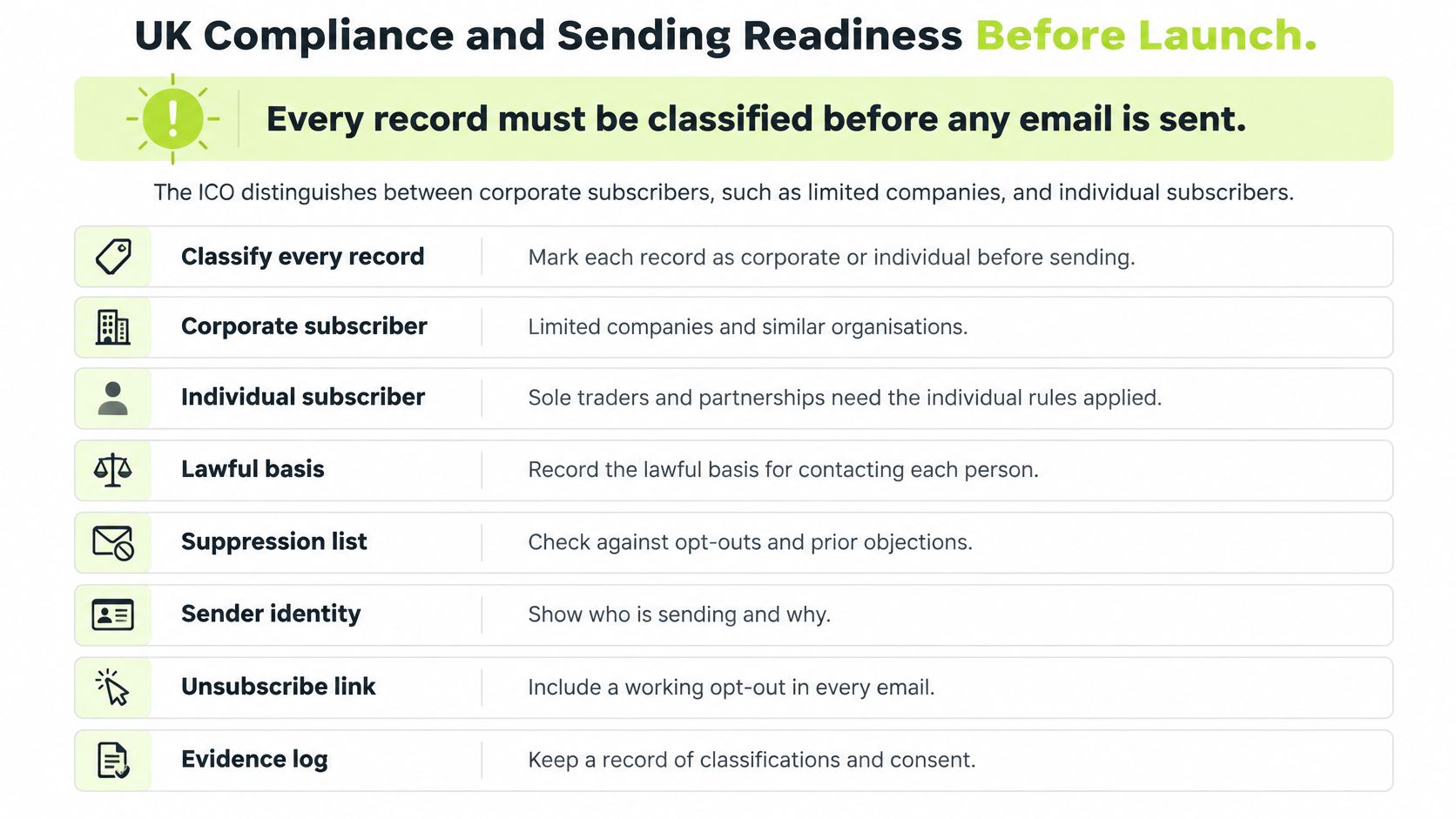
Classifying UK Recipients Under PECR and Data Protection
Under the ICO's UK B2B direct marketing guidance, organisations must separate corporate subscribers (such as limited companies) from individual subscribers (including sole traders and some partnerships). Under PECR, marketing emails to corporate subscribers don't require prior consent, whereas email marketing to sole traders and similar individual subscribers generally requires consent or a valid soft opt-in.
Even when PECR allows corporate email outreach, UK data-protection law still applies whenever you process a named person's work email, phone number, or personal details. You must never conceal your identity, and every email must include a valid way to opt out.
| Recipient type | PECR email rule | Record field to add |
|---|---|---|
| Corporate subscriber, such as a limited company | No PECR consent requirement for email marketing | Business type set to corporate |
| Individual subscriber, such as a sole trader | Consent or a valid soft opt-in generally required | Business type set to individual |
| Some partnerships | Treated as individual subscribers; consent or soft opt-in generally required | Partnership status checked, not assumed |
| Named work email | UK data-protection law still applies | Lawful basis and source recorded |
| Generic inbox, such as sales@company.co.uk | May be treated differently; classification must be checked | Address type and classification checked |
A single "permission" checkbox in your CRM isn't enough. Following the ICO's lawful-basis guidance, store separate fields for legal entity type, whether the address identifies an individual, the applicable PECR condition, the data-protection lawful basis (consent or legitimate interests), the data source, suppression status, and the date of that decision. Score commercial fit separately from compliance readiness: an account can be a perfect ICP match and still stay excluded until its legal status and contact fields are resolved.
Sending Readiness and Pre-Launch Checks
A clean, compliant list still fails if your sending infrastructure isn't configured properly. Under Google's email sender guidelines, all senders emailing Gmail accounts must use SPF or DKIM authentication. Bulk senders sending more than 5,000 messages per day to Gmail accounts must implement SPF, DKIM, and DMARC, align the From domain with SPF or DKIM, maintain valid forward and reverse DNS records, use TLS encryption, and offer one-click unsubscribe for marketing messages.
Google also enforces a 0.3% spam-rate threshold for bulk-sender support and requires teams to honour unsubscribe requests within 48 hours. Run through this sending-readiness checklist before loading any large prospect list, and pair it with these practical tips for cold emails when drafting your first sequences:
- Validate authentication early: Confirm domain authentication and TLS encryption pass before importing campaign records into your sending tool.
- Separate operational and campaign records: Keep transactional and day-to-day company email isolated from outbound prospecting domains and workflows.
- Automate suppression syncing: Connect global opt-out and bounce lists directly to your sending platform and CRM so suppressed contacts never re-enter a sequence.
- Confirm grey areas properly: Where legal entity status, partnership rules, or international privacy laws are unclear, take advice from a qualified adviser before sending.
Keeping the List Accurate and Measuring Quality
A prospect list begins losing accuracy the day you assemble it. Contacts change roles, companies merge, domains retire, and buying triggers expire. Prospecting-data research from 42 Agency estimates that B2B contact data decays by roughly 22.5% annually in SaaS, or about 2% per month.
Hypothetical calculation: On a list of 2,000 contacts decaying at roughly 2% per month, around 230 records would go stale within six months. Planning your enrichment and verification budget around that expected attrition prevents sudden bounce spikes halfway through the year.
Refresh Schedules and Stop Rules
Don't re-verify every column on the same calendar. Assign a confidence date to each key field and run different refresh cadences based on how fast the data changes:
- Email validity: Recheck immediately before any outreach wave launches.
- Job title and employment: Revalidate on a recurring monthly or quarterly cycle, especially for Tier 1 and Tier 2 accounts.
- Firmographic fit: Review headcount, funding, and ownership structure on a set semi-annual cycle.
- Buying-signal evidence: Confirm triggers before every new campaign wave so reps never reference a vacancy filled four months ago.
Strong operators also define stop rules that dictate when to exclude a record rather than keep spending credits trying to fix it. Drop any record with conflicting source data that can't be resolved, an unverifiable identity, a generic catch-all inbox you can't classify cleanly, unclear consent status, or insufficient evidence of commercial fit.
Record count is the wrong headline metric for outbound. A smaller list with documented provenance, strict stop rules, and scheduled revalidation creates far more reliable pipeline than a massive database full of unverified rows.
Metrics That Replace Record Count
Judge your list-building pipeline by commercial output and operational hygiene, not database size. Track usable records, bounce or invalid-contact rate, duplicate rate, enrichment cost per accepted record, qualified conversations, meetings booked, and opportunities created.
Compare conversion rates across Tier 1, Tier 2, and Tier 3, as well as across different buying signals. When a specific trigger produces replies that never convert to pipeline, tighten your scoring threshold or replace that signal. During launch and scale, H2 builds precise lists alongside mobile-first messages, runs controlled campaigns, and uses every reply, objection, and booked meeting to refine targeting and messaging in the next iteration. Applying that same closed feedback loop inside your own RevOps process turns list building into a compounding system.
Choose Your Build Path Before You Load Any Data
Before you import a single spreadsheet or connect an enrichment workflow, decide who will own the system month after month. Running this process well takes sustained operational discipline, not just a burst of enthusiasm in week one.
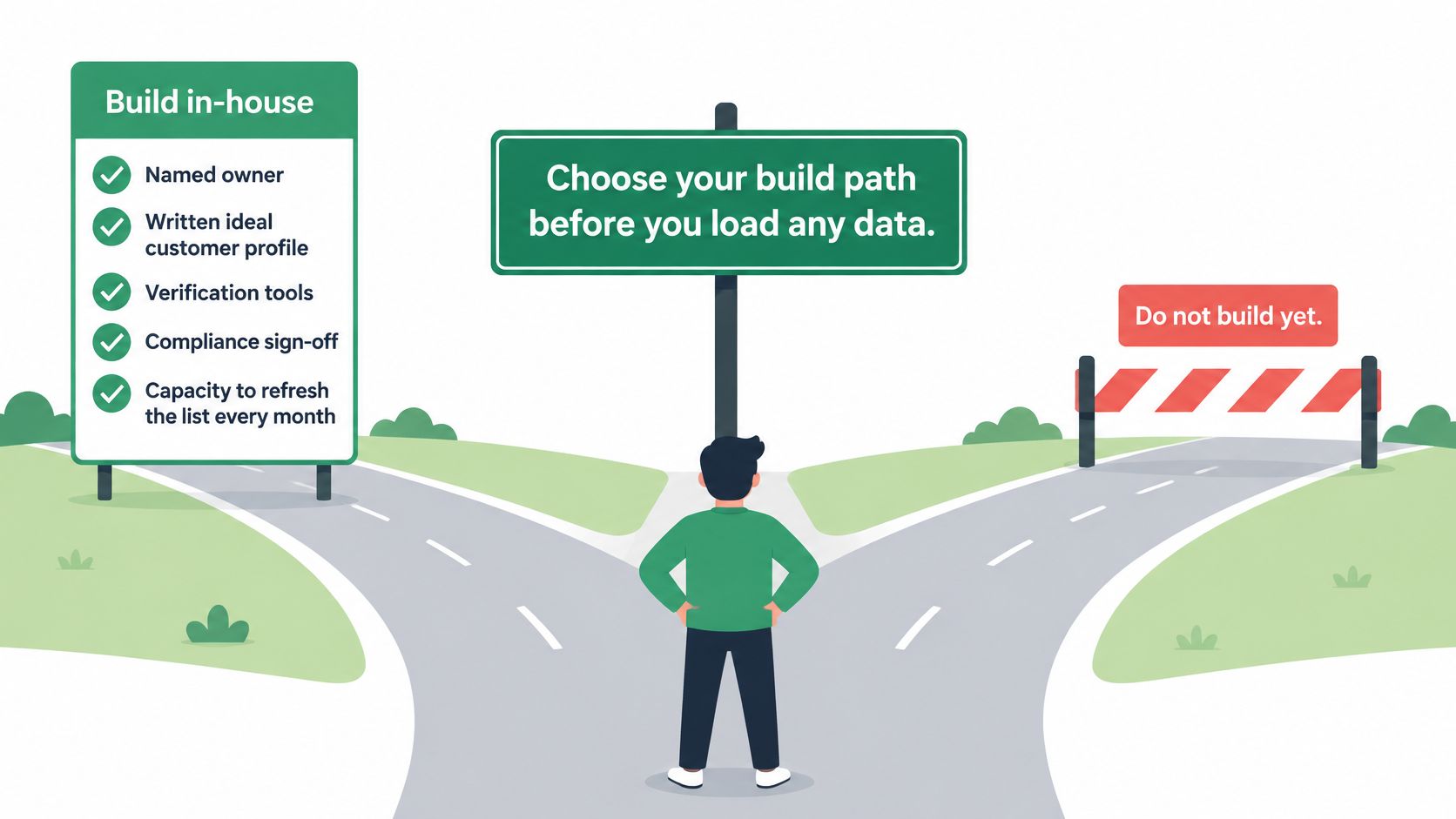
Build in-house when you have five things already in place: a named operational owner, a written ideal customer profile, paid verification and enrichment tools, formal compliance sign-off, and protected monthly capacity to refresh decaying records. Your owner also needs the domain familiarity to monitor specialist sources where real hiring and context signals appear, whether that's engineering communities or niche sector resources such as WaterJobsIntel.com's job search guide for water engineers when tracking technical hiring in infrastructure markets.
Outsource when you have a proven offer, sales capacity ready to take more qualified conversations, and a clear need for pipeline, without the internal time or appetite to build and maintain an outbound function yourself.
If outsourcing or specialist help fits your stage, H2 supports three clear routes depending on where your team is stuck:
- Fully managed outbound: Built for ongoing pipeline generation where H2 researches the market, builds the sending and data infrastructure, writes and tests campaigns, and logs conversations and next steps directly in your CRM.
- Custom GTM system builds: Designed to fix one specific manual bottleneck, such as account discovery, enrichment, tiered scoring, or CRM routing, with full documentation and handover.
- Private GTM workshops: Focused training built around your own market, tools, and live commercial questions when your team wants to build and operate the workflow internally.
To explore which path makes sense, book a 15-minute introductory call and explain where growth is currently stuck. H2 offers a free GTM strategy and shows you the exact audience, infrastructure, and campaign it would build before you commit. You can review current engagement options on H2's pricing page. Whatever route you choose, confirm the build path and assign a single accountable owner before loading any data into your CRM.
H2 helps B2B founders, sales leaders, and RevOps teams turn messy market research into compliant, verified prospect lists and repeatable outbound systems through fully managed outbound, custom GTM system builds, and private GTM workshops. Whether you want an experienced partner to run campaigns end to end or need a cleaner enrichment and scoring pipeline built for your own team, visit H2 to book a 15-minute intro call and request a free GTM strategy.
