A survey of CRM users and stakeholders across the US, UK and Australia, reported by Aiola, found that 76% said less than half of their organisation's CRM data was accurate and complete, and 37% traced revenue loss directly to that gap. Most sales teams don't have a data volume problem. They have a data correctness problem, and adding another dozen fields to a record that's already wrong doesn't solve it.
This guide treats data enrichment for sales as a measurable quality process rather than a list-expansion exercise. It covers what enrichment adds, which fields earn their place, how a pipeline runs, how to test accuracy before a record reaches a sequence, and where the line sits between a signal worth investigating and proof that someone wants to buy.
What Sales Data Enrichment Means
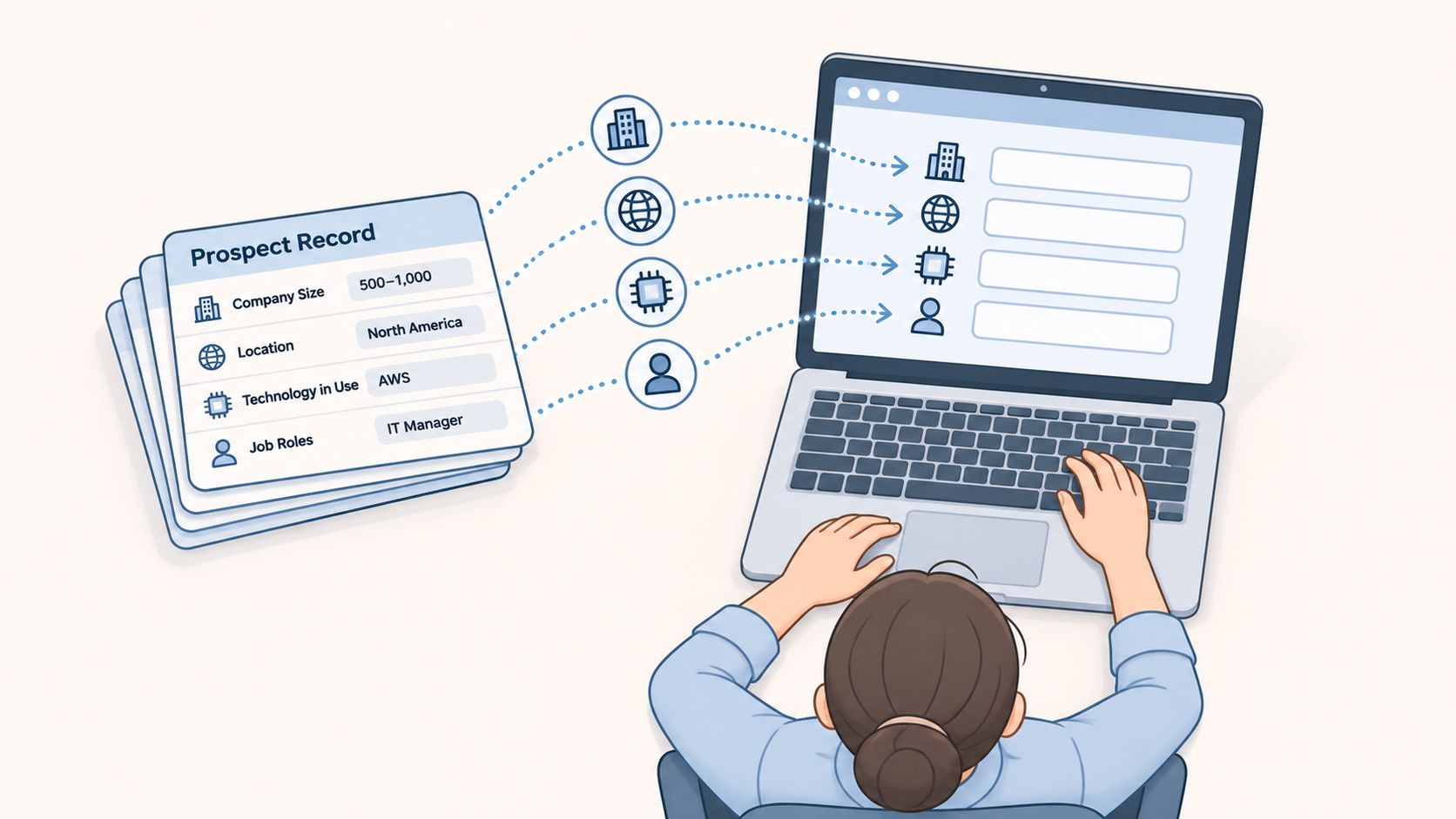
Sales data enrichment is the process of adding missing or updated information to records a team already holds, so a person can make a decision about them. A CRM entry with a name and a company is a business card with no address, no job title and no clue whether that person buys software or sells it. Enrichment fills in the details that show whether a call is worth making: company size, sector, location, technology in use, job roles and a contact channel that works.
That work usually happens in a tool or a spreadsheet before anything reaches a seller, as the image below suggests.
Where enriched data comes from
Four source types feed a programme, and many teams need at least two of them.
- First-party history. Past deals, replies, support tickets and product usage already sit in your systems and are the most reliable signal of what a company is.
- Public company information. Registry filings, careers pages, press releases and annual reports confirm identity, size and ownership.
- Website and technology analysis. What a company publishes about its products, plus the software it visibly runs, tells you whether your offer fits its environment.
- Third-party providers. Licensed firmographic and contact databases fill gaps at scale, priced by record, credit or subscription.
Say a list of 1,000 company names arrives with nothing but a name and a country. Enrichment narrows it: sector, employee range and location filters remove the companies that were never a fit, and in a run like this roughly 240 records survive as genuine matches for the target market. The output that matters isn't 1,000 fuller records. It's 240 records worth working.
Why trust breaks down
Salesforce's sixth State of Sales study, run between 8 March and 18 April 2024 with 5,500 sales professionals across North America, Latin America, Asia-Pacific and Europe, found that only 35% completely trusted the accuracy of their organisation's data (Salesforce). Among those who didn't, 38% blamed incomplete information, 37% blamed records stored in multiple formats and 37% said records weren't updated regularly. Poor data quality also hindered accurate forecasting for 39% of respondents.
When to enrich and when to stop
Enrich when a named decision is blocked by a missing or stale field: a market filter, a territory, a persona match, a channel choice or a fit score. Run enrichment before a new outbound segment, before a CRM import, and on a schedule for records already sitting in sequences.
Stop when a field has no owner. Don't add a field that no rule, route or report uses. Don't send a record with no stable company domain, an unverified email or nowhere to store its source, check date and opt-out status. Pause a segment when two monthly samples miss the error threshold the team agreed in advance.
If the live question is which supplier to buy from, comparing leading data enrichment platforms is a sensible way to weigh coverage and price. Coverage is the easier question. The harder one is whether a record can be defended when a buyer asks why they received your email.
Which Fields Enrichment Adds and What Each One Is For
Almost every enrichment build starts from the same field set. What separates a useful one from an expensive one is whether anyone has named the decision each field supports.
| Field | Example value | Used for | Main risk |
|---|---|---|---|
| Company domain | acme-example.com | Matching the account to one record | Two companies merged under one domain |
| Employee range | 51 to 200 staff | Segmenting by company size | Out of date after hiring or layoffs |
| Industry and sub-sector | Developer tools | Market filters and messaging | Broad labels hide the real business model |
| Headquarters region | London, UK | Territory routing and time zones | Head office may differ from the buying team |
| Job title and function | Head of Sales | Persona matching | Titles vary widely between companies |
| Technology in use | Salesforce | Technical fit and integration angle | Detected usage may be out of date |
| Verified work email | Address confirmed at the company domain | Email outreach channel | Bounces and spam complaints if unverified |
| Connectable phone number | Confirmed direct line | Call channel | Numbers change and need rechecking |
Name the decision before the field
A field earns its place when a rule, a route or a report uses it. Employee range drives size segmentation. Industry and region drive market filters and territory routing. Job title and function drive persona matching. A verified email or a connectable phone number drives the channel choice.
A common pattern looks like this. A RevOps team adds twelve fields to a prospect list and then routes records using only four of them: domain, size band, region and email status. The other eight still need refreshing, still get questioned in a review and still take up space on a seller's screen. They cost money and change nothing.
The domain is the identity key
The company domain holds the other fields together. It's the value that tells the system two records describe one business, so matching, deduplication and CRM routing all depend on it being clean and present.
Without a domain, matching falls back on company names, and names are messy. "Acme Ltd", "ACME" and "Acme Group Holdings" can resolve to one business or three, and the system has no way to tell which is correct. That's why a missing or conflicting domain is treated as a blocking error rather than a minor gap.
None of the fields in the table proves purchase intent. Size, sector and technology describe what a company is, not what it's about to do. That distinction matters enough to handle separately, and it's the difference between scoring fit and scoring timing.
Before adding anything to the schema, write down the decision the field supports and the rule that reads it. If you can't name both, leave the field out. A shorter record set that sales trusts beats a rich one nobody opens.
How an Enrichment Pipeline Works Step by Step
Skipping steps is tempting when a campaign is due. Adobe's B2B marketing research found that 75% of organisations identified data integration and quality as their biggest challenge in implementing agentic AI (Adobe), which is a fair description of what happens when automation arrives before the data underneath it is sound. The sequence below exists to stop that.
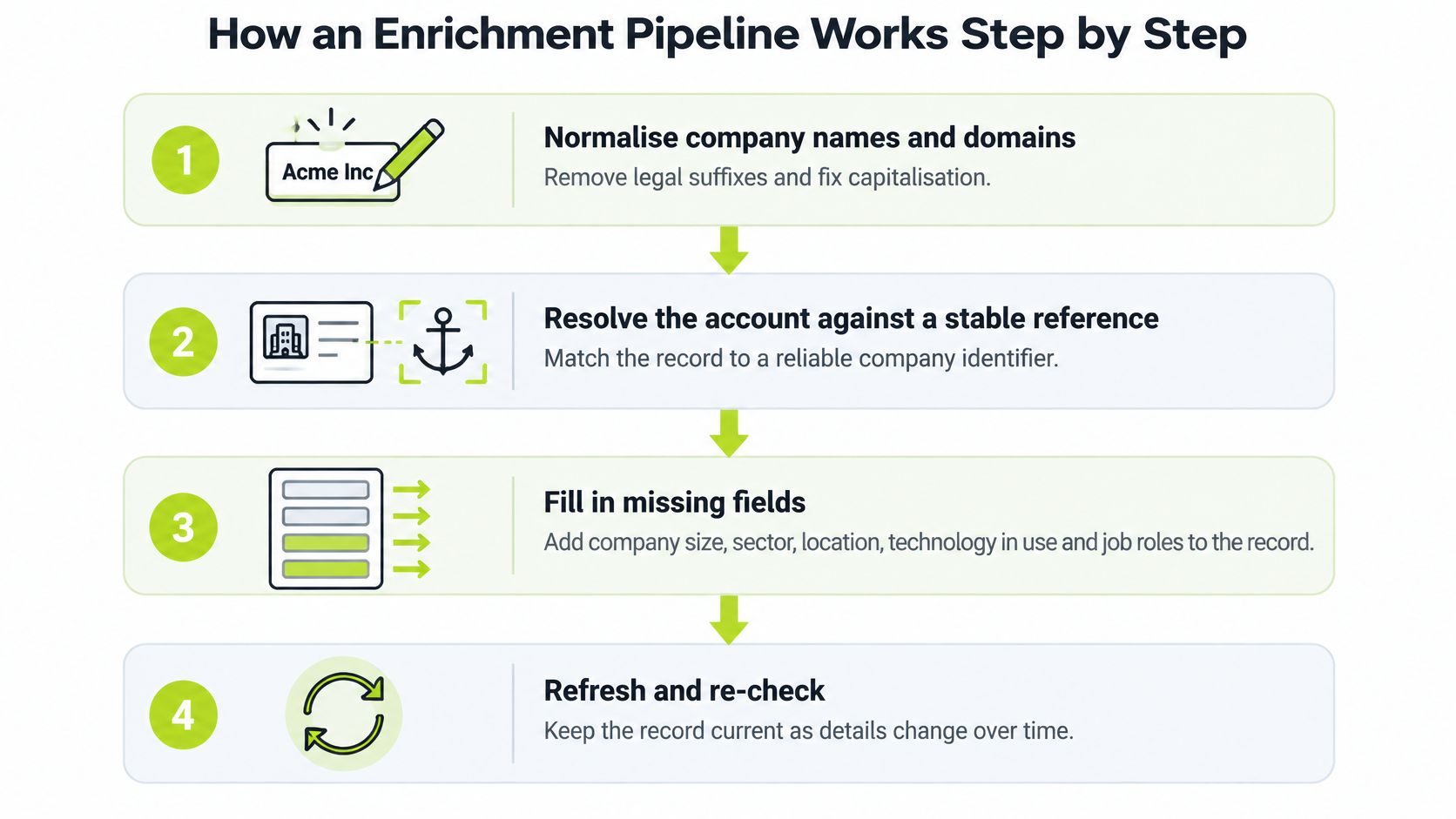
- Normalise names and domains. Strip legal suffixes such as Ltd, GmbH and Inc, lowercase the domain and fix capitalisation. Two records for "Acme Ltd" and "ACME" then collapse into one match instead of two failed lookups.
- Resolve the account against a stable identifier. Match on the company domain or a registry number. Everything appended afterwards inherits that identity, so a duplicate can't collect a competitor's employee count.
- Append attributes and record provenance. Pull from first-party history, public sources and providers, and stamp each field with its source and collection date. A field with no date can't be judged fresh or stale later.
- Validate the mandatory fields. The domain has to exist, the identity can't conflict and the email has to be verified before sending. This is the step teams drop when the launch date moves, and it's the step that produces the bounces.
- Score fit and timing as two separate values. Fit describes how closely the account matches the profile. Timing describes how recent and how strong the evidence is. A single blended number hides which one moved.
- Route every record to exactly one of three places. CRM or campaign, review queue, or research only. Fallback paths matter, because a record that fails a check should still be usable by a human rather than deleted.
- Set the next check date and log the change. A company that moved from 51 to 200 staff to 201 to 500 is a different account for segmentation purposes, and the log is what proves the record was maintained.
The failure route in practice
Say a record arrives with a personal Gmail address, a company name typed as "acme" and no corporate domain. The identity can't be resolved, so it goes to review rather than into a sequence. A minute of human checking replaces a bounce, a wrong first name in a subject line and a CRM entry nobody trusts afterwards.
A healthy output has a shape. Each important field carries its source, its check date and a confidence status, so a seller can see why an account was included, which evidence supported it and when that evidence might have gone out of date.
Practical rule: a record with no stable company domain never reaches a sending system, however complete the rest of it looks.
For a second walkthrough from a data-engineering angle, RichAPI's sales enrichment guide sets out the same order of operations with more detail on matching logic. The design and build step of an H2 system build follows the same principle: sources, enrichment, qualification and integrations joined in the order the sales team works.
Checking Whether Enriched Data Is Accurate Enough
A filled field isn't a checked field. The test is whether a record survives a defined check and whether anyone counted how many failed. Six checks cover most of the risk.
| Check | Pass condition | If it fails |
|---|---|---|
| Identity match | Domain and legal name agree | Route to review before any use |
| Email deliverability | Reconfirmed within 60 days | Suppress until verified |
| Phone connectability | Reconfirmed within 180 days (90 days for high-demand records) | Remove from call lists |
| Duplicate rate | One record per company domain | Merge before sending |
| Field freshness | Last checked date inside the refresh interval | Re-enrich or mark as stale |
| Source conflict | Sources agree on size band and sector | Keep the lower-confidence value flagged |
Set thresholds before you test
Decide the acceptable error rate for each field first, then measure. Doing it the other way round invites a conversation about whether 12% wrong emails is really that bad.
Once a month, pull 100 records per segment and check them by hand against the source. Count errors per field, not records, because one bad field is fixable and a vague sense that "the data feels off" isn't. When a field breaches the threshold the team agreed, pause the automation that uses it and fix the rule that let the error through.
There's a benchmark worth borrowing. Dun & Bradstreet reconfirms email deliverability every 60 days and phone connectability every 180 days, or every 90 days for high-demand records that represent approximately 33% of the relevant population (D&B quality data). Where a provider publishes no cycle at all, set the interval from your own bounce and connect rates and label it as your own rule rather than the vendor's promise.
Provenance is the point
The State of Sales report documents the underlying pattern: incomplete or inaccurate records, information stored across disconnected systems, inconsistent formats and updates that don't happen on schedule. Field-level validation, deduplication and freshness rules applied before a record reaches a CRM or a sending system are what break that pattern.
When two sources disagree on a company's size band or sector, keep the value and flag the one you trust less. A seller who can see the conflict makes a better judgement than one handed a single confident number.
A record can be complete and wrong at the same time. Counting filled fields tells you nothing about whether the sales team should trust the account.
Where records pass through a warehouse before the CRM, the checks belong in the sync as well, and the principles in data engineering best practices apply to the identity resolution that decides which record wins. Then run the sample again. The sample is the test, not the field count.
Using Signals to Qualify Accounts and Prioritise Outreach
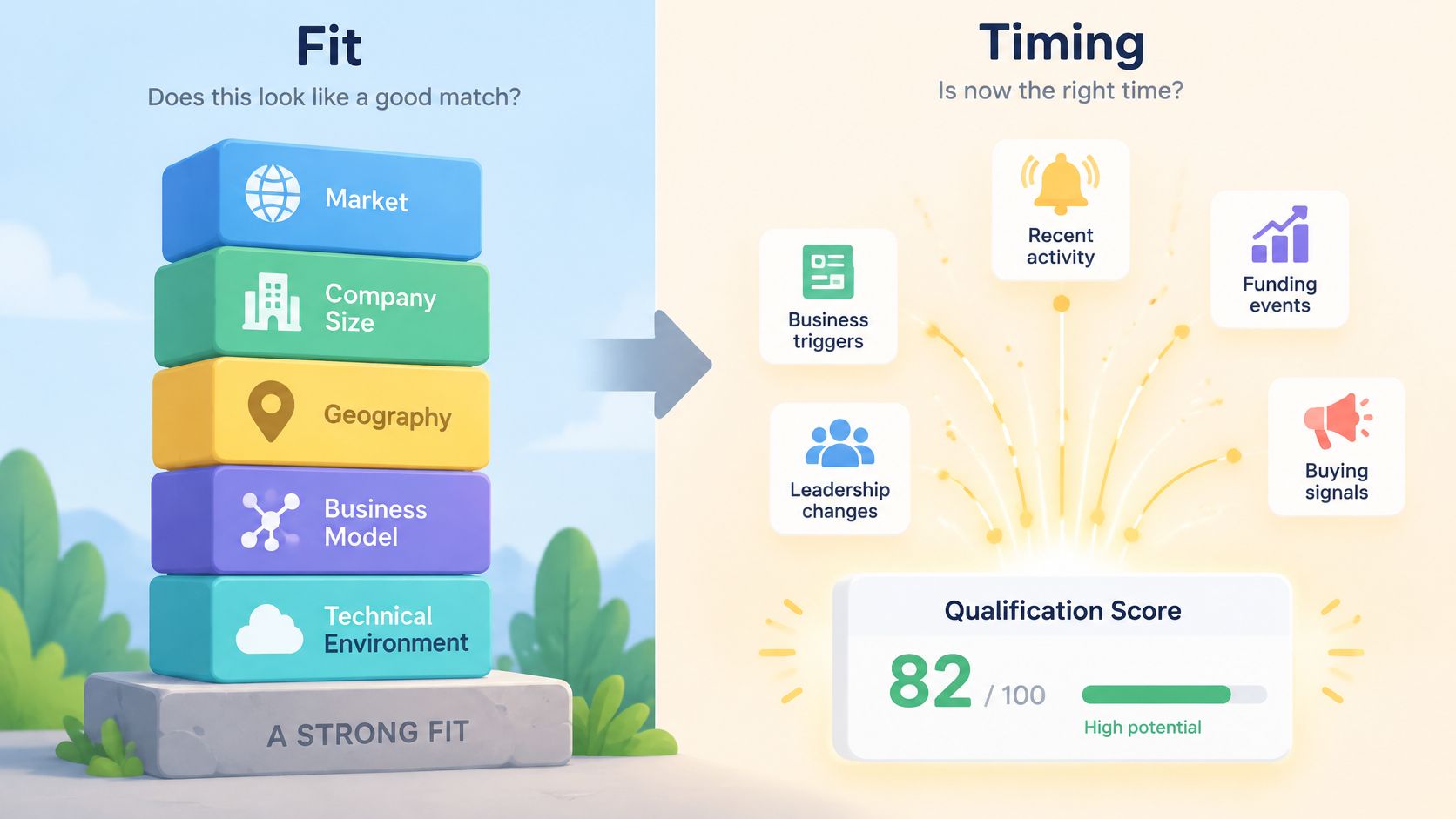
Say an account matches the ideal customer profile almost exactly: right sector, right size, right region, running the platform you integrate with. It also shows no recent trigger of any kind. A fit score ranks it near the top of the list. A timing score puts it at the bottom. It belongs in nurture, not in a sequence.
Splitting the two is the whole discipline. Fit uses relatively stable variables: market, company size, geography, business model and technical environment. Timing uses evidence that something changed: a relevant vacancy, a new sales leader, a product launch visible on the website, adoption of a technology you work with. Mixing them into one number means a perfectly matched account with no reason to act outranks a good-enough account with an urgent problem.
Timing matters because buyers do most of their deciding before they talk to anyone. 6sense reports that 91% of buyers have a preferred vendor before contacting sales, and that 73% avoid vendors who send irrelevant outreach (6sense).
Three tiers, three different actions
The practical output of signal scoring is a routing decision, not a score on a dashboard.
- Fit only. The record stays in nurture with its context attached. Nothing gets sent on the strength of a profile match.
- Fit plus one weak signal. The signal adds context a seller can use if the account comes up. A single job advert doesn't justify a campaign.
- Fit plus several recent signals. The account moves into manual research, where a person checks what the signals mean before anything is written.
Read signals as evidence for investigation. A vacancy for a database administrator may suggest a capability gap. A technology platform suggests a technical environment. Content research suggests a topic of interest. None of them proves readiness to buy, and treating it as proof is how personalisation turns into an invented problem.
Signal rule: record what the signal is, where it came from, when it was true and how fast it decays. A six-month-old vacancy counts for less than one posted last week.
Connecting several signals into one prioritisation model is also where the commercial return sits. McKinsey reports that companies using data-driven B2B sales-growth engines report above-market growth and EBITDA increases of roughly 15 to 25% (McKinsey).
Calibrate the model against qualified replies, meetings and opportunities rather than open rates, which move for reasons that have nothing to do with fit. H2 measures campaign success by qualified conversations, booked meetings and the opportunities those meetings create, treating opens and raw send volume as diagnostic signals rather than the outcome. This guide to sales buying signals covers which evidence deserves a place in a scoring model and which just adds noise.
UK Consent, Data Rules and Suppression Lists
UK rules for outbound email turn on who receives the message, not on what your database calls them. An enriched record that treats a sole trader as a corporate lead is a compliance problem created by a data field, which is why organisation type belongs in the schema.
| Recipient type | Consent position for email marketing | What to store |
|---|---|---|
| Limited company or LLP contact | Consent not required for direct marketing to corporate subscribers | Organisation type, source, opt-out status and a valid unsubscribe route |
| Sole trader | Treated as an individual subscriber, so consent or a valid soft opt-in is generally needed | Consent or soft opt-in basis, source and suppression status |
| Partnership | Some partnerships are treated as individual subscribers | Partnership type checked and the basis recorded |
| Named individual's personal data | Data protection law applies even at a corporate address | Lawful basis, purpose, source and collection date |
The ICO's guidance on the PECR rules for electronic mail marketing confirms that consent isn't required for direct marketing emails to corporate subscribers such as limited companies and limited liability partnerships. Two conditions still apply: you must not conceal your identity, and you must give a valid address for opting out.
Personal data doesn't stop at the firewall
A named individual's direct email address, mobile number or job title is personal data even when the company is a corporate subscriber. That brings lawful basis, purpose and retention into the record. Storing the source and collection date is what lets you answer a subject access request or a correction request without rebuilding the list.
Retention works the same way. The ICO's direct marketing planning guidance asks organisations to review marketing information regularly so it doesn't become irrelevant, excessive or inaccurate, and to delete or anonymise data that's no longer needed for direct marketing. Practically, that means a refresh date on every field and a suppression list that objections flow into automatically.
If your programme spans several markets, GDPR compliant email marketing is a useful companion on consent records and suppression handling. Building the list itself to hold organisation type, source and opt-out status from the first import saves retrofitting later, and a prospecting list template is a reasonable starting structure for those columns.
Rules change, and enforcement priorities shift. Confirm the current position against ICO guidance or a legal adviser before scaling a segment that depends on a soft opt-in. Treat this as operating context, not legal advice.
Confirm the Quality Gate Before You Scale Enrichment
Run a pilot before you commit budget to a bigger list or a new provider. The sequence below takes a few days and answers the question that matters: does this enrichment hold up when someone checks it by hand?
- Pick 100 records across two segments. Two segments, because accuracy varies by market, company size and region, and one clean segment can hide a broken one.
- Run them through the full pipeline and every accuracy check. Include the records you expect to fail. A run with no failures usually means the checks aren't strict enough.
- Count pass rates per field and how many records went to review. The review queue is a cost. If 40% of records land there, the matching rules need work before volume arrives.
- Send a small test to records that passed. Track qualified replies, meetings and opportunities, not opens. A campaign with strong opens and no meetings has told you something about targeting.
- Expand only when error rates stay under the agreed threshold for two consecutive samples. One clean sample can be luck. Two is a signal.
Custom work becomes relevant when those same rules have to run across several systems, with edge cases and integrations that a spreadsheet can't hold. Before a custom build expands, H2 defines the commercial outcome, required inputs, decision rules, integrations, edge cases and ownership. H2's custom GTM system builds cover research, qualification, enrichment and CRM workflows built around the client's team and are quoted to scope, which is the right shape of engagement when the pilot has proved the logic and the next job is production.
Then hold the line. Scale the segment that passed. Keep the rest in review until the next sample clears it.
H2 builds the data and outbound systems that make this kind of quality gate routine: enrichment, qualification, scoring and CRM routing designed around how your team sells, with the checks and fallback paths left in place after handover. If you've proved a pilot and need it running across several systems, start with a custom GTM system build or talk to H2 about a fully managed outbound programme.
