Nearly 18% of email failed to reach the inbox in independent research covering more than 400 billion emails sent in 2025, according to the Sinch Mailgun report. The same work found that 41% of teams used AI to generate email content, while higher-impact uses such as optimisation, segmentation and deliverability stayed underused.
That gap is the whole subject. AI outbound sales is not a licence to send more. It is an operating model: software prepares research, scores and drafts, and a person approves every decision that changes who is contacted or what is claimed. Judge it by verified accounts, qualified conversations, cost and compliance risk. Emails sent is a diagnostic, not a result.
Founders, sales leaders and RevOps teams can use the same test. If a step only increases activity, it is not finished. If a step produces a sourced, reviewed output that a seller can stand behind, it belongs in the system.
What AI Outbound Sales Means for B2B Teams
AI outbound sales means using AI inside outbound prospecting, account research, list building, message drafting and reply handling, while the sales team keeps control of targeting and claims. The channel does not change. Email and LinkedIn still carry the message. What changes is who prepares the file before a person sends it.
Simple automation is a timer. A sequence sends the same message to everyone on day one, day four and day seven. An AI step reads a record, makes a judgement and returns an output: a score, a summary, a draft or a label. That output can be wrong. Treat it as a draft decision, not a fact.
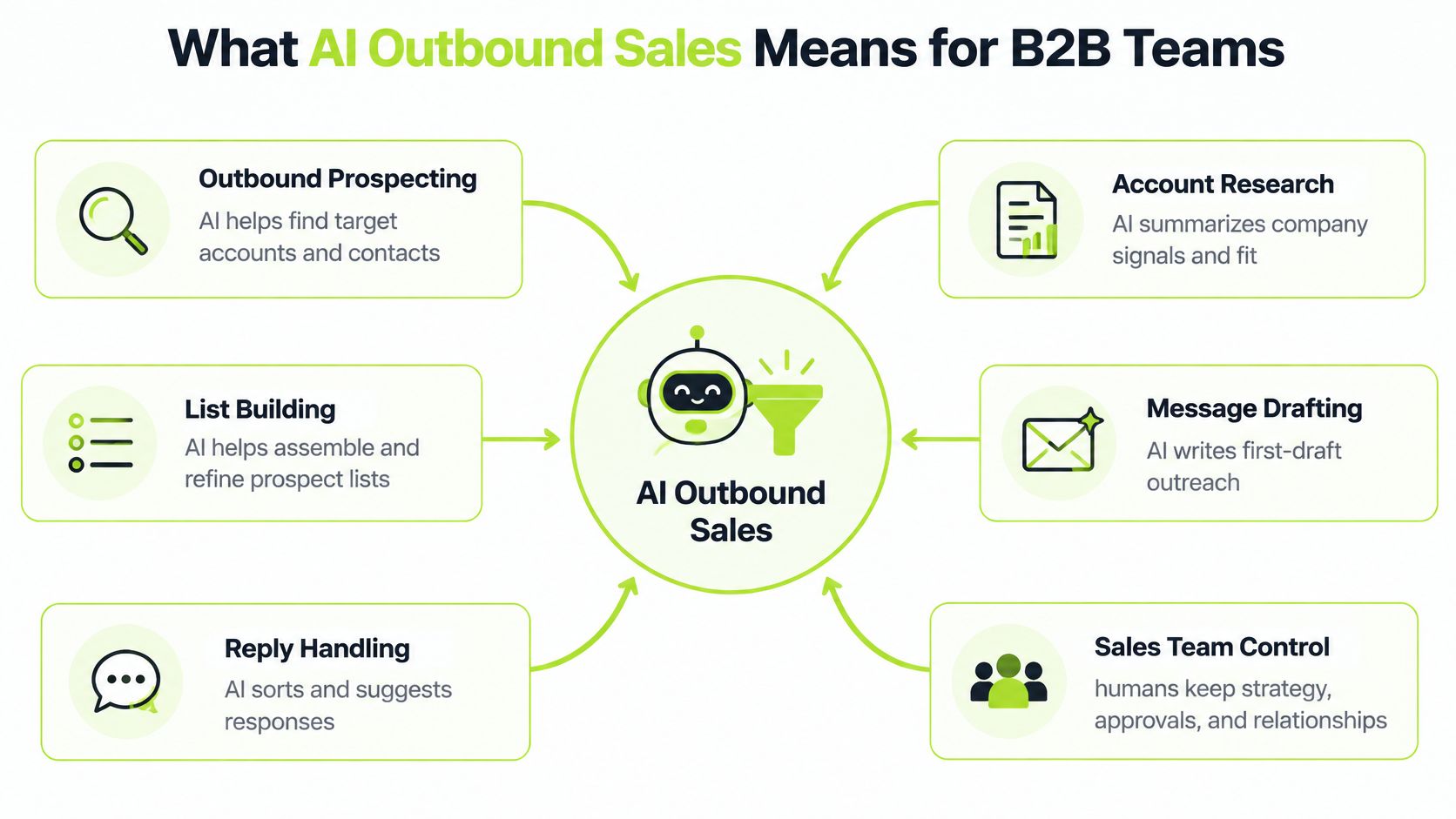
Think of AI as the research assistant who prepares the file. The salesperson still decides who to call and what to promise. The assistant can miss a stale job post, invent a technology stack or smooth over a poor fit. The seller owns the relationship that follows.
Where the assistant helps
The work sits in five places, not one copy tool:
- Outbound prospecting: find accounts and contacts that match a written target.
- Account research: summarise public signals and say where each note came from.
- List building: assemble, deduplicate and refine the people you might contact.
- Message drafting: write a first draft, not the version that leaves the building.
- Reply handling: sort interested, not now, wrong person and objection, then stop.
Working definition: AI assists each step, and a person approves every decision that changes who is contacted or what is claimed.
A team can share that sentence in a standup. It stops two failure modes at once: a fully manual process that never scales, and an unattended sender that scales bad claims.
Before you add a tool, list every step in the current outbound process on one page. Mark where AI could prepare the work, and mark where it must not decide. Pricing, technical promises, legal wording and "this account is qualified" stay with a named person.
Results Teams Report and How Far to Trust Them
Published figures are useful if you read the limit next to the number. Adoption, estimated value, revenue growth and time saved are not the same claim.
| Source and year | Finding | Limit |
|---|---|---|
| McKinsey, 2024 | 65% of organisations regularly used generative AI in at least one function | Self-reported survey; adoption is not the same as maturity |
| McKinsey, 2024 | $0.8 trillion to $1.2 trillion of productivity value across sales and marketing | Estimate, not a measured result |
| McKinsey, 2024 | 21% of commercial leaders said generative AI was fully enabled enterprise-wide in B2B buying and selling | Self-reported by leaders |
| Salesforce, 2024 | 83% of AI-using sales teams reported revenue growth, against 66% of non-users | Correlation, not proof of cause |
| Outreach, 2025 | 54% of surveyed teams used AI for personalised outbound emails | Vendor survey |
| Outreach, 2025 | Sellers using its AI tools cut research and personalisation time by 90% | Vendor-reported; depends on the tasks measured |
| HubSpot, 2025 | 84% of reps said AI saved time; 83% said it improved personalisation | Self-reported opinion, not measured output |
What the independent survey actually shows
McKinsey's Global Survey on AI, run from 22 February to 5 March 2024 with 1,363 respondents, found that 65% of organisations were regularly using generative AI in at least one business function, almost double the prior survey. Marketing and sales saw the largest increase, with reported use more than doubling compared with 2023. Lead identification, prioritisation and personalised marketing were named commercial uses. Many individual use cases were still early. Regular use is not a finished revenue process.
A separate McKinsey estimate puts generative AI at an extra $0.8 trillion to $1.2 trillion of productivity value across sales and marketing, on top of traditional analytics. In the same B2B sales analysis, only 21% of commercial leaders said their companies had fully enabled enterprise-wide generative AI in B2B buying and selling, and 22% had piloted use cases without that full enablement. The value figure is a model. The 21% figure is what leaders said, not an audit of their CRM.
Vendor and self-reported results
Salesforce's 2024 State of Sales reported that 83% of sales teams using AI experienced revenue growth, compared with 66% of teams not using AI. That is a correlation. It does not prove the software caused the growth. Teams that adopt tools may already have tighter management.
In 2025, 54% of surveyed sales teams reported using AI for personalised outbound emails, according to Outreach's prospecting research. Separately, sellers using Outreach's AI tools reported cutting research and personalisation time by 90%, in Outreach's 2025 analysis. HubSpot's State of Sales report found that 84% of sales representatives said AI saved time and 83% said it improved personalisation. Both are opinions about the tool, not counted meetings.
Read any new claim with three rules:
- Favour independent surveys when you want a picture of the market, and still treat them as self-reported.
- Check whether the source sells AI. A vendor result can be true for its users and still not transfer.
- Treat time saved as a hypothesis. Test it on your own pipeline: qualified conversations, not hours the tool claims back.
Five Use Cases Across the Outbound Workflow
Use this as a lookup, not a shopping list. Each row saves time only if the human check is cheaper than the error it prevents.
| Use case | What AI does | Human check | Typical output |
|---|---|---|---|
| Account research | Summarises websites, job posts and public information | Confirm any claim before it is used in outreach | Account brief with sourced notes |
| Data enrichment | Fills and standardises missing fields | Spot-check a sample of rows for errors | Complete, deduplicated contact fields |
| Lead scoring | Ranks accounts against ICP rules | Review rules and edge cases | Priority tier with the reasons given |
| Copy generation | Drafts first lines and sequence emails | Approve claims, prices and technical statements | Draft variants ready for testing |
| Reply handling | Labels replies and extracts objections | Decide on qualification and pricing questions | Labelled reply with a suggested next action |
Account research turns a website, a careers page and a news mention into a short brief. The risk is a fluent summary of the wrong year. A reviewer confirms any line that might appear in a message and keeps the source URL on the record.
Data enrichment fills role, company size, location and technology, and standardises the spelling so the CRM does not split one account into three. This is usually the best first build, because a wrong field is visible in a sample. A practical comparison of data enrichment tools helps you see what each provider returns before you trust a waterfall of sources.
Lead scoring ranks accounts against an ideal customer profile (ICP), a written description of the company, role and situation that makes a buyer likely to need the product. AI applies the rules quickly. A person still owns the rules. Edge cases, such as a perfect industry with no budget owner, should fall to a human queue rather than a silent reject.
Copy generation is the step teams rush. It should be last. Drafts of first lines and sequence emails are useful. Prices, integration claims and "you are struggling with X" are not free to send. Approval here is a commercial control, not a style edit.
Reply handling labels interested, not now, wrong person or objection, and pulls out the phrase the buyer used. Qualification and any talk of price stay with the seller. A wrong label wastes a meeting. A missed objection wastes the deal.
Where to start
Start with the task that loses the most time and has the easiest errors to spot. That is usually enrichment or reply labelling, not copy. Run a first test on 50 to 100 accounts. If the sample is dirty, scaling the prompt only scales the dirt.
Where AI Needs Human Review
More automation does not mean better outbound. Activity goes up easily. Trust does not.
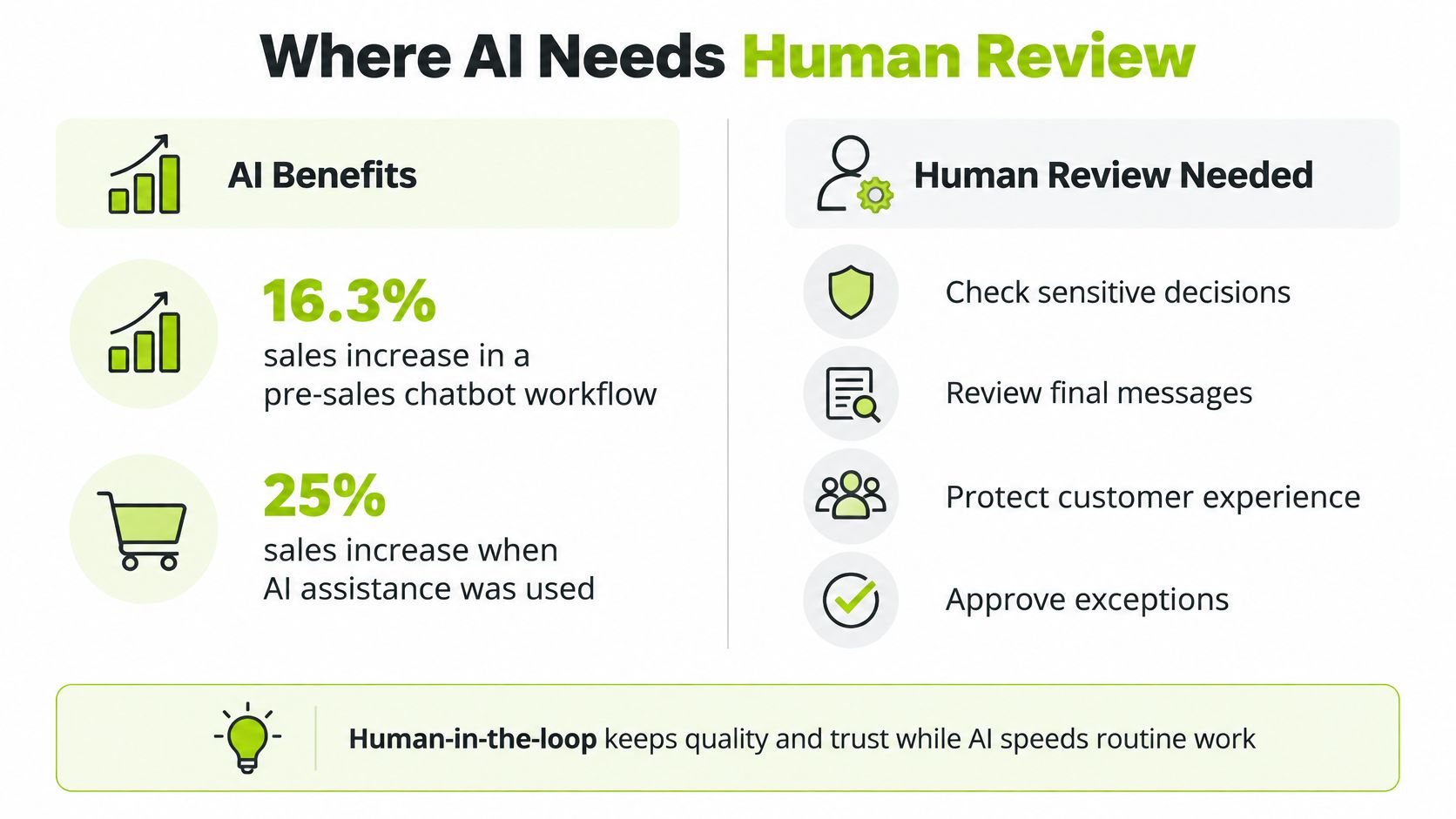
A large randomised field experiment, covering millions of users and products, found that generative AI increased sales by 16.3% in a pre-sales chatbot workflow versus a control group. The stronger result was 25% when AI assistance was combined with human escalation, relative to no pre-sales support, as reported in the field experiment write-up. The setting was a chatbot, not a cold email programme. The operating lesson still travels: AI can classify, retrieve and draft, and people should take pricing, technical claims, objections and qualification.
Buyers already check the machine
Buyer behaviour points the same way. In technology-purchase research summarised by Toflow, 63% of technology buyers used AI during their purchase, 94% fact-checked AI-generated information at least sometimes, and buyers were 39 percentage points more likely to say a human sales representative understood their needs than a generative-AI tool. If your buyer is checking AI output, your seller cannot send unchecked AI output.
A three-level confidence scale
Give every AI-generated claim one of three labels before it can affect a person:
- Fact: verified in a named source and stored on the record.
- Hypothesis: plausible, but not verified, so the message must not state it as fact.
- Disqualifier: a written rule that removes the account from this campaign.
Say a model drafts, "I saw you are hiring a data lead, so pipeline reporting is probably slowing the team down." The job post is four years old. The pain is a guess. The note is a hypothesis at best, and the stale post makes it a bad one. The email damages trust before anyone replies.
No AI claim enters a message unless its source is saved alongside the record.
Route the work to match the label. AI may sort replies, extract pain language, suggest a buying stage and recommend a next action. A person signs off pricing, technical statements, objections and any move from "interested" to "qualified". Measure qualified conversations and opportunities. A rise in sends, with a flat qualified rate, is a failed test.
How an AI Outbound Workflow Runs Step by Step
The sequence matters more than the brand of software. Each step has an owner and a reason to stop.
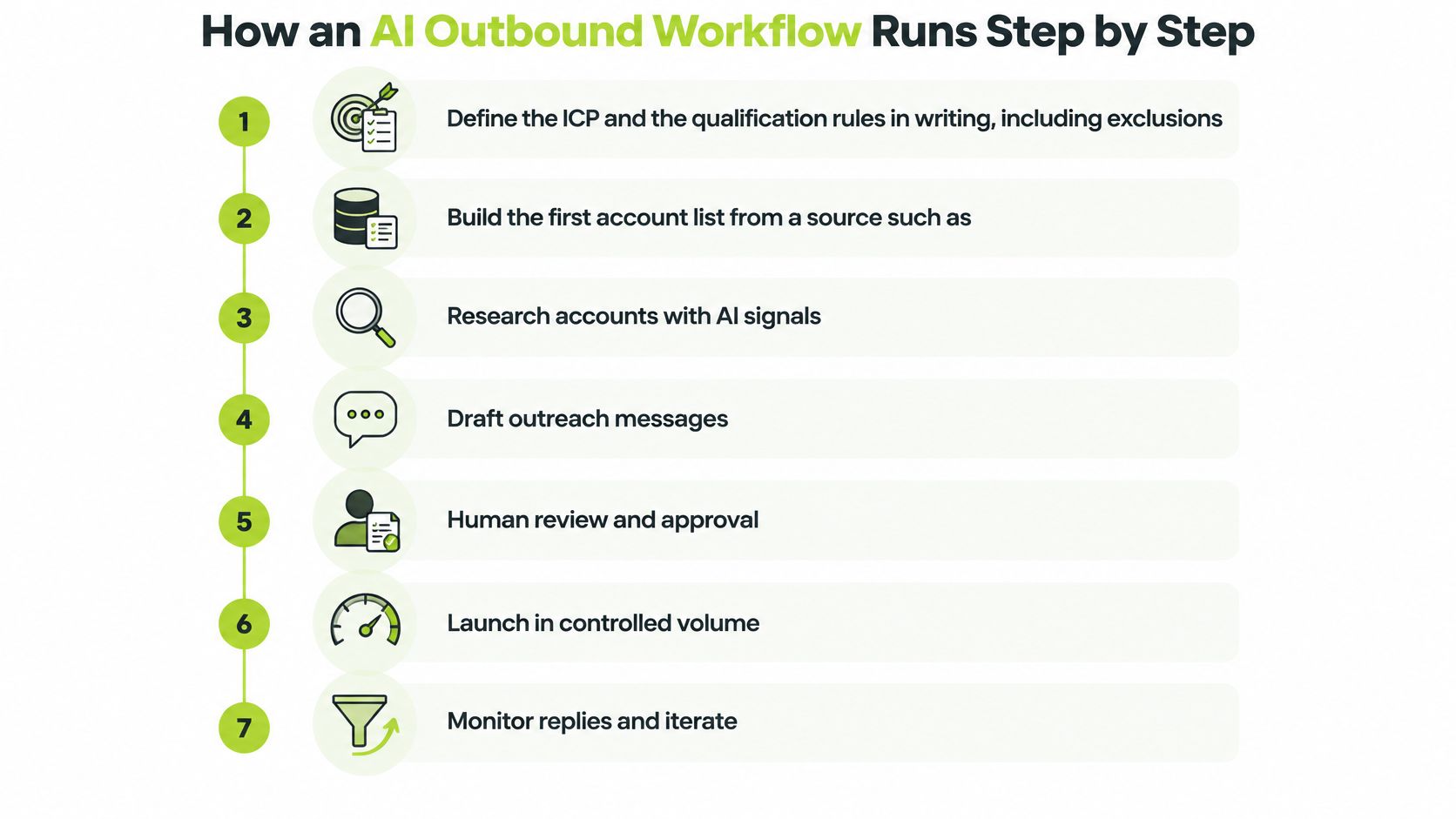
- Write the ICP and the exclusions. Include industry, size, role and the situations you will not pursue. If it is not written, scoring will drift toward whoever shouts loudest in the prompt.
- Build the first account list from a company database or a search by industry, size and location. Keep the source on the row so you can drop a bad file later without guessing.
- Enrich with a provider waterfall. Try the first data source, then the next, only when a field is empty. Waterfalls save money. They also stack errors, so spot-check before you trust the fill rate.
- Add AI research columns. Point them at the company site or a job post. Ask for a short sourced summary and a yes, no or unclear flag. Unclear is a valid answer. Forcing yes or no creates false fits.
- Score against the ICP and sort accounts into tiers A, B and C, with the reasons stored. A tier without reasons cannot be audited when replies disappoint.
- Draft first lines for tier A only. The prompt should ban unsupported claims and require the source to be listed under the draft. Tiers B and C wait until the message earns replies.
- Send every draft to a reviewer who approves, edits or rejects it. Rejection is a normal outcome, not a failure of the tool.
- Launch a small test and push replies and meeting outcomes back to the CRM. Do not open this step until authentication, a suppression list, a tested unsubscribe path and a daily cap are in place.
- Review weekly. If replies show the wrong pain or the wrong person, change the ICP or the prompt. Do not add a new sequence to hide a bad list.
Tools do not replace the order
Clay is one way to do steps 3 to 6. It is a spreadsheet-style workspace that joins data providers with AI columns. A CRM plus scripts can reach the same review points. Pick the stack your team can maintain on a quiet Friday, not the one with the longest feature list. A wider look at a GTM tech stack belongs with that choice, once the steps are agreed.
If the workflow starts calling tools on its own, read up on designing secure agentic automation before you grant send rights. An agent that can research is useful. An agent that can mail the whole list is a different risk.
In a system-build engagement, H2 sets up data sources, signals, enrichment, qualification and integrations, backed by sending domains and inboxes configured for the target market. Whoever builds it, the same gate applies: no launch while the infrastructure checks are still open.
Compliance Checks Before Launch and Reading the Funnel
Deliverability and the law sit in front of copy. A clever first line cannot repair a domain that mailbox providers already distrust.
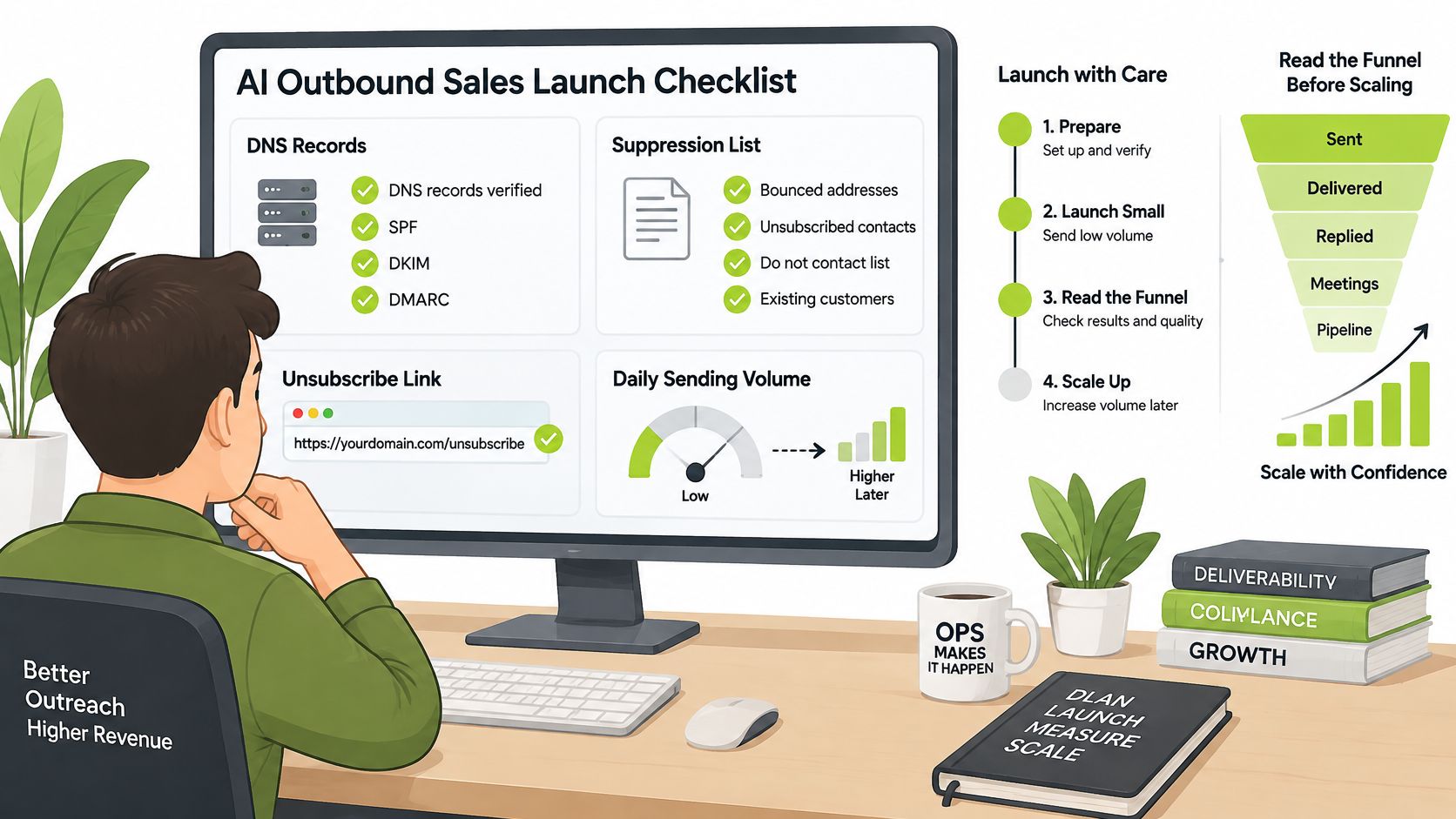
Checks before the first send
Run this list, then raise volume only after domain health and opt-out handling are confirmed. A practical email deliverability audit is the right depth if inbox placement is already slipping.
- DNS records: confirm the domain resolves the way your sending platform expects, both ways.
- SPF, DKIM and DMARC: test that they pass and that the visible From domain lines up with the authenticated domain.
- Suppression: load unsubscribes, customers who asked you to stop, and anyone your contract excludes.
- Unsubscribe: click the link yourself from a test message. One-click should complete without a login maze.
- Daily cap: set a ceiling you can watch. Do not "see how it goes" on day one.
Google's Workspace sender guidance treats senders delivering close to 5,000 or more messages to personal Gmail accounts in 24 hours as bulk senders. It recommends a user-reported spam rate below 0.1%, and says senders at 0.3% or higher can lose access to mitigation. Since February 2024 those senders must use SPF, DKIM and DMARC, valid forward and reverse DNS, TLS, and an easy unsubscribe on marketing mail.
Gmail's sender guidance also requires the visible From domain to align with the SPF or DKIM organisational domain, and says enforcement against non-compliant traffic is increasing. Falling inbox placement is often an authentication, complaint or reputation problem. It is not automatically a weak subject line.
| Rule | Applies when | What to check |
|---|---|---|
| Gmail bulk sender requirements | Sending about 5,000 or more messages a day to Gmail accounts | SPF, DKIM and DMARC alignment; one-click unsubscribe |
| Gmail spam rate | Bulk senders to Gmail | User-reported spam below 0.1%; avoid 0.3% or higher |
| CAN-SPAM Act (US) | Commercial email whose primary purpose is advertising | Accurate headers, honest subject lines, postal address, opt-out honoured within 10 business days |
| UK PECR, corporate subscribers | Limited companies and LLPs | Consent not generally required; no concealed identity; working opt-out |
| UK PECR, individual subscribers | Sole traders and some partnerships | Specific consent unless the soft opt-in applies |
The copy does not get a free pass
The US CAN-SPAM Act compliance guide covers commercial email whose primary purpose is advertising or promoting a product or service. It requires accurate From, To, Reply-To and routing information, honest subject lines, a clear advertisement label where required, and a valid physical postal address. Opt-out requests must be honoured within 10 business days. Each separate violating email can draw a civil penalty of up to $53,088.
UK rules follow the recipient, not the tool. The ICO's direct marketing guidance says the PECR email rule does not generally require consent for corporate subscribers such as limited companies and limited liability partnerships. The sender still must not conceal its identity and must offer a valid opt-out address. Sole traders and some partnerships count as individual subscribers. They generally need specific consent unless the soft opt-in applies: details collected during a sale or negotiation, marketing for similar products, a chance to refuse at collection, and an opt-out in every later message.
These duties apply whether a person or a model wrote the sentence. Hype is its own risk. The FTC's warnings about online risks from AI hype are a reminder that inflated AI claims in ads draw regulatory attention. Specific legal questions need a qualified adviser. This is an operating checklist, not a legal opinion.
Raise volume only after domain health, data quality and opt-out processing have been checked on a live test, not on a slide.
A worked funnel, clearly hypothetical
Say a campaign is labelled as a planning example, not a promised result. You load 2,000 accounts. 400 pass ICP scoring (20%). 300 of those have verified contacts (75%). Reviewers approve 240 emails (80% of verified contacts). 7 replies are positive, about 3% of emails sent. 4 become qualified conversations (about 57% of those replies). 2 meetings are booked (half of the qualified conversations).
If data, tooling and review time cost £1,500, that example is £5 per verified contact (1,500 divided by 300) and £750 per meeting (1,500 divided by 2). Swap in your own counts. The shape of the sum is what matters.
Track inbox placement, positive reply rate, qualified conversation rate, unsubscribe and complaint rate, and pipeline created. Ignore a leaderboard of emails sent. If the qualified conversation rate stays under the threshold you agreed for two review cycles, pause the sequence and go back to the ICP and the data. Another draft will not fix a list that should not have been mailed.
Choose Build, Buy or Outsource Your AI Outbound
The decision is easier if you separate the work from the tool. Outbound has four layers: data and signals, copy and offer, sending and deliverability, and review. Ask which layer is broken. A team with a good list and weak copy does not need a new data vendor. A team with strong copy and a burned domain does not need another AI writer.
Then check three things in order. Is the offer proven with real buyers? Can the team absorb more sales conversations? Does someone own the workflow after launch? That last question decides most build-versus-buy arguments. A spreadsheet with no Friday reviewer becomes a stale list within a month, and an AI sequence with no approval step becomes a compliance risk.
Build in-house when you have engineering capacity, a stable offer and a named owner for the workflow. The owner approves the ICP, the review rule and the send. If that person does not exist, the build waits. If the gap is only one layer, a map of your GTM tech stack shows whether you are missing data, enrichment, routing or sending infrastructure before you add another subscription.
Buy tools and train the team when capacity exists and the skill does not. You still need the ICP, the review rule and the compliance gate from this guide. Swapping one sales engagement platform for another does not create them. A sober scan of sales engagement options beyond Outreach is useful once you know which step is broken. Buy the gap, not the logo.
Outsource when the offer is proven, sellers can take meetings, and nobody has the weeks to stand up domains, data and review. Fully managed outbound fits B2B teams in that spot: a proven offer, room for more conversations, a need for pipeline, and no appetite to build the function inside the company. The test is whether the partnership records verified conversations in your CRM and gives your team a clear approval loop.
If you want a partner to carry a defined piece
H2, a B2B go-to-market firm in Bournemouth, offers three ways in, which you can match to the bottleneck rather than to a package name.
- Fully Managed Outbound: H2 handles research, infrastructure, campaign writing and testing, reply handling and meeting booking. The client shares the business, market and goals. H2 works out the strategy, systems and launch plan. The managed outbound plan has a guide range of $5,000 to $8,000 per month in USD. Data, software and mailboxes sit inside the agreed scope.
- Custom GTM System Builds: one manual bottleneck, or several connected workflows, built around your CRM and rules, then handed over with documentation.
- Private GTM Workshops: practical training on the client's own market, including Clay workflows, AI prospecting and quality control, for teams who will run the system themselves.
Current scope and commercial terms are on the pricing page. Do not treat a guide range as a quote. Fit depends on market, volume and how much of the work you keep.
This week, write three lines before any sales call with a vendor or an internal build: the offer in one sentence, the target account in one sentence, and the main bottleneck (data, copy, deliverability, time or review). If you cannot fill those lines, you are not ready to automate the send. You are ready to define the work a person must still approve.
H2 builds AI outbound as a reviewed operating system, not a pile of generated email, through fully managed campaigns, custom GTM systems and private workshops for B2B teams. If you want the research, infrastructure and human approval points handled against your market, start with a short look at H2 and book the introductory call when the three lines above are written.
