A 12-person SDR team changes email service providers and triples its usual cold volume. Ten days later, reported opens have fallen from 42% to 11%, while replies and booked meetings remain broadly unchanged. The team rewrites subject lines, swaps call-to-action language and blames the copy, even though the change is probably that fewer messages are reaching the primary inbox.
That distinction matters because email deliverability issues are measurement problems before they become sending problems. Independent benchmarking reported average inbox placement around 83.1% to 87.2% during 2024 to 2026, so roughly one in six legitimate emails still fails to reach the inbox. Validity's deliverability benchmark also illustrates why a delivered message shouldn't be treated as a seen message. A receiving server can accept it while routing it to spam, a secondary tab or a corporate quarantine.
When Inbox Placement Quietly Breaks
The SDR team in this situation has three competing explanations. The copy might be weaker, the new email service provider might be configured incorrectly, or the volume spike might have changed how mailbox providers evaluate the sender. Open-rate data alone can't distinguish among them.
The first clue is a sudden click-through-rate decline without a meaningful change in the message. If a small group still replies, books meetings or references the offer, the email may be working for the people who see it. The collapse is more likely to reflect a shift from the primary inbox to Promotions, Junk or a tenant-level quarantine than a universal copy failure.
Operator's rule: Don't rewrite a campaign until you know which folders received it.
The team should have checked three signals immediately:
- Inbox placement: The share of messages that reached the intended inbox.
- Spam placement: The share routed to spam, junk or another filtered folder.
- Missing or blocked mail: Messages that were rejected, hard bounced, deferred or never appeared in testing.
ESP dashboards rarely provide that separation. They can show that a server accepted a message, but acceptance isn't proof of inbox placement, and it says even less about whether a recipient saw the message.
Postmaster notifications often contain useful evidence, but they only help if somebody reviews them. A sudden reputation warning, provider-specific complaint signal or authentication anomaly can sit unnoticed while the team debates subject-line length.
The correct recovery path is ordered. Measure placement, segment the result by mailbox provider, inspect authentication and DNS, then review volume, engagement, content and list quality. A team that follows that sequence avoids changing several variables at once, which is the fastest way to lose the evidence needed to identify the actual cause.
Measuring Deliverability the Right Way
Start with a controlled seed panel. It should include test addresses at Gmail, Outlook, Yahoo and corporate Microsoft 365 or Google Workspace tenants, because consumer and business environments can apply different filtering and quarantine rules.
Seed addresses should be included in real campaigns, not isolated in a special test send that behaves differently from production traffic. Check the result at 1 minute, 15 minutes, 60 minutes and 24 hours when the sending event matters operationally. These intervals are part of the testing method, not universal provider guarantees. Early checks expose rejection and delay, while the later check captures folder movement and deferred placement.
A useful report records the provider, mailbox type, sender domain, sending stream, placement folder and timestamp. Keep inbox, spam and missing results separate. Don't roll them into one deliverability score before examining the provider-level detail.
What each measurement source tells you
| Source | What it measures | Limitation |
|---|---|---|
| Seed panel | Folder placement and missing messages across selected providers | It represents the panel, not every recipient |
| ESP dashboard | Accepted, bounced, deferred and blocked messages | It usually doesn't reveal inbox versus spam placement |
| Google Postmaster Tools | Gmail-related domain reputation, IP reputation and delivery signals | It focuses on Google-operated mailbox ecosystems |
| Microsoft SNDS and JMR | Microsoft sending and complaint-related visibility | Access and interpretation depend on Microsoft traffic and account context |
| InboxAlly or GlockApps | Cross-provider seed testing and placement visibility | Third-party tests still depend on panel coverage and test conditions |
Every significant send should produce a seed report before anyone debates copy. Compare the same message by provider, domain and sending stream. If Gmail is healthy while Outlook is poor, the next action isn't a global rewrite. It's a provider-specific investigation.
The benchmark evidence is sobering. One report found average inbox placement in the 83.1% to 87.2% range, and another comparison showed primary inbox placement rising from 49% to 63% year on year while the gap between the best and worst provider widened. These figures come from Validity's email deliverability benchmark, and they support one practical conclusion: aggregate delivery rates hide operational damage.
Why Mailbox Providers Are Not the Same
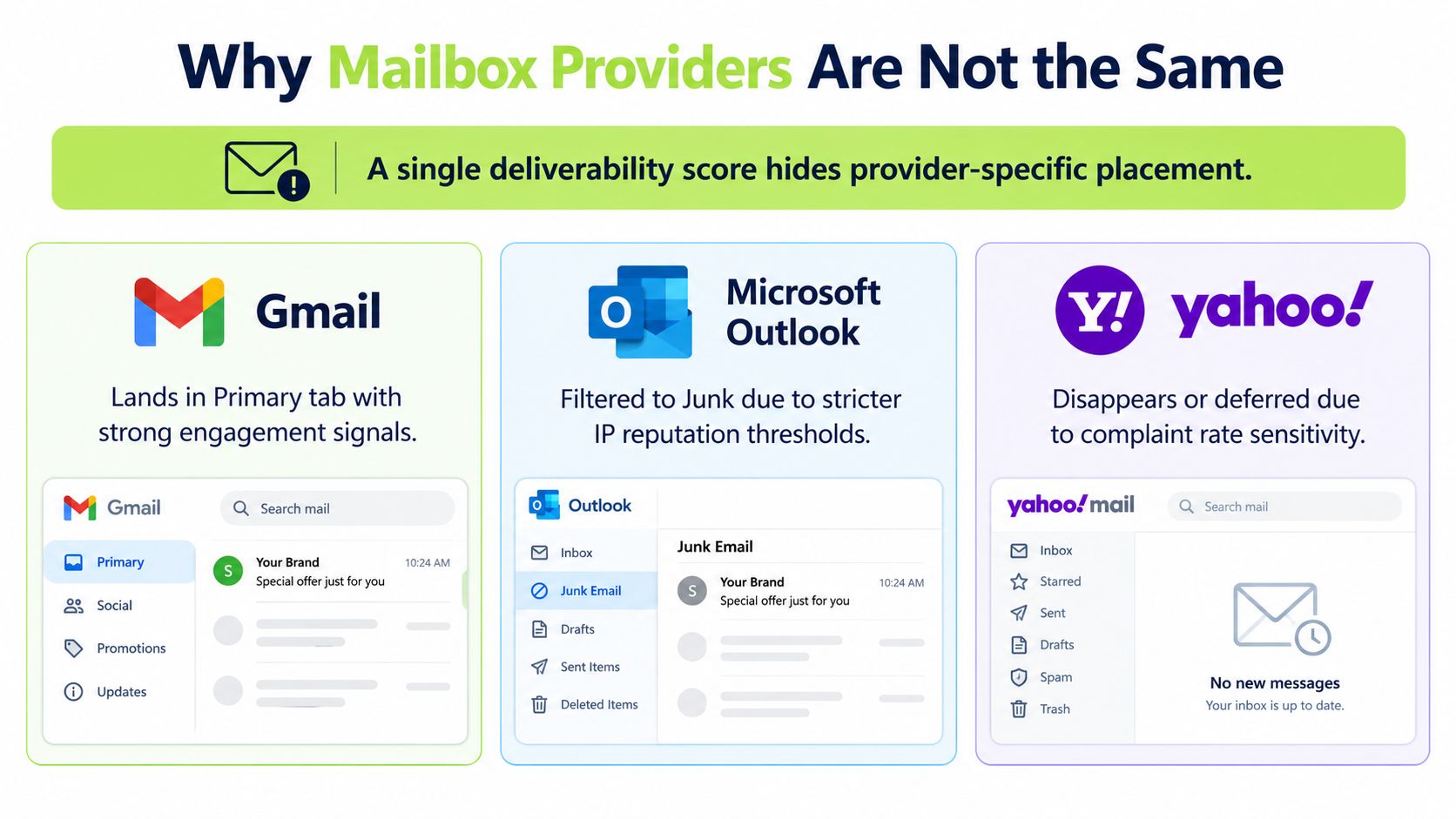
“Deliverability” sounds like one score, but mailbox providers don't operate as one filter. The same campaign can reach Gmail Primary, land in Microsoft Junk and appear inconsistently at Yahoo or inside a corporate security gateway.
Google places substantial weight on domain reputation, recipient interaction and the history of similar messages. Microsoft evaluates sender and IP reputation alongside filtering rules, tenant configuration and safe-sender decisions. Yahoo applies its own combination of reputation, complaints, authentication and content signals. These aren't interchangeable systems, so passing one provider's test doesn't validate the others.
The divergence is large enough to deserve its own operating process. A 2026 provider-divergence report from Unspam.email found a 83.9-point difference between the best and worst providers in panel testing, while also reporting materially different address-validity patterns between Microsoft 365 and Google Workspace. The precise result depends on the panel and test design, but the diagnosis is consistent: provider variance can overwhelm the campaign-level average.
How divergence changes the fix
If Gmail placement is strong and Microsoft placement is weak, investigate Microsoft-facing reputation, message authentication alignment and tenant-specific filtering before changing a subject line. If Yahoo is the outlier, examine complaint patterns, list source and content consistency. If every provider is weak, a shared infrastructure or audience problem becomes more likely.
Provider-level reporting should therefore include:
- Mailbox ecosystem: Gmail, Outlook.com, Yahoo and corporate tenants should be visible separately.
- Folder outcome: Primary, other tabs, spam, junk, quarantine and missing should not be combined.
- Sender identity: Compare domains, subdomains, IP pools and transactional versus outbound streams.
- Time trend: A sudden break after a volume or infrastructure change carries more diagnostic value than a long-term average.
A campaign optimized only for Gmail can damage Microsoft placement. Conversely, a change made to satisfy Microsoft filtering can reduce engagement elsewhere. Evaluate every fix against the providers that matter to the target audience, not against a single blended number.
Authentication and DNS Foundations That Actually Work
Authentication is the floor, not the whole building. DMARC passes when SPF or DKIM passes and aligns sufficiently with the visible From domain, so a record can exist, validate in a basic tester and still fail the receiving system's alignment check.
Begin with the sending identity. Map the visible From domain, the envelope or return-path domain and the DKIM signing domain. They don't always need to match character for character, but they must align under the receiving provider's DMARC rules and your chosen alignment posture.
Check the chain rather than the checklist
SPF authorizes sending services, but it has a hard ceiling of 10 DNS lookups. Nested include statements, verification services and old vendors can push a record beyond that limit. The result may be a silent SPF failure, particularly after a new platform is added.
DKIM depends on the selector, public key retrieval and message integrity. Rotating a key without publishing the corresponding DNS record breaks verification. Research cited in NIST Technical Note 1945 found that RSA keys above 2000 bits can trigger non-delivery when DNS responses become oversized. Bigger keys aren't automatically safer if receiving systems can't retrieve them reliably.
DMARC evaluates alignment and tells the receiver what to do with failures. A long-established sending domain left at p=none may collect reports without asking providers to quarantine or reject unauthorised mail. Aggregate report URIs, often called RUA destinations, provide the visibility needed to identify legitimate senders and misalignment before enforcement.
Run a verification ritual
- Query SPF, DKIM and DMARC records from more than one resolver or diagnostic service.
- Check the SPF lookup count, DKIM key retrieval and DNS response size.
- Send a production-like message to a seed mailbox that exposes authentication results.
- Compare the envelope domain, DKIM signing domain and visible From domain.
- Review a DMARC aggregate report within 48 hours before declaring the setup sound.
Don't treat a green DNS checker as proof of inboxing. Infrastructure can pass syntax checks and still produce provider-specific filtering because reputation, alignment, message stream and recipient behaviour remain separate inputs.
Engagement and List Growth Behaviour
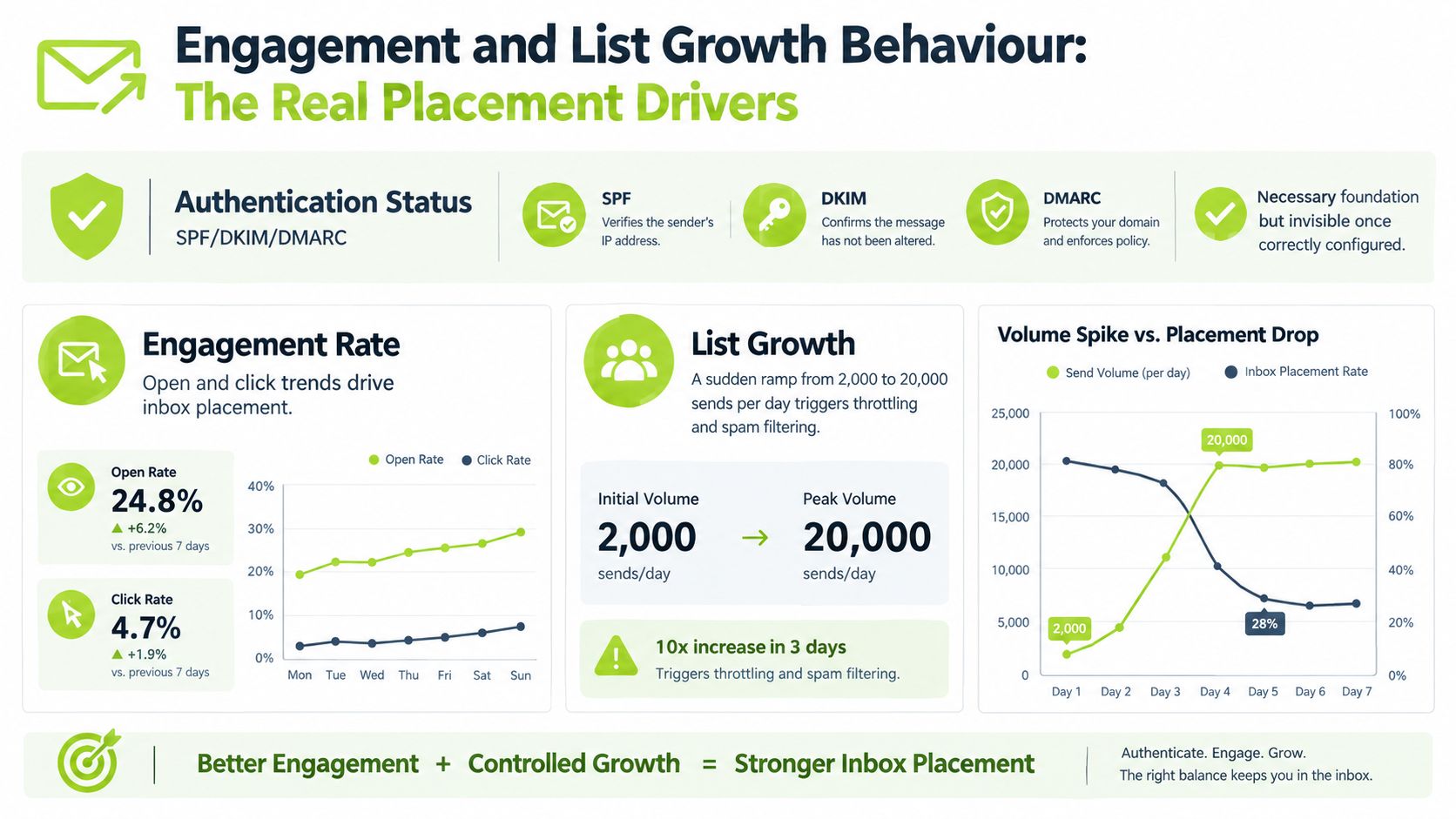
Authentication removes uncertainty about who sent the message. It doesn't make an unwanted message welcome. Once SPF, DKIM and DMARC are correctly configured, mailbox providers still observe whether recipients engage, complain, ignore, delete or consistently move messages out of the inbox.
That explains why authenticated mail can still perform poorly. Analysis published by Visionary Marketing's 2026 email deliverability statistics review reported that fully authenticated mail reached spam more than 30% of the time in corpus-level testing. The same source associated list growth above 15% month on month with an 8.4-point inbox-placement drop within 90 days. Authentication is necessary, but it isn't a substitute for controlled audience growth.
A sudden increase from 2,000 to 20,000 daily sends on a warmed domain compresses the reputation history providers have available. Purchased and scraped lists create a similar problem because recipients haven't requested the messages, records may be stale and complaint signals can arrive before hard bounces become obvious.
Control behaviour before increasing volume
Watch engagement by provider and cohort, not just across the whole list. A small high-intent segment can remain healthy while a newly imported audience damages the shared sending identity.
Useful controls include:
- Ramp gradually: Increase volume in measured steps and pause when placement or complaints deteriorate.
- Separate risk: Keep transactional, customer and outbound streams distinct where the infrastructure allows it.
- Protect the primary domain: If list growth is unusually aggressive, reconsider the audience and acquisition process before adding more sends or domains.
- Use engagement feedback: Replies, positive clicks, deletions, spam reports and inactivity all inform reputation.
For practical guidance on audience selection, messaging and sending discipline, use H2's cold email best practices. The central lesson is simple: deliverability responds to recipient behaviour, and list growth is itself a deliverability variable.
Content, Copy and List Hygiene Levers
Content matters after measurement and infrastructure have been checked. It can reinforce a healthy sender or make a marginal one harder for a provider to trust, but changing copy won't repair a broken SPF record, a misaligned DKIM signature or a damaged list.
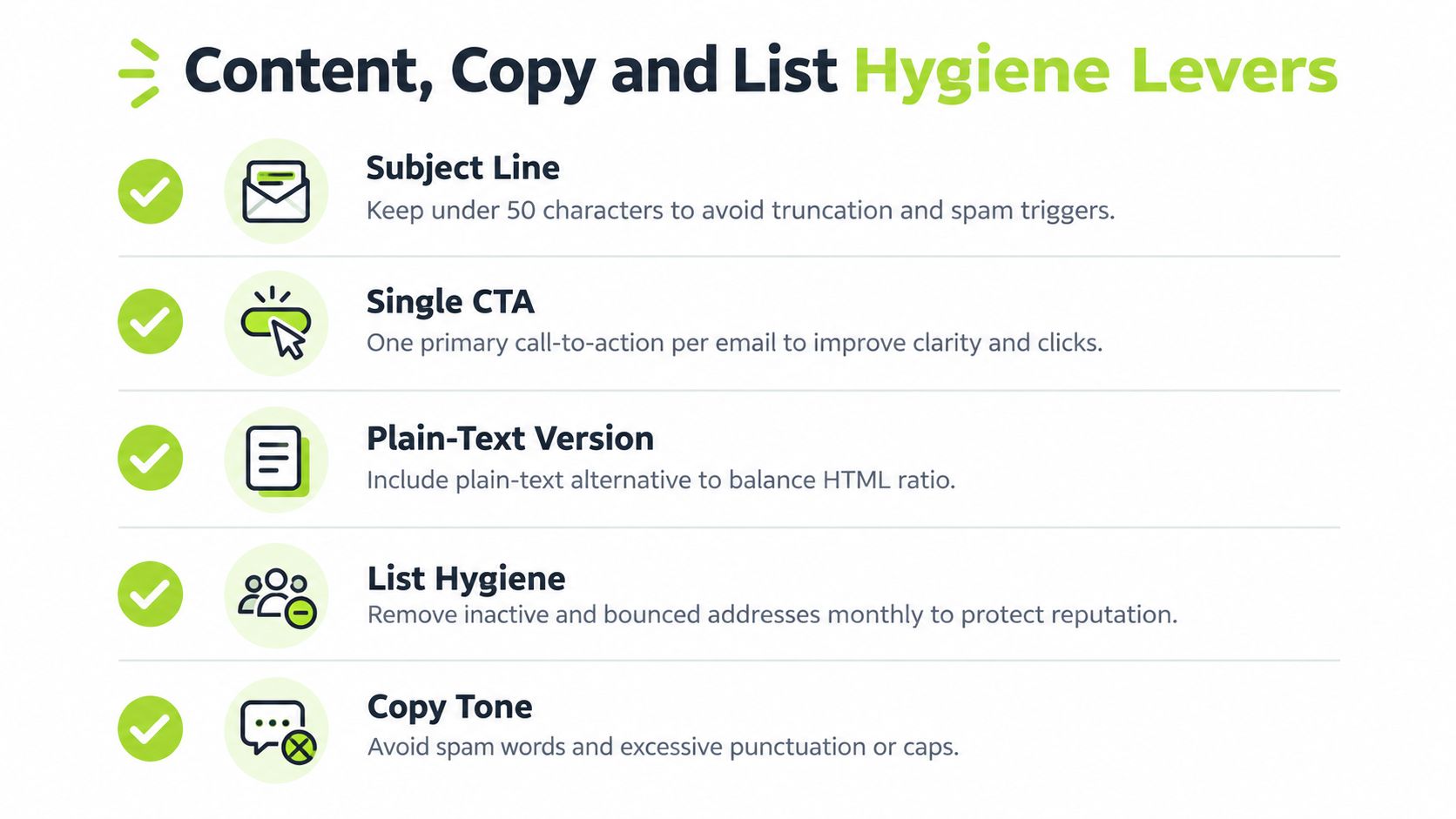
Keep the message easy to classify. A subject line under 50 characters, one primary call to action and a plain-text alternative reduce ambiguity for both recipients and filtering systems. Keep the link-to-text balance above 60:40, avoid URL shorteners and remove unnecessary tracking links. These are operating preferences, not guarantees of inbox placement, so test them against your own provider panel.
Make the message easier to understand
Use one clear reason for contact. Several competing offers, multiple links and heavy formatting make it harder for a recipient to understand what to do, especially in a short B2B outbound message.
- Subject line: Describe the relevance rather than manufacturing urgency.
- Primary CTA: Ask for one next step, such as confirming whether a problem exists.
- HTML and text: Send a readable plain-text part alongside HTML.
- Link posture: Use recognisable destination domains and remove links that don't support the requested action.
- Tone: Avoid excessive punctuation, all caps and language that creates a mismatch between promise and message.
A clean message sent to the wrong audience still generates complaints. List hygiene is therefore a placement lever, not merely a compliance task.
Suppress bad and inactive records
Suppress a hard bounce on its first occurrence. Suppress a soft bounce after three attempts within 14 days, then investigate whether the problem is temporary or persistent. Feed spam complaints and unsubscribes into a standing suppression list that applies across every campaign, system and sending domain.
Use recency segments to control exposure:
- Active: Opened or replied within 30 days.
- Cooling: No meaningful engagement between 30 and 90 days.
- Re-engagement: Older than 90 days and eligible for a deliberate recovery sequence.
- Archive: No open or reply within 180 days, removed from active mailing.
Before archiving, give suitable contacts a clear re-engagement option. Don't keep mailing an address indefinitely because it once opened a message. For outbound teams, verify risky records before they enter a live sequence, and use H2's guide to verifying email addresses as a practical reference for that preparation.
The operating rule is firm: a contact that hasn't opened or replied in 180 days should be archived, not mailed. A smaller responsive audience gives providers cleaner engagement evidence than a large list padded with silent or invalid records.
Monitoring Cadence and Common Questions
Deliverability work only holds when somebody owns the operating rhythm. A one-time DNS repair or list clean-up can improve conditions, but providers continue to evaluate new sends, new recipients and new behaviour.
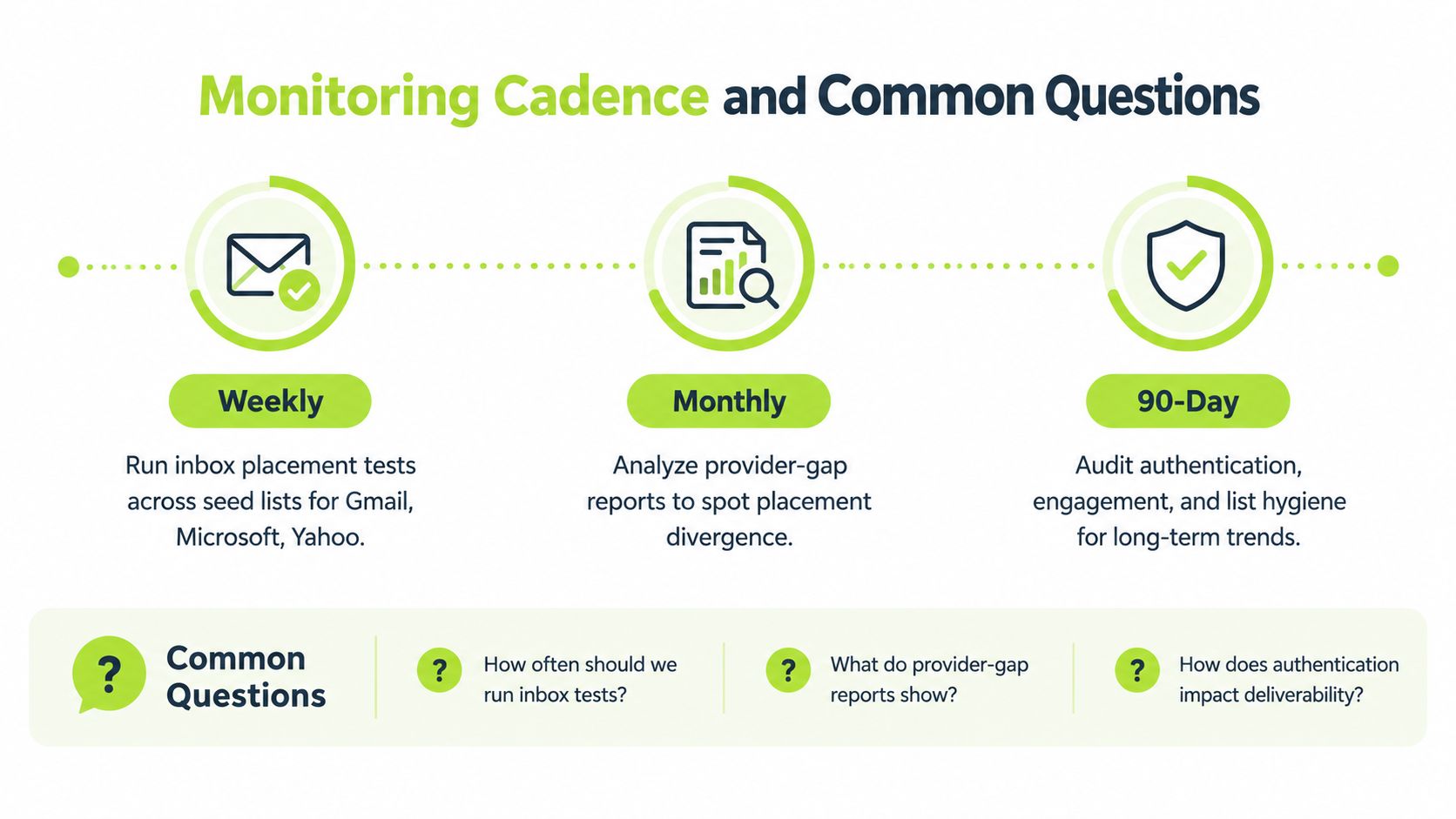
Use a practical 30/60/90 cadence:
- Weekly: Run inbox-placement tests across the seed list. Record inbox, spam and missing outcomes by provider.
- Monthly: Compare Gmail, Microsoft, Outlook.com and Yahoo placement. Investigate widening gaps rather than accepting the blended average.
- Every 90 days: Audit SPF, DKIM and DMARC, suppression rules, vendor authorisation, sending streams and warm-up status.
Track placement rate by provider, spam-folder hits, bounce and block outcomes, and complaint rate. A complaint rate kept under 0.1% is a useful operational ceiling for pausing and investigating, rather than treating complaints as an afterthought.
Common questions from B2B teams
How fast can a new sending domain grow? There isn't a universal safe daily rate because provider response depends on domain history, audience quality, authentication, engagement and message stream. Start with a controlled ramp, monitor placement at each provider and increase only after clean engagement persists. Any fixed number should be treated as a test boundary, not a promise.
Why does the same message land in Gmail Primary but Microsoft Junk? Gmail and Microsoft weigh different combinations of engagement history, reputation, filtering rules, tenant settings and content signals. The provider-divergence evidence discussed earlier shows that identical campaigns can produce materially different outcomes, so a Microsoft-specific investigation is more useful than a global copy rewrite.
What should trigger a send pause? Pause when inbox placement drops sharply, spam placement rises, blocks appear, complaint signals move beyond your operating limit or authentication alignment fails. Restore the last known clean configuration, isolate the affected provider and test before resuming.
Automation can help enforce these checks, but it shouldn't hide the decisions. Teams evaluating email automation workflows should make suppression, provider segmentation and human review explicit parts of the workflow, not optional reporting layers.
The best deliverability programme is diagnostic by design. It tells you where mail went, which provider changed its response and whether the cause sits in infrastructure, audience, message or sending behaviour.
H2 helps B2B teams build and run outbound programmes with list research, contact verification, sending infrastructure, deliverability management, copy testing and campaign operations. If your team needs a provider-specific diagnosis or a more reliable outbound system, visit H2 to discuss your audience and current sending challenge.
