The database looked strong when it was built. The first campaigns landed. Meetings came in. Then the same list started dragging performance down. Reply rates slipped, reps spent longer checking titles by hand, and bounce problems started showing up in places that looked fine a month earlier.
That usually isn't a messaging problem. It's a B2B data enrichment problem, and more specifically a maintenance problem. Teams treat enrichment like a one-off list-building task, when it's really part of the outbound operating system. If the record isn't still relevant, reachable and commercially useful this quarter, it doesn't matter how impressive the row count looks in the CRM.
Why Outbound Lists Decay Faster Than Teams Expect
Most outbound teams overvalue list size and undervalue list condition. A database is a perishable asset. People switch jobs, companies rebrand, domains change, ownership changes, teams reorganise, and tools get ripped out and replaced. A list can still look complete while being unfit for live campaigns.
That erosion happens faster than many teams expect. B2B contact data is estimated to decay by approximately 2.1% per month, around 22.5% per year, so a 10,000-record list can lose roughly 2,250 usable records by year-end without regular re-verification, according to Zeliq's review of B2B contact database decay. That's the core reason enrichment can't sit in a one-time “data project” bucket.
What actually causes decay
A stale record usually breaks in one of a few predictable ways:
- Role drift. The person still exists, but no longer owns the problem the campaign speaks to.
- Company drift. The account has changed size, focus or structure and no longer fits the ICP.
- Channel drift. The email, direct dial or domain is no longer usable.
- Signal drift. Technology use, hiring activity or account context has changed since the list was built.
Some teams also confuse enrichment with intent. They're related, but they aren't the same job. Enrichment tells a team who the account is and whether the contact is usable. Intent helps judge timing. A practical explainer on what is intent data and types is useful here, because many outbound setups fail by blending fit data and buying signals into one messy score.
A large list isn't an asset if a meaningful share of the records are stale, duplicated or no longer reachable.
The metric that matters
Serious teams stop asking, “How many records are in the database?” They ask four harder questions:
- Which fields matter for routing and outreach
- How often each field needs re-checking
- Who owns corrections when sales finds bad data
- What qualifies a record as usable
The useful metric isn't record count. It's the share of records that are still relevant, verified and action-ready for live outbound.
What B2B Data Enrichment Actually Means
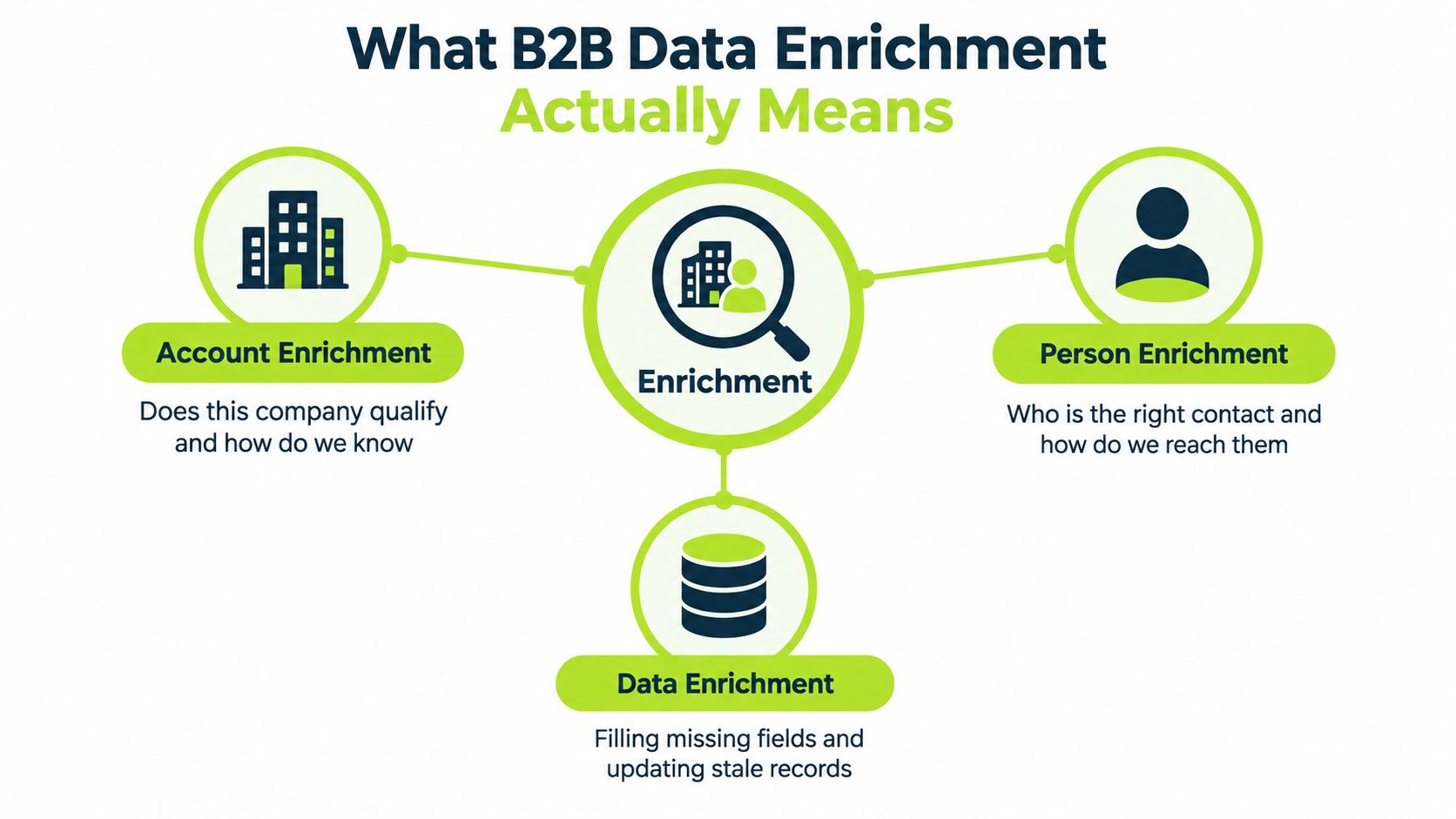
B2B data enrichment is the process of turning a thin record into a decision-ready account or contact. That sounds simple, but teams usually bundle three different jobs into one label and then buy the wrong tools for the wrong reason.
The easiest way to think about it is this. A CRM record is like a parcel in a warehouse. If the label is incomplete, wrong or old, the parcel gets routed to the wrong place, delayed, or returned. Enrichment is the work of fixing the label before the team spends money trying to deliver something.
The three jobs teams keep mixing together
Account enrichment asks whether the company qualifies. That includes fields like company name, domain, industry, size, geography, hiring context, technology signals and other evidence that the account fits the ICP.
Person enrichment asks who should be contacted. That means identifying the right buying group, role relevance, seniority and possible routes in.
Contact verification asks whether the channel is still usable. An email address or phone number isn't valuable just because a provider returned it. It needs to be verified enough for the way the team plans to use it.
What enrichment is not
It isn't the same thing as scraping. Scraping extracts data from a source. Enrichment decides what to add, what to trust and how to use it.
It isn't the same thing as lead generation either. Lead generation finds potential demand. Enrichment improves the quality of records inside that process.
It also isn't the same thing as intent data. Intent may suggest timing. Enrichment determines fit and contactability.
A practical resource on how cleaner records can improve outreach deliverability is useful because deliverability problems often start with bad data rather than bad copy.
The field status rule that makes workflows sane
Every field in the CRM should fall into one of three states:
- Verified. Confirmed by a source or validation method the team trusts for that field.
- Inferred. Probable, but not reliable enough to treat as confirmed.
- Missing. No usable value is available.
Practical rule: A populated field and a trustworthy field are not the same thing.
That distinction is what makes later decisions possible. Without it, teams treat every filled cell as equally reliable, and the workflow starts lying to sales.
Data Sources and How to Evaluate Them
Many teams don't have a provider problem. They have an evaluation problem. They buy a platform because the category sounds right, then discover it's strong in one segment and weak in the one they care about.
The sensible way to look at sources is by what they're good at, where they fail, and what the team needs the field for.
The main source categories
First-party data is the best place to start. CRM history, replies, form fills, call notes and closed-won patterns already reflect the company's market. The downside is coverage. First-party data is rich where the business already has touchpoints, and thin everywhere else.
Licensed B2B data providers are useful for scale. They can fill firmographic and contact gaps quickly, but quality varies by field, market and provider.
Public web sources help with validation and qualification. Company websites, team pages and legal pages can clarify what the business does, but the data is unstructured and slower to use.
Technology and hiring signals can sharpen account selection. They're valuable for qualification, but they don't prove buying intent on their own.
Social profiles can help verify recency for people and companies. They're often good for role validation, less reliable for complete contact coverage.
AI-assisted research is useful for summarising evidence and classifying accounts. It's dangerous when teams let it promote weak signals into hard facts without scrutiny.
Why testing matters more than provider branding
Provider comparisons only matter against a held-out sample that matches the target market. An independent benchmark of eight company-enrichment APIs tested the same 282 human-reviewed companies and reported field-level accuracy between 89.0% and 92.6%, while per-record costs ranged from $2.76 to more than $4.23, according to DataMagnet's enrichment vendor benchmark. The lesson is obvious. Headline accuracy isn't enough. Cost per usable record matters.
Teams that want a broader walkthrough of trade-offs can review H2's guide to data enrichment services, especially when comparing outsourced workflows with in-house tooling.
Provider evaluation checklist
| Criterion | What to measure | Acceptable threshold |
|---|---|---|
| Match rate | Returned records for the target segment | High enough to support the specific campaign use case |
| Field-level accuracy | Correctness of the exact fields the workflow needs | Strong on the fields that drive qualification and contactability |
| Verification status | Whether the value is verified, inferred or just returned | Clear status per field, not one blended score |
| Latency | How quickly records can move through the workflow | Fast enough for the campaign cadence |
| Per-record cost | Spend relative to usable output | Acceptable only if the final record passes qualification |
The right way to test
Stratify the sample by industry, geography, company size, seniority and data difficulty. Average scores hide segment failures. A provider can look fine overall and still be poor for a commercially important niche.
Designing an Enrichment Workflow That Stops Burning Budget
Bad enrichment workflows waste money in a very specific way. They pay multiple providers to return fields that weren't needed, trust conflicting values without rules, and push low-confidence contacts into sequencing because the CRM looks fuller.
A tighter workflow starts with a written stopping rule. If the team doesn't know what makes a record good enough, every extra provider feels justified.
A practical waterfall that keeps spend under control
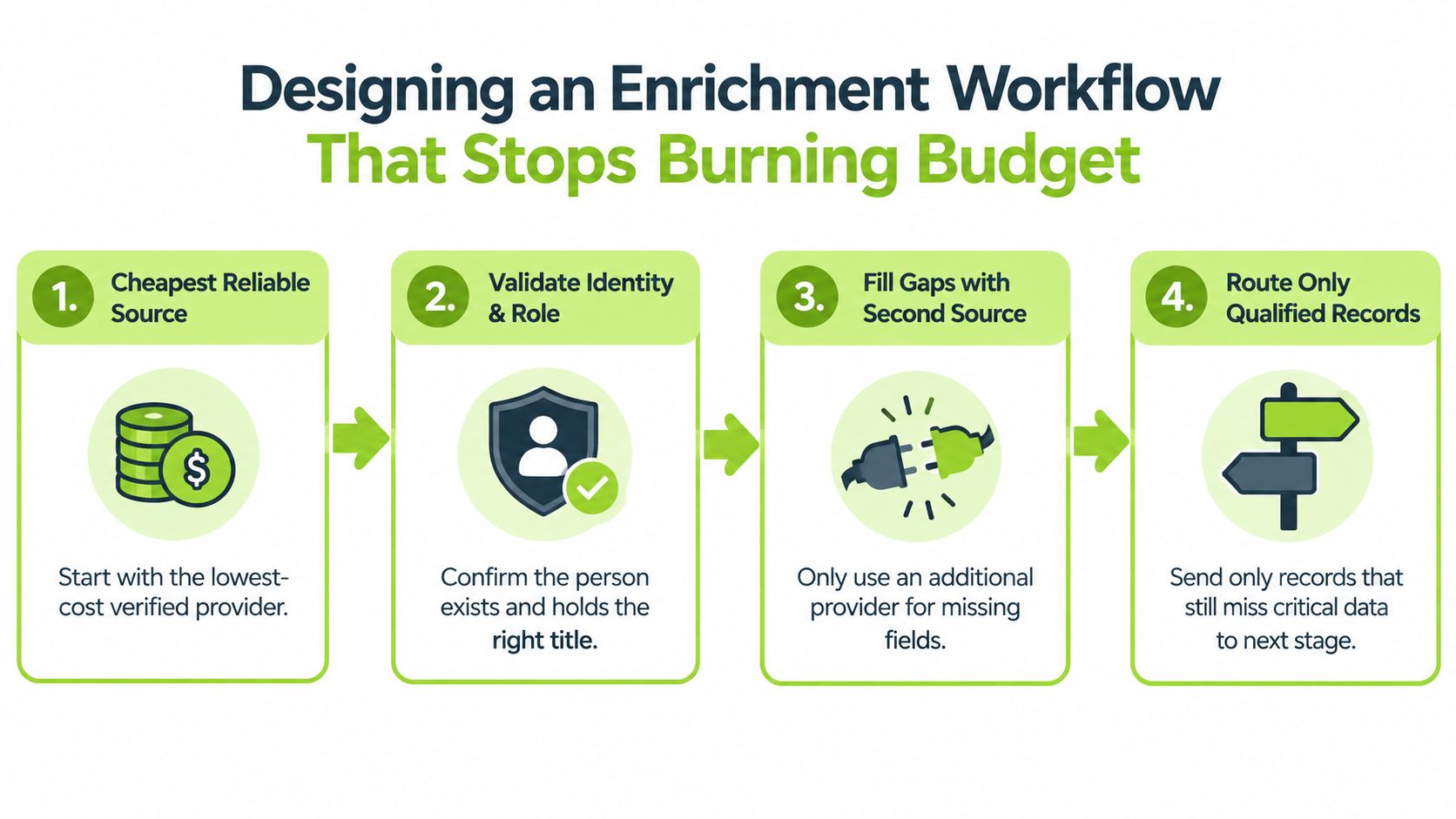
A sensible waterfall looks like this:
- Start with the cheapest reliable source for the fields that matter most.
- Validate company identity first. If the domain or account identity is unclear, stop there.
- Check role relevance next. A valid email for the wrong person is still wasted spend.
- Use a second source only for missing critical fields.
- Route unresolved records to manual or AI-assisted research only if the segment justifies it.
- Drop the record if it still can't pass the qualification gate.
The workflow should query expensive sources only when cheaper ones fail on required fields. That sounds obvious, but a lot of stacks do the reverse because the automation was built around tools, not business rules.
Write the stopping rules before buying more credits
A record should stop moving once the team has enough information to make the outbound decision. Typical stopping rules include:
- Confirmed company domain
- Confirmed ICP fit
- Verified role in the buying group
- A deliverable contact route
- No compliance or suppression conflict
Anything short of that should either go to review or get excluded. A popular source of over-spend is using enrichment to chase completeness instead of usefulness.
For teams building these logic layers in Clay or similar tools, this guide to Clay data enrichment workflows is useful because it focuses on gating and orchestration rather than just stacking providers.
How to handle conflicting values
When two sources disagree, the workflow needs a boring rule, not a debate.
- Most recent verified value wins
- If recency is unclear, prefer the value with source provenance and timestamp
- If neither can be trusted, mark the field as inferred or unresolved
- Never overwrite a strong value with a weaker one just because it arrived later
Keep the original source, confidence status and last-checked date on write-back. Otherwise the CRM becomes a graveyard of unattributed guesses.
What belongs in the CRM
Every enriched field should carry three pieces of metadata:
- Source provenance
- Confidence or status
- Last checked date
Without those, there's no practical way to re-evaluate the record later or understand why sales no longer trusts it.
Measuring Quality Where It Actually Matters
Coverage is not quality. A provider can return lots of values and still make the outbound system worse. A correct company name doesn't help if the contact is wrong. A deliverable email doesn't help if the person sits outside the buying group.
That's why data quality should be measured at the point where it changes a decision, not at the point where an API returns something.
The KPIs that actually matter
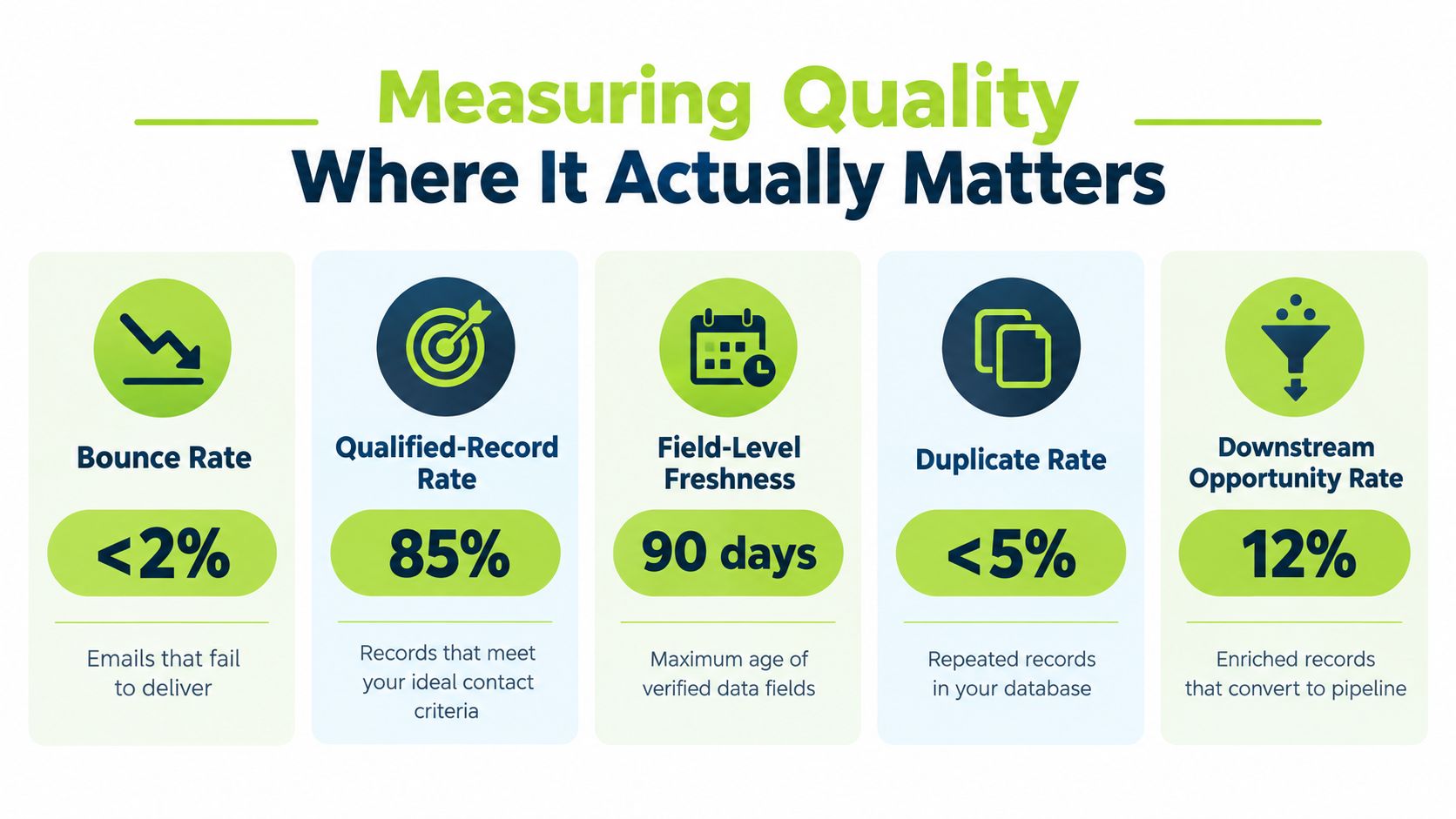
Start with a short list:
- Bounce rate, because it exposes contact-channel quality fast
- Qualified-record rate, because not every enriched record should enter sequencing
- Field-level freshness, because different fields age differently
- Duplicate rate, because duplicate contacts distort counts and trigger repeated touches
- Downstream opportunity signal, because the point of enrichment is better pipeline decisions
Experian's research highlights how common the underlying problems are, identifying incomplete or missing fields in 60% of organisations, outdated information in 54%, and duplicate data in 51%, in its CRM data quality strategy report. Those aren't abstract hygiene issues. They create weak segmentation, wasted outreach and unreliable reporting.
Field by field beats provider by provider
A reported test against 1,000 B2B leads found email accuracy of 78% for Apollo and 84% for ZoomInfo, while mobile-number match rates were 41% and 67%, with live-campaign bounce rates of 1.8% and 0.8%, according to this review of B2B contact data accuracy. That's exactly why provider arguments often miss the point. One vendor can be acceptable for email and poor for mobile. Another can return a valid contact route but weak role relevance.
The operational response to each KPI
- Bounce rate rises. Pause the segment and re-check contact verification logic.
- Qualified-record rate falls. Tighten account and role filters before buying more data.
- Freshness ages out. Re-verify only the risky fields, not the entire record.
- Duplicates increase. Fix matching and merge rules before any new append job.
- Opportunity quality drops. Revisit ICP logic, not just data vendors.
If a metric doesn't trigger an action, it's decoration.
The CRM should visibly distinguish verified, inferred and missing values. Sales teams should never have to guess which populated fields are safe to trust.
Cost, ROI and When to Stop Enriching
Enrichment depth is a commercial decision. Teams that forget that usually overspend on low-value segments and underspend on records that could justify deeper research.
The right question isn't “Which provider gives the highest match rate?” It's “How much should the team spend to make this record usable, and when should it stop?”
Start with expected value, not tool preference
The minimum model is simple:
- Expected value of a qualified conversation
- Probability the record leads to one
- Enrichment cost
- Verification or manual review cost
- Cost of a false positive, such as wasted touches or inappropriate outreach
That framework changes how a team treats market segments. A mid-market SaaS account with meaningful upside may justify multi-step enrichment and manual review. A small-business segment with low deal value probably doesn't.
The trade-off between single-source and waterfall
Single-source enrichment is cheaper and simpler, but it often leaves too many gaps. Single-source enrichment is reported to leave 40-60% of records incomplete, whereas sequential multi-source enrichment may improve coverage to roughly 80-95% for many B2B contact segments, at higher cost, according to Pintel's review of B2B data decay and enrichment trade-offs.
That doesn't mean every team should build a deep waterfall. It means teams should reserve deeper enrichment for records where extra certainty changes the economics.
A practical decision model
For a higher-value mid-market segment, the workflow can justify:
- account qualification
- second-source person enrichment
- direct contact verification
- manual review for unresolved but promising accounts
For a lower-value volume segment, the workflow should usually stop earlier:
- confirm account identity
- confirm broad fit
- use one reliable contact route
- drop uncertain records instead of chasing perfection
There's also a difference between account-level enrichment and person-level enrichment. A company can still be worth keeping and routing to research even when a named buyer can't yet be verified. That distinction saves money because it prevents teams from discarding good accounts just because one contact lookup failed.
Integration, Deliverability and Compliance Touchpoints
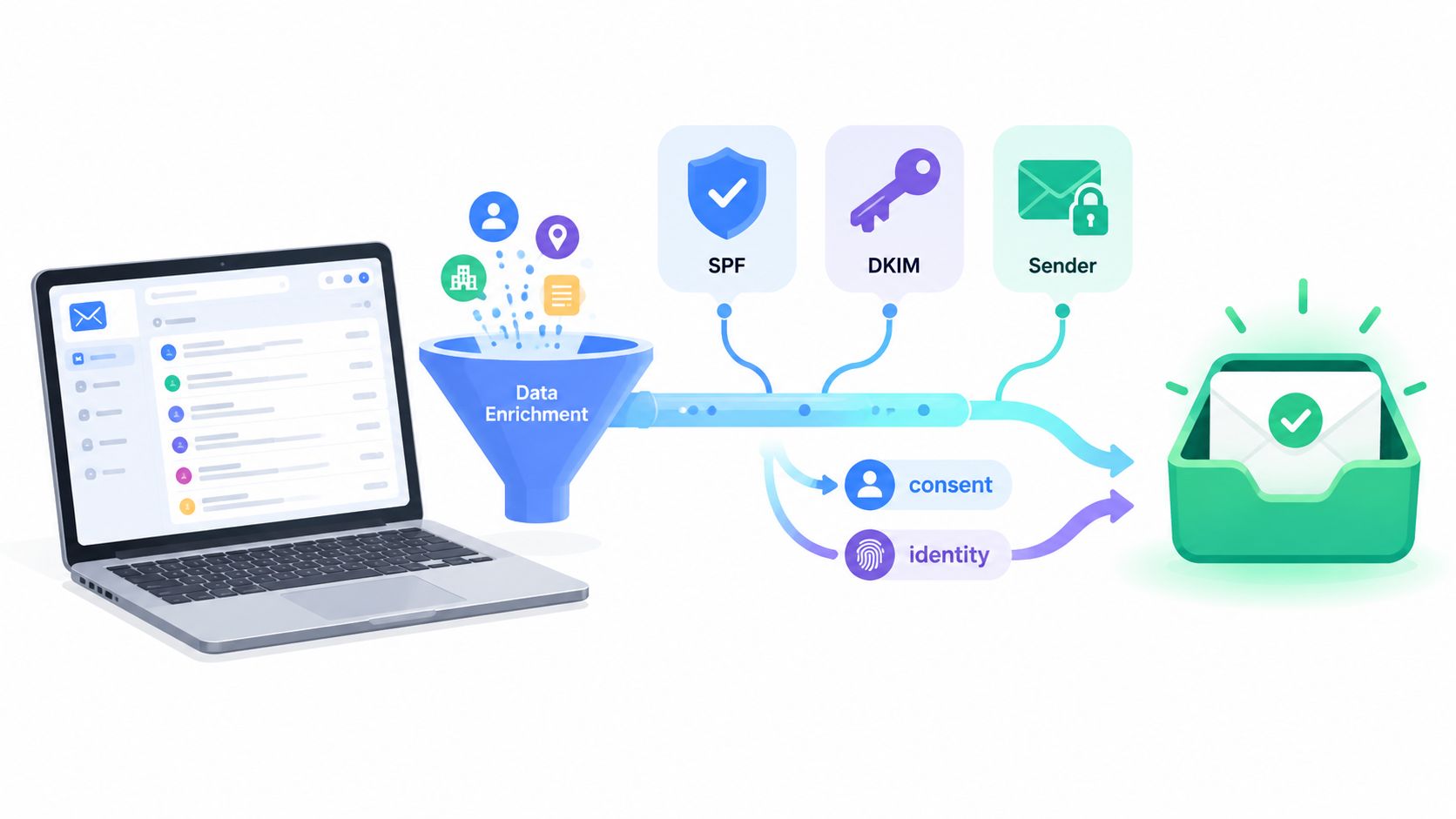
Enrichment doesn't end when the row is populated. It feeds the parts of outbound that usually get blamed later, deliverability, suppression, sender identity and consent handling.
That matters because a technically valid campaign can still fail operationally if the enrichment layer doesn't preserve the right fields and statuses.
The Gmail rules teams can't ignore
Google defines a bulk sender as an organisation sending close to 5,000 or more messages to personal Gmail accounts in a 24-hour period, and large senders must provide one-click unsubscribe and process unsubscribe requests within two days, according to Google's Gmail sender requirements overview. Google also requires alignment between the sender domain in the From header and either the SPF or DKIM organisational domain for direct mail to personal Gmail accounts, as set out in Google's bulk sender guidance.
That means enrichment should retain and validate the company domain, not just the contact address. Domain identity is part of outbound mechanics. It isn't optional housekeeping.
Teams that need the operational side of this mapped in greater detail can use this guide to email deliverability best practices.
The UK PECR distinction that changes who can be emailed
Under UK PECR, direct marketing emails can generally be sent to corporate bodies such as limited companies, LLPs and government bodies without consent, while sole traders and some partnerships are treated as individuals, where marketing email normally requires specific consent or a valid soft opt-in, according to the ICO guide to electronic mail marketing rules.
The ICO also states that PECR applies even to generic or role-based addresses, and every marketing email must identify the sender and include a valid contact address or simple unsubscribe route, as explained in the ICO's compliance guidance for electronic mail marketing.
What the workflow must capture
- Legal entity type
- Suppression status
- Sender identity context
- Unsubscribe handling state
- Enough record context to support lawful routing
If re-enrichment can accidentally reactivate an opted-out address, the workflow is broken.
Putting It Together as an Operating System
The durable version of B2B data enrichment looks less like a list job and more like a managed operating system. The team needs written rules, named owners and a feedback loop from live campaigns back into the data layer.
That starts with a clear ICP, explicit qualification criteria and agreement on what counts as a usable record before it enters sequencing.
The ownership checklist
A workable model usually assigns clear owners for these jobs:
- Sales or GTM leadership owns ICP rules and commercial thresholds
- RevOps owns field definitions, matching logic, deduplication and CRM write-back
- Outbound operators own sequencing gates, suppression checks and campaign feedback
- Sales reps flag false positives, role changes and unusable contacts
- Marketing or compliance stakeholders review unsubscribe and lawful marketing handling
Without that ownership, corrections sit in Slack threads, not in systems.
The cadence that keeps the system honest
Not every field needs the same refresh schedule. Teams should re-verify based on risk.
- Fast-changing person fields should be checked more often
- Stable account fields can run on a slower cadence
- Signals and contextual qualifiers should be refreshed when they directly affect routing or timing
- Conflict logs should be reviewed routinely so the same bad overwrite doesn't repeat
The cleanest enrichment stack still fails if nobody owns the exceptions.
The next decision
Some teams should build this internally. That makes sense when they already have strong ops capability, clear commercial rules and time to test workflows properly.
Other teams should externalise the build or the operation. The practical split is simple. If the need is an outsourced outbound programme, a managed service is the right route. If the need is a fixed-scope workflow with documentation and handover, a system build fits better. If the team needs training around stack design, qualification logic and tooling, a private workshop is the better choice.
H2 helps B2B teams run this properly, whether that means a fully managed outbound programme, a fixed-scope GTM system build, or a private workshop built around their actual stack and market. If the current problem is stale data, weak qualification or a messy enrichment workflow that keeps wasting credits, visit H2 and book a short introductory call to work out the right route.
